Sign In Start Free Trial
Account

Add to playlist

Create a Playlist

Modal Close icon
You need to login to use this feature.
  • Book Overview & Buying CiviCRM Cookbook
  • Table Of Contents Toc
CiviCRM Cookbook

CiviCRM Cookbook

4.7 (6)
close
close
CiviCRM Cookbook

CiviCRM Cookbook

4.7 (6)

Overview of this book

CiviCRM is a web-based, open source, Constituent Relationship Management (CRM) software geared toward meeting the needs of non-profit and other civic-sector organizations.Organizations realize their mission via CiviCRM through contact management, fundraising, event management, member management, mass e-mail marketing, peer-to-peer campaigns, case management, and much more.CiviCRM is localized in over 20 languages including: Chinese (Taiwan, China), Dutch, English (Australia, Canada, U.S., UK), French (France, Canada), German, Italian, Japanese, Russian, and Swedish.CiviCRM Cookbook will enhance your CiviCRM skills. It has recipes to help you use CiviCRM more efficiently, integrate it with CMSs, and also develop CiviCRM.This book begins with recipes that help save time and effort with CiviCRM. This is followed by recipes for organizing data more efficiently and managing profiles.Then you will learn authentication and authorization and managing communication with contacts.Then you will be guided on using the searching feature and preparing reports. We will then talk about integrating Drupal and CiviCRM. You will also be taught to manage events effectively. Finally, learn about CiviCampaign, Civimember, and developing CiviCRM.
Table of Contents (13 chapters)
close
close
12
Index

Autofiling e-mails

Interactions between your contacts and your organization are many and complex. A lot of these interactions will involve exchanges of e-mail. You may want to keep a record of these exchanges for each of your contacts. This is particularly useful in situations where you are dealing with a contact and you need to see a history of correspondence relating to the contact and other members of your organization. CiviCRM lets you do this by filing e-mail correspondence as an activity on each contact record.

How to do it…

We will set up an e-mail account that will act as a "dropbox" for messages that we want to file, and link this to CiviCRM.

  1. Set up an e-mail account. You can use Gmail or an account provided by your hosting provider. In this recipe we will use an account called [email protected].
  2. Navigate to Administer | System Settings | Enable CiviCRM components, and make sure that CiviMail is enabled.
  3. Navigate to Administer | CiviMail | Mail Accounts.
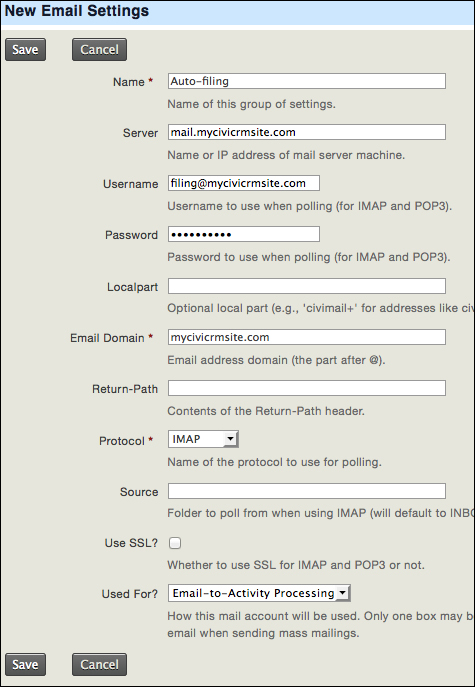
  4. Click on the Add Mail Account button and complete the details for each account you are adding. Getting this right can sometimes be a matter of trial and error. Leave the Source field blank.
    How to do it…
  5. Create a test e-mail message in your e-mail client, and Bcc it to [email protected].
  6. Navigate to Administer | System Settings | Scheduled Jobs, and execute the job titled Process Inbound Emails.
  7. Click on the View Job Log link to see the log entry. If the log error message is Failure, this is highly likely to be a connection problem, so you must go back to Administer | CiviMail | Mail Accounts, and make the necessary changes.
  8. Navigate to Reports | Contact Reports | Activities. You will see that CiviCRM has recorded e-mail activities for the sender and the recipient of the e-mail.

How it works…

Each time CiviCRM processes inbound e-mails, it checks the e-mail account you had set up. It then processes each message. If the sender or recipient e-mail address is not held within CiviCRM, it will create a new contact record for each, and will file the e-mail activity.

If the contacts do exist, it files the e-mails as an activity for the sender and an activity for the receiver.

See also

CONTINUE READING
83
Tech Concepts
36
Programming languages
73
Tech Tools
Icon Unlimited access to the largest independent learning library in tech of over 8,000 expert-authored tech books and videos.
Icon Innovative learning tools, including AI book assistants, code context explainers, and text-to-speech.
Icon 50+ new titles added per month and exclusive early access to books as they are being written.
CiviCRM Cookbook
notes
bookmark Notes and Bookmarks search Search in title playlist Add to playlist font-size Font size

Change the font size

margin-width Margin width

Change margin width

day-mode Day/Sepia/Night Modes

Change background colour

Close icon Search
Country selected

Close icon Your notes and bookmarks

Confirmation

Modal Close icon
claim successful

Buy this book with your credits?

Modal Close icon
Are you sure you want to buy this book with one of your credits?
Close
YES, BUY

Submit Your Feedback

Modal Close icon
Modal Close icon
Modal Close icon