Sign In Start Free Trial
Account

Add to playlist

Create a Playlist

Modal Close icon
You need to login to use this feature.
  • Book Overview & Buying CiviCRM Cookbook
  • Table Of Contents Toc
CiviCRM Cookbook

CiviCRM Cookbook

4.7 (6)
close
close
CiviCRM Cookbook

CiviCRM Cookbook

4.7 (6)

Overview of this book

CiviCRM is a web-based, open source, Constituent Relationship Management (CRM) software geared toward meeting the needs of non-profit and other civic-sector organizations.Organizations realize their mission via CiviCRM through contact management, fundraising, event management, member management, mass e-mail marketing, peer-to-peer campaigns, case management, and much more.CiviCRM is localized in over 20 languages including: Chinese (Taiwan, China), Dutch, English (Australia, Canada, U.S., UK), French (France, Canada), German, Italian, Japanese, Russian, and Swedish.CiviCRM Cookbook will enhance your CiviCRM skills. It has recipes to help you use CiviCRM more efficiently, integrate it with CMSs, and also develop CiviCRM.This book begins with recipes that help save time and effort with CiviCRM. This is followed by recipes for organizing data more efficiently and managing profiles.Then you will learn authentication and authorization and managing communication with contacts.Then you will be guided on using the searching feature and preparing reports. We will then talk about integrating Drupal and CiviCRM. You will also be taught to manage events effectively. Finally, learn about CiviCampaign, Civimember, and developing CiviCRM.
Table of Contents (13 chapters)
close
close
12
Index

Developing a CiviCRM Drupal module

In this recipe, we will explore how a CiviCRM Drupal module works. The basic code for this module is already available online.

How to do it…

In this example, we have a contact that is in a specific group. We are going to fire off an e-mail if someone edits that contact.

  1. Set up your own local development environment.
  2. Download, install, and enable the Drupal Devel module, available at http://drupal.org/project/devel.
  3. Navigate to https://github.com/eileenmcnaughton/civicrm_developer.
  4. Download the ZIP file for the module and expand it. It expands as a directory called civicrm_developer-master.
  5. Rename it civicrm_developer.
  6. Install and enable the module.
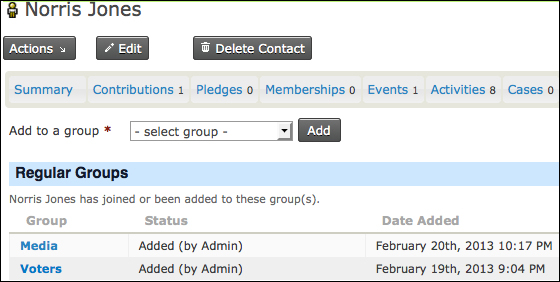
  7. In CiviCRM, add a contact to a group. Make a note of the contact ID; in this case, it was 51.
    How to do it…

    Here, a contact was added to the Media group.

  8. Navigate to Contacts | Manage groups. Note the ID of the Media group. In this case, the ID was 7. In your own implementation, the ID is likely to be different.
  9. Click on the Edit...
CONTINUE READING
83
Tech Concepts
36
Programming languages
73
Tech Tools
Icon Unlimited access to the largest independent learning library in tech of over 8,000 expert-authored tech books and videos.
Icon Innovative learning tools, including AI book assistants, code context explainers, and text-to-speech.
Icon 50+ new titles added per month and exclusive early access to books as they are being written.
CiviCRM Cookbook
notes
bookmark Notes and Bookmarks search Search in title playlist Add to playlist font-size Font size

Change the font size

margin-width Margin width

Change margin width

day-mode Day/Sepia/Night Modes

Change background colour

Close icon Search
Country selected

Close icon Your notes and bookmarks

Confirmation

Modal Close icon
claim successful

Buy this book with your credits?

Modal Close icon
Are you sure you want to buy this book with one of your credits?
Close
YES, BUY

Submit Your Feedback

Modal Close icon
Modal Close icon
Modal Close icon