Sign In Start Free Trial
Account

Add to playlist

Create a Playlist

Modal Close icon
You need to login to use this feature.
  • Book Overview & Buying Oracle APEX Cookbook : Second Edition
  • Table Of Contents Toc
Oracle APEX Cookbook : Second Edition

Oracle APEX Cookbook : Second Edition - Second Edition

4.6 (7)
close
close
Oracle APEX Cookbook : Second Edition

Oracle APEX Cookbook : Second Edition

4.6 (7)

Overview of this book

As a Cookbook, this book enables you to create APEX web applications and to implement features with immediately usable recipes that unleash the powerful functionality of Oracle APEX 4.2. Each recipe is presented as a separate, standalone entity and the reading of other, prior recipes is not required.It can be seen as a reference and a practical guide to APEX development.This book is aimed both at developers new to the APEX environment and at intermediate developers. More advanced developers will also gain from the information at hand.If you are new to APEX you will find recipes to start development and if you are an experienced user you will find ways to improve your productivity and efficiency and make the most of APEX to enhance your applications.A little knowledge of PL/SQL, HTML and JavaScript is assumed.
Table of Contents (16 chapters)
close
close
15
Index

Creating a computation

Computations are events that will prepare items with data. As the name implies, computations can "compute" how data is to be shown on screen or how data is handled after submitting. Computations can be triggered during page rendering, but they can also be used in the After Submit process.

This example will show an implementation of a computation, but there are many more possible uses for computations.

How to do it...

Start by creating a normal text item on the form that was created in the second recipe of the first chapter. This is a normal form based on the EMP table. Normally, a user would have to manually enter the commission. What we are going to do is to create a computation that will automatically enter an amount into this field, based on a percentage of the salary and a bonus for people that work in the Sales department.

First, identify the item that holds the commission column.

The next step is to find the moment when we want to execute the computation. In this case, before the page is submitted but after the Save button is pressed. So in this case we will create the computation After Submit.

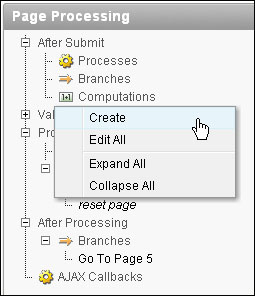
  1. Right-click on the Computations under After Submit in the Page Processing component and click on Create:
    How to do it...
  2. Choose Item on this page and press Next.
  3. Select P5_COMM from the Compute Item select list, select PL/SQL Function Body from the Computation Type select list and click on Next.
  4. The next step is to enter the PL/SQL code for this computation:
    declare
      l_comm number;
    begin
      if :P5_DEPTNO = 30
      then
        l_comm := :P5_SAL * 1.10;
      else
        l_comm := :P5_SAL * 1.05;
      end if;
      return l_comm;
    end;
    [9672_01_15.txt]
  5. Click on Create.

The computation is now done. It can be tested by selecting an existing record from the list of employees and altering its salary and then saving the data. Another option is to create a completely new employee. You will see that an employee under the Sales department with dept no. 30 will receive a 10 percent commission whilst employees from all other departments will receive 5 percent.

There's more...

Computations can be used for far more situations than preparing an item before saving it to the database.

An example of another implementation can be an item that will show the current date when the page loads, or an item that will show a total amount when certain other amount items are entered. Used with dynamic actions, computations can be very powerful.

CONTINUE READING
83
Tech Concepts
36
Programming languages
73
Tech Tools
Icon Unlimited access to the largest independent learning library in tech of over 8,000 expert-authored tech books and videos.
Icon Innovative learning tools, including AI book assistants, code context explainers, and text-to-speech.
Icon 50+ new titles added per month and exclusive early access to books as they are being written.
Oracle APEX Cookbook : Second Edition
notes
bookmark Notes and Bookmarks search Search in title playlist Add to playlist font-size Font size

Change the font size

margin-width Margin width

Change margin width

day-mode Day/Sepia/Night Modes

Change background colour

Close icon Search
Country selected

Close icon Your notes and bookmarks

Confirmation

Modal Close icon
claim successful

Buy this book with your credits?

Modal Close icon
Are you sure you want to buy this book with one of your credits?
Close
YES, BUY

Submit Your Feedback

Modal Close icon
Modal Close icon
Modal Close icon