Sign In Start Free Trial
Account

Add to playlist

Create a Playlist

Modal Close icon
You need to login to use this feature.
  • Book Overview & Buying Oracle APEX Cookbook : Second Edition
  • Table Of Contents Toc
Oracle APEX Cookbook : Second Edition

Oracle APEX Cookbook : Second Edition - Second Edition

4.6 (7)
close
close
Oracle APEX Cookbook : Second Edition

Oracle APEX Cookbook : Second Edition

4.6 (7)

Overview of this book

As a Cookbook, this book enables you to create APEX web applications and to implement features with immediately usable recipes that unleash the powerful functionality of Oracle APEX 4.2. Each recipe is presented as a separate, standalone entity and the reading of other, prior recipes is not required.It can be seen as a reference and a practical guide to APEX development.This book is aimed both at developers new to the APEX environment and at intermediate developers. More advanced developers will also gain from the information at hand.If you are new to APEX you will find recipes to start development and if you are an experienced user you will find ways to improve your productivity and efficiency and make the most of APEX to enhance your applications.A little knowledge of PL/SQL, HTML and JavaScript is assumed.
Table of Contents (16 chapters)
close
close
15
Index

Locking a workspace

There may be situations when you want to immediately lock an application for all the users; for example, when there are security issues. In that case, you can (temporarily) lock the workspace. Locking a workspace means locking all the user accounts in the workspace. Besides that, the status of all the applications in the workspace will be "unavailable". When the workspace is locked, all the users will not be able to log on to the workspace. Starting an APEX application of a workspace that is locked will result in a message that the application is unavailable.

Getting ready

You need to have access to the APEX internal workspace.

How to do it...

  1. Log on to the internal workspace.
  2. Click on Manage Workspaces.
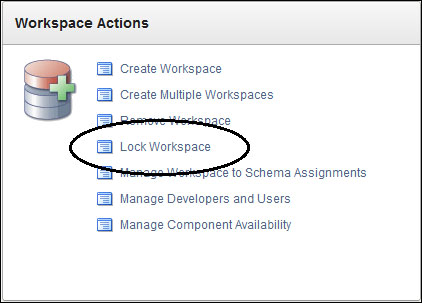
  3. In the Workspace Actions section, click on the Lock Workspace link.
    How to do it...
  4. In the Workspace text field, enter the name of the workspace you want to lock. You can also click on the List of Values button next to the text field to choose from a list of workspaces. After you...
CONTINUE READING
83
Tech Concepts
36
Programming languages
73
Tech Tools
Icon Unlimited access to the largest independent learning library in tech of over 8,000 expert-authored tech books and videos.
Icon Innovative learning tools, including AI book assistants, code context explainers, and text-to-speech.
Icon 50+ new titles added per month and exclusive early access to books as they are being written.
Oracle APEX Cookbook : Second Edition
notes
bookmark Notes and Bookmarks search Search in title playlist Add to playlist font-size Font size

Change the font size

margin-width Margin width

Change margin width

day-mode Day/Sepia/Night Modes

Change background colour

Close icon Search
Country selected

Close icon Your notes and bookmarks

Confirmation

Modal Close icon
claim successful

Buy this book with your credits?

Modal Close icon
Are you sure you want to buy this book with one of your credits?
Close
YES, BUY

Submit Your Feedback

Modal Close icon
Modal Close icon
Modal Close icon