Sign In Start Free Trial
Account

Add to playlist

Create a Playlist

Modal Close icon
You need to login to use this feature.

Navigating code with ease


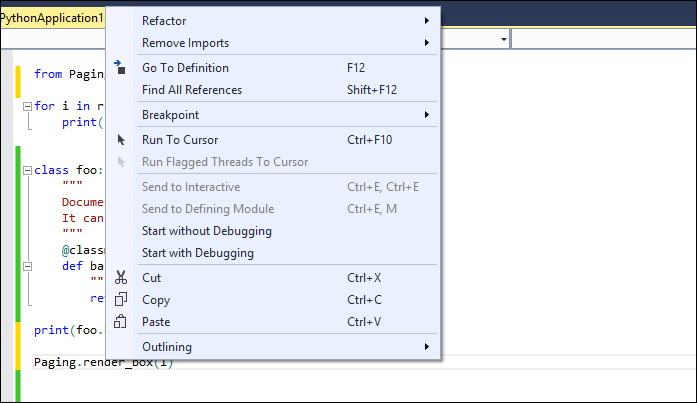
Visual Studio provides lots of features to speed up the process of code navigation; at the same time, these features allow Visual Studio to have a streamlined coding process with a more holistic view of the project. This is particularly useful when you need to switch to a module to see the actual implementation or to update some parts of it, even when it is located somewhere else in the project. Some of the most important features for code navigation are reachable from the context menu in the coding panel:

As shown in the preceding screenshot, when the cursor is over a method and the contextual menu is opened, the command Go To Definition can be found. The Go To Definition command moves the view to the implemented code of the method inside the referenced module.

Another useful debugging function is the Find All References command (the Shift + F12 shortcut). It shows all the points inside the project where the method is used:

The result of the execution of the Find...

CONTINUE READING
83
Tech Concepts
36
Programming languages
73
Tech Tools
Icon Unlimited access to the largest independent learning library in tech of over 8,000 expert-authored tech books and videos.
Icon Innovative learning tools, including AI book assistants, code context explainers, and text-to-speech.
Icon 50+ new titles added per month and exclusive early access to books as they are being written.
Python Tools for Visual Studio
notes
bookmark Notes and Bookmarks search Search in title playlist Add to playlist font-size Font size

Change the font size

margin-width Margin width

Change margin width

day-mode Day/Sepia/Night Modes

Change background colour

Close icon Search
Country selected

Close icon Your notes and bookmarks

Confirmation

Modal Close icon
claim successful

Buy this book with your credits?

Modal Close icon
Are you sure you want to buy this book with one of your credits?
Close
YES, BUY

Submit Your Feedback

Modal Close icon
Modal Close icon
Modal Close icon