-
Book Overview & Buying
-
Table Of Contents
Coffeescript Application Development Cookbook
By :
In this recipe, we will demonstrate how to add CoffeeScript support to Visual Studio.
If you are on the Windows platform, you can use Microsoft's Visual Studio software. You can download Microsoft's free Express edition (Express 2013 for Web) from http://www.microsoft.com/express.
If you are a Visual Studio user, Version 2010 and above can work quite effectively with CoffeeScript through the use of Visual Studio extensions.
If you are doing any form of web development with Visual Studio, the Web Essentials extension is a must-have.
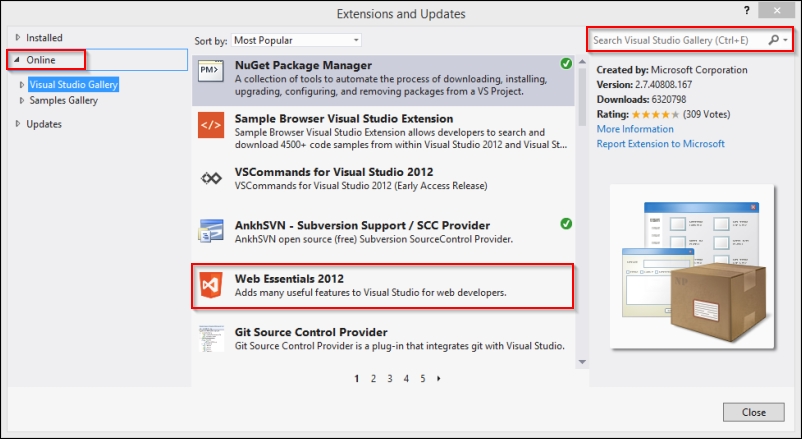
To install Web Essentials, perform the following steps:
You will likely find Web Essentials 2012 ranked highly in the list of Most Popular packages. If you do not see it, you can search for Web Essentials using the Search box in the top-right corner of the window.

Once installed, the Web Essentials package provides many web development productivity features, including CSS helpers, tools to work with Less CSS, enhancements to work with JavaScript, and, of course, a set of CoffeeScript helpers.
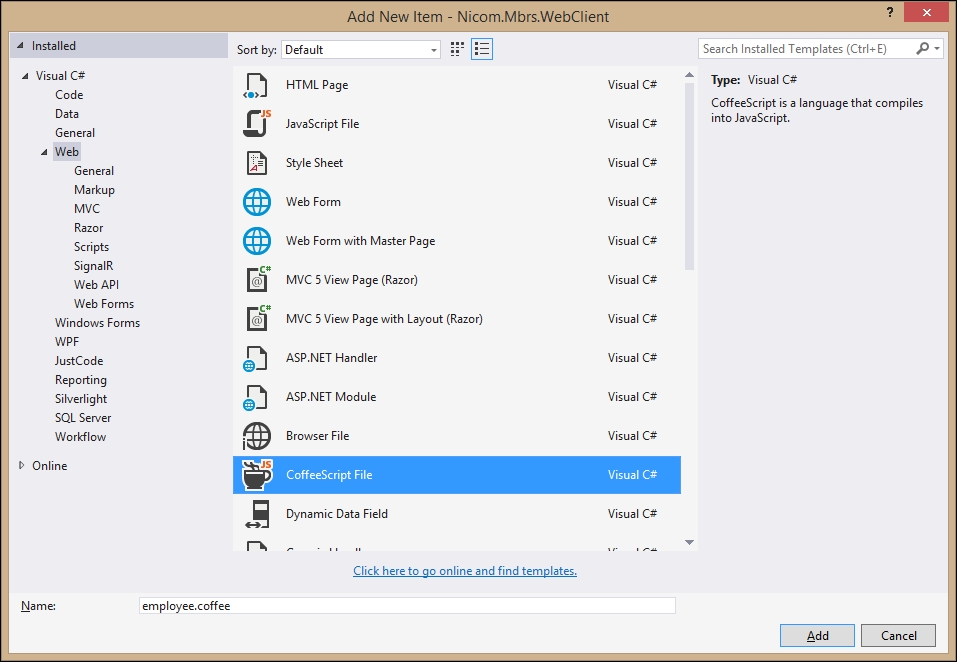
To add a new CoffeeScript file to your project, you can navigate to File | New Item or press Ctrl + Shift + A. This will display the Add New Item dialog, as seen in the following screenshot. Under the Web templates, you will see a new CoffeeScript File option. Select this option and give it a filename, as shown here:

When we have our CoffeeScript file open, Web Essentials will display the file in a split-screen editor. We can edit our code in the left-hand pane, while Web Essentials displays a live preview of the JavaScript code that will be generated for us.
The Web Essentials CoffeeScript compiler will create two JavaScript files each time we save our CoffeeScript file: a basic JavaScript file and a minified version. For example, if we save a CoffeeScript file named employee.coffee, the compiler will create employee.js and employee.min.js files.
Though I have only described two editors to work with CoffeeScript files, there are CoffeeScript packages and plugins for most popular text editors, including Emacs, Vim, TextMate, and WebMatrix.
Change the font size
Change margin width
Change background colour