Sign In Start Free Trial
Account

Add to playlist

Create a Playlist

Modal Close icon
You need to login to use this feature.
  • Book Overview & Buying Coffeescript Application Development Cookbook
  • Table Of Contents Toc
Coffeescript Application Development Cookbook

Coffeescript Application Development Cookbook

By : Hatfield
4.6 (5)
close
close
Coffeescript Application Development Cookbook

Coffeescript Application Development Cookbook

4.6 (5)
By: Hatfield

Overview of this book

If you are interested in developing modern applications, this book will help you leverage the vast JavaScript ecosystem while using an elegant language, helping you avoid the shortcomings of JavaScript.
Table of Contents (13 chapters)
close
close
12
Index

Debugging CoffeeScript using source maps

If you have spent any time in the JavaScript community, you would have, no doubt, seen some discussions or rants regarding the weak debugging story for CoffeeScript. In fact, this is often a top argument some give for not using CoffeeScript at all. In this recipe, we will examine how to debug our CoffeeScript application using source maps.

Getting ready

The problem in debugging CoffeeScript stems from the fact that CoffeeScript compiles into JavaScript which is what the browser executes. If an error arises, the line that has caused the error sometimes cannot be traced back to the CoffeeScript source file very easily. Also, the error message is sometimes confusing, making troubleshooting that much more difficult.

Recent developments in the web development community have helped improve the debugging experience for CoffeeScript by making use of a concept known as a source map. In this section, we will demonstrate how to generate and use source maps to help make our CoffeeScript debugging easier.

To use source maps, you need only a base installation of CoffeeScript.

How to do it...

You can generate a source map for your CoffeeScript code using the -m option on the CoffeeScript command:

coffee -m -c employee.coffee

How it works...

Source maps provide information used by browsers such as Google Chrome that tell the browser how to map a line from the compiled JavaScript code back to its origin in the CoffeeScript file.

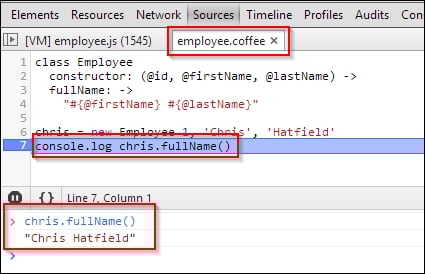
Source maps allow you to place breakpoints in your CoffeeScript file and analyze variables and execute functions in your CoffeeScript module. This creates a JavaScript file called employee.js and a source map called employee.js.map.

If you look at the last line of the generated employee.js file, you will see the reference to the source map:

//# sourceMappingURL=employee.js.map

Google Chrome uses this JavaScript comment to load the source map.

The following screenshot demonstrates an active breakpoint and console in Goggle Chrome:

How it works...
Visually different images
CONTINUE READING
83
Tech Concepts
36
Programming languages
73
Tech Tools
Icon Unlimited access to the largest independent learning library in tech of over 8,000 expert-authored tech books and videos.
Icon Innovative learning tools, including AI book assistants, code context explainers, and text-to-speech.
Icon 50+ new titles added per month and exclusive early access to books as they are being written.
Coffeescript Application Development Cookbook
notes
bookmark Notes and Bookmarks search Search in title playlist Add to playlist font-size Font size

Change the font size

margin-width Margin width

Change margin width

day-mode Day/Sepia/Night Modes

Change background colour

Close icon Search
Country selected

Close icon Your notes and bookmarks

Confirmation

Modal Close icon
claim successful

Buy this book with your credits?

Modal Close icon
Are you sure you want to buy this book with one of your credits?
Close
YES, BUY

Submit Your Feedback

Modal Close icon
Modal Close icon
Modal Close icon