-
Book Overview & Buying
-
Table Of Contents
QGIS Python Programming Cookbook
By :
Plugins are the best way to extend QGIS, as they can be easily updated and reused by other people.
The easiest approach to creating a plugin is to use the Plugin Builder plugin to jumpstart development. You can find it in the main QGIS plugin repository and install it.
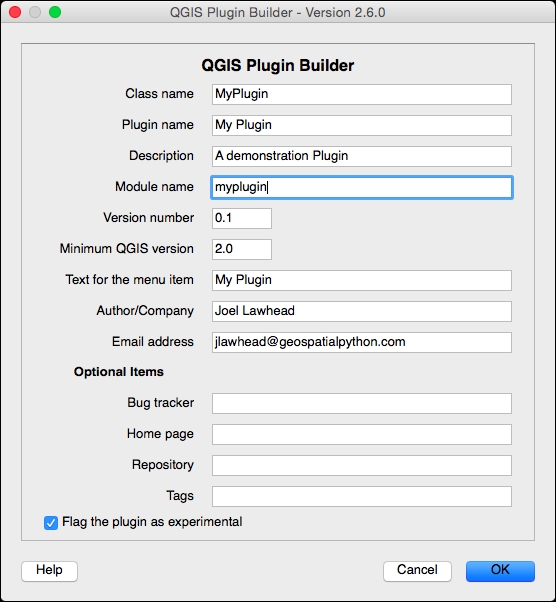
Perform the following steps to create a simple plugin that displays a dialog box with a custom message:
MyPlugin.My Plugin.A demonstration on building a QGIS Plugin.myplugin for the Module name.My Plugin in the Text for the menu item field.
plugins within the python folder in either the main user directory or the QGIS program directory. The following examples are from a Windows machine. You should use the folder in your user directory, which is the preferred place for third-party plugins. QGIS standard plugins go in the main program directory:C:\Documents and Settings\Joel\.qgis2\python\plugins C:\Program Files\QGIS Brighton\apps\qgis\python\plugins
pyrcc4 command to compile the resource file:pyrcc4 –o resources_rc.py resources.qrc
If you are on Windows, it is important to use the OSGEO4W shell, which is installed along with QGIS, for the Qt compilation tools to work properly.
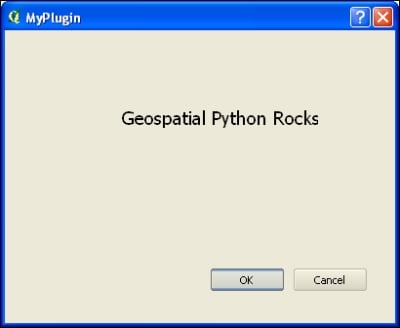
myplugin_dialog_base.ui.</widget> tag. Save the file after this edit:<widget class="QLabel" name="label"> <property name="geometry"> <rect> <x>120</x> <y>80</y> <width>201</width> <height>20</height> </rect> </property> <property name="font"> <font> <pointsize>14</pointsize> </font> </property> <property name="text"> <string>Geospatial Python Rocks!</string> </property> </widget>
ui file using the pyuic4 tool:pyuic4 –o ui_myplugin.py ui_myplugin.ui

This recipe shows you the bare bones needed to make a working plugin. Although we haven't altered it, the code for the plugin's behavior is contained in myplugin.py. You can change the icon and the GUI, and just recompile any time you want. Note that we must compile the Qt4 portion of the plugin, which creates the dialog box. The entire QGIS GUI is built on the Qt4 library, so the pyrrc4 compiler and pyuic4 is included to compile the GUI widgets.
You can download the completed plugin with both the source and compiled ui and resource files at https://geospatialpython.googlecode.com/svn/MyPlugin.zip.
You can find out more about QGIS plugins, including the purpose of the other files in the directory, in the QGIS documentation at http://docs.qgis.org/testing/en/docs/pyqgis_developer_cookbook/plugins.html.
We have edited the myplugin_dialog_base.ui XML file by hand to make a small change. However, there is a better way to use Qt Creator. Qt Creator is a fully-fledged, open source GUI designer for the Qt framework. It is an easy what-you-see-is-what-you-get editor for Qt Widgets, including PyQGIS plugins, which uses the included Qt Designer interface. On Windows, Qt Designer can be found in the QGIS program directory within the bin directory. It is named designer.exe. On other platforms, Qt Designer is included as part of the qt4-devel package.
You can also download Qt Creator, which includes Qt Designer, from http://qt-project.org/downloads.
When you run the installer, you can uncheck all the installation options, except the Tools category to install just the IDE.
Change the font size
Change margin width
Change background colour