Sign In Start Free Trial
Account

Add to playlist

Create a Playlist

Modal Close icon
You need to login to use this feature.
  • Book Overview & Buying Learning Selenium Testing Tools - Third Edition
  • Table Of Contents Toc
  • Feedback & Rating feedback
Learning Selenium Testing Tools - Third Edition

Learning Selenium Testing Tools - Third Edition - Third Edition

By : Raghavendra Prasad MG
4.4 (11)
close
close
Learning Selenium Testing Tools - Third Edition

Learning Selenium Testing Tools - Third Edition

4.4 (11)
By: Raghavendra Prasad MG

Overview of this book

If you are a software developer with a basic knowledge of testing and are interested in automated testing using Selenium, this is the book for you. No prior knowledge of Selenium is required.
Table of Contents (17 chapters)
close
close
16
Index

Creating test suites

We managed to create a number of tests using Selenium IDE and have managed to run them successfully. The next thing to have a look at is how to create a test suite, so that we can open the test suite and then have it run a number of tests that we have created. If you have Selenium IDE open from the last steps, click on the File menu:

  1. Click New Test Case.
  2. You will see that Selenium IDE has opened a new area on the left of the IDE as shown in the following screenshot:
    Creating test suites

You can do this as many times as you want, and when the Play entire test suite button is clicked, it will run all the tests in the test suite. It will log all the passes and failures at the bottom of the Test Case box.

To save this, click on the File menu and then click Save Test Suite and save the test suite file to a place where you can get to it again. One thing to note is that saving a test suite does not save the test case. Make sure that you save the test case every time you make a change and not just the test suite.

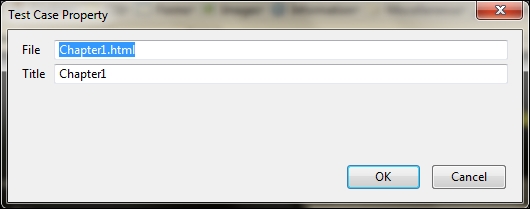
To change the name of the test case to something a lot more meaningful, you can do this by right-clicking on the test and clicking on the Properties item in the context menu:

Creating test suites

You can now add meaningful names to your tests and they will appear in Selenium IDE instead of falling back to their filenames.

We have managed to create our first test suite. This can be used to group tests together to be used later. If your tests have been saved, you can update the test suite properties to give the tests a name that is easier to read.

Visually different images
CONTINUE READING
83
Tech Concepts
36
Programming languages
73
Tech Tools
Icon Unlimited access to the largest independent learning library in tech of over 8,000 expert-authored tech books and videos.
Icon Innovative learning tools, including AI book assistants, code context explainers, and text-to-speech.
Icon 50+ new titles added per month and exclusive early access to books as they are being written.
Learning Selenium Testing Tools - Third Edition
notes
bookmark Notes and Bookmarks search Search in title playlist Add to playlist font-size Font size

Change the font size

margin-width Margin width

Change margin width

day-mode Day/Sepia/Night Modes

Change background colour

Close icon Search
Country selected

Close icon Your notes and bookmarks

Confirmation

Modal Close icon
claim successful

Buy this book with your credits?

Modal Close icon
Are you sure you want to buy this book with one of your credits?
Close
YES, BUY

Submit Your Feedback

Modal Close icon
Modal Close icon
Modal Close icon