Sign In Start Free Trial
Account

Add to playlist

Create a Playlist

Modal Close icon
You need to login to use this feature.
  • Book Overview & Buying Python Multimedia
  • Table Of Contents Toc
Python Multimedia

Python Multimedia

By : Ninad Sathaye
3 (3)
close
close
Python Multimedia

Python Multimedia

3 (3)
By: Ninad Sathaye

Overview of this book

Multimedia applications are used by a range of industries to enhance the visual appeal of a product. This book will teach the reader how to perform multimedia processing using Python. This step-by-step guide gives you hands-on experience for developing exciting multimedia applications using Python. This book will help you to build applications for processing images, creating 2D animations and processing audio and video. Writing applications that work with images, videos, and other sensory effects is great. Not every application gets to make full use of audio/visual effects, but a certain amount of multimedia makes any application a lot more appealing. There are numerous multimedia libraries for which Python bindings are available. These libraries enable working with different kinds of media, such as images, audio, video, games, and so on. This book introduces the reader to the most widely used open source libraries through several exciting, real world projects. Popular multimedia frameworks and libraries such as GStreamer,Pyglet, QT Phonon, and Python Imaging library are used to develop various multimedia applications.
Table of Contents (13 chapters)
close
close
Python Multimedia Beginner's Guide
Credits
About the Author
About the Reviewers
Preface

Time for action – rotating


  1. Download the file Rotate.png from the Packt website. Alternatively, you can use any supported image file of your choice.

  2. Write the following code in Python interpreter or in a Python file. As always, specify the appropriate path strings for inPath and outPath variables.

    1 import Image
    2 inPath = "C:\\images\\Rotate.png"
    3 img = Image.open(inPath)
    4 deg = 45
    5 filterOpt = Image.BICUBIC
    6 outPath = "C:\\images\\Rotate_out.png"
    7 foo = img.rotate(deg, filterOpt)
    8 foo.save(outPath)
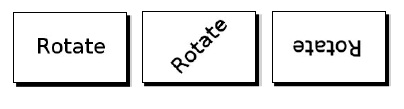
  3. Upon running this code, the output image, rotated by 45 degrees, is saved to the outPath. The filter option Image.BICUBIC ensures highest quality. The next illustration shows the original and the images rotated by 45 and 180 degrees respectively—the original and rotated images.

  4. There is another way to accomplish rotation for certain angles by using the Image.transpose functionality. The following code achieves a 270-degree rotation. Other valid options for rotation are Image.ROTATE_90 and Image...

CONTINUE READING
83
Tech Concepts
36
Programming languages
73
Tech Tools
Icon Unlimited access to the largest independent learning library in tech of over 8,000 expert-authored tech books and videos.
Icon Innovative learning tools, including AI book assistants, code context explainers, and text-to-speech.
Icon 50+ new titles added per month and exclusive early access to books as they are being written.
Python Multimedia
notes
bookmark Notes and Bookmarks search Search in title playlist Add to playlist font-size Font size

Change the font size

margin-width Margin width

Change margin width

day-mode Day/Sepia/Night Modes

Change background colour

Close icon Search
Country selected

Close icon Your notes and bookmarks

Confirmation

Modal Close icon
claim successful

Buy this book with your credits?

Modal Close icon
Are you sure you want to buy this book with one of your credits?
Close
YES, BUY

Submit Your Feedback

Modal Close icon
Modal Close icon
Modal Close icon