-
Book Overview & Buying
-
Table Of Contents
IBM Sametime 8.5.2 Administration Guide
By :
Should you install or upgrade to Sametime 8.5.2? You or your organization may be reviewing options for a new instant messaging and/or web conferencing system. Perhaps you are considering whether or not to upgrade your existing Sametime servers that are currently meeting your requirements. In either case, there are several key points to consider.
First, if you already have a Sametime environment you should be aware that Sametime 7.5.x is being moved to end-of-life status by IBM in September 2011. What does this actually mean for you? If you are running Sametime 7.5.x or earlier, then you can continue to do so. However, after end-of-life you will no longer be able to get support or fixes for it if you have problems.
In addition, if you are upgrading your Domino environment to the 8.5.x versions, then you will also need to upgrade your Sametime server to 8.5.2 as this is the only version fully supported by IBM on Domino 8.5.x.
Unlike previous versions, Sametime 8.5.2 has been designed to run as separate server components that integrate together. Although the Instant Messaging component remains as a task running under Domino, the other server elements are applications managed by WAS.
WAS is IBM's application management server environment. Deployment, security, clustering, performance management, and availability are part of the benefit of WAS, so applications running under the control of WAS are able to leverage these for their own services. A single WAS server can, and usually does, run several different applications in their own discrete and isolated logical space.
Multiple instances of Sametime Meeting Server or Sametime Proxy Server can be clustered by WAS. The configuration of the servers as well as their running state will be maintained and managed by WebSphere's Network Deployment Manager. Network Deployment Manager is a specific WAS server that manages clusters of servers deployed on secondary hardware. In this way, if one Meeting Server is unavailable, another will take over and provide the same service.
The following Sametime 8.5.2 servers and services run under WAS:
You also have the Instant Messaging component running under Domino. To further increase Instant Messaging capacity per server, we can move the Multiplexor service from the Domino server onto its own hardware. The Multiplexor (or MUX) is responsible for connecting client requests to the Sametime Community Server and usually runs alongside the other Sametime Community services. However, the MUX can be moved to separate hardware and doing so will increase the capacity of a single Sametime Community Server tenfold. This is possible because the MUX will maintain a single network connection between it and the Sametime Community Server instead of allowing every client to connect on its own network connection to the Sametime Community Server directly. Using multiple MUX services is a method for improving the reliability and performance of your instant messaging environment.
If you are interested in clustering your instant messaging services, then, as in previous versions, Sametime Community Server can leverage Domino's clustering capabilities to provision its own Instant Messaging cluster, which will support both load balancing and failover.
When designing your Sametime infrastructure, it is entirely up to you how many servers you want to have running the applications and features you need. What follows are some examples of server implementations so you can see how flexible the Sametime server architecture can be.
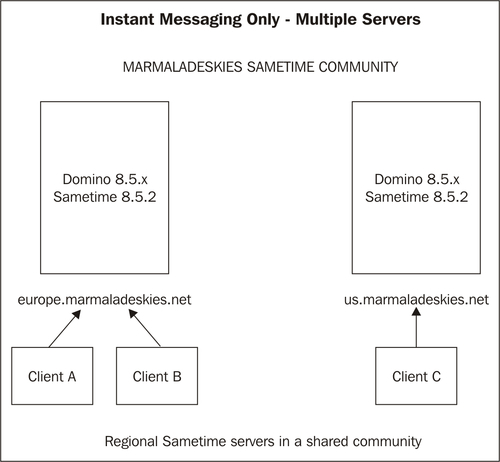
If your company is interested primarily in instant messaging, then you can deploy Sametime 8.5.2 with only that service. The Instant Messaging infrastructure and deployment in 8.5.2 is very similar to earlier versions of Sametime as it runs on a supported Domino server platform.
In the following example, we have deployed two separate Sametime 8.5.2 Instant Messaging servers, each of which is providing instant messaging services to users in its own region. Both servers in the screenshot are in a shared Sametime Community so users on either server can see each other.
As you will see, only two servers are in use in the following diagram, and there is no failover:

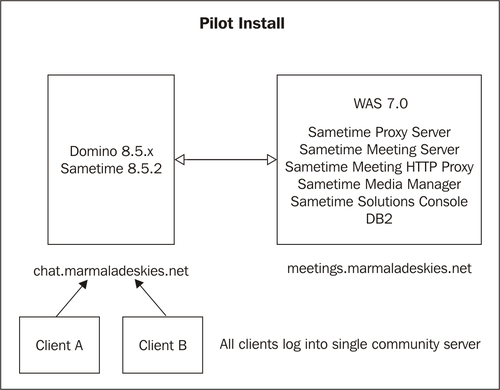
This is the design of the default pilot install of all Sametime 8.5.2 elements as per IBM's documentation. It requires only two servers, one as a platform for Domino and one as a platform for WebSphere. The WebSphere elements, which are all installed onto a single server, require significant combined resources to run concurrently. This configuration is recommended for pilot and test deployments only, and should not be used for production environments.
There is no failover in this design and only two servers. Although the Instant Messaging elements can be expanded with additional servers, the Meeting, Media, and Proxy servers would need to be rebuilt to increase resources.

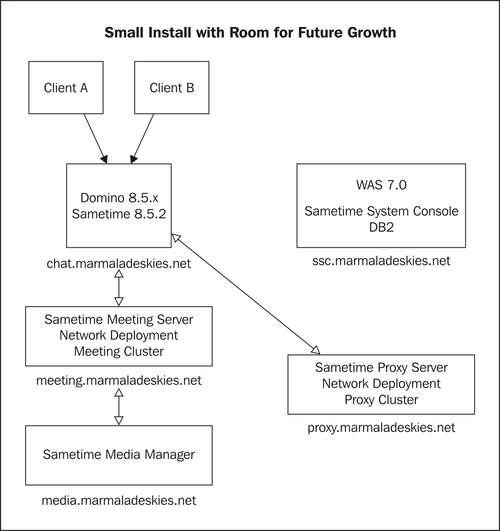
In this design, the Meeting, Proxy, and Media Manager Servers are installed each on their own hardware. With this scenario, there is the option in the future of introducing additional Proxy and Meeting Servers into the cluster to provide failover services. The Media Manager can now be clustered.

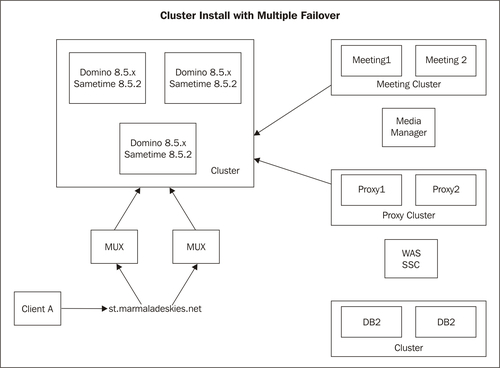
A clustered install with a provision for multiple failover would be an example of the basis for an enterprise-level design. Each component has been installed, where possible, with a cluster mate to provide failover capabilities. As we mentioned previously, the only servers that cannot be clustered are the Media Manager and the SSC itself.

What specific features of Sametime should you consider as targeted reasons for an upgrade or install? As we have already described briefly, the re-design of the Sametime infrastructure in 8.5.2 has also provided the following significant feature enhancements across the board.
Sametime and the use of instant messaging are central to many other Lotus products you may already have or are deploying. The Sametime embedded client ships and installs with Lotus Notes and is also available through a browser interface. Sametime functionality such as chatting and online awareness can also be integrated with Microsoft Office products, including Microsoft Outlook.
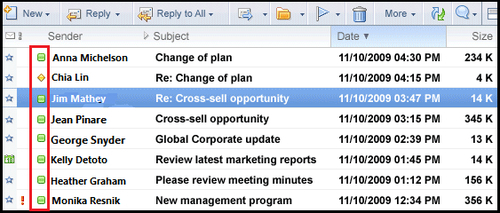
Frequently, when we talk about Sametime integration we are usually talking presence awareness. Presence awareness is the ability to see if someone is online and if they are, to initiate a chat. In the Sametime embedded client used with Lotus Notes, awareness icons appear in not only in the Sametime sidebar, but also in the mail inbox. Users can click to chat from the inbox, as shown in the following screenshot:

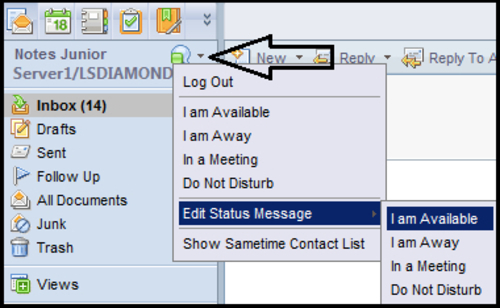
A unified icon set is used across all clients, so for example in iNotes, you will see the familiar online status icon.

There is Sametime integration in IBM Connections, Lotus Quickr, and virtually every other collaborative solution IBM delivers. Additionally, it is very simple to add Sametime awareness to any web application regardless of the hosting platform. With all of these potential interfaces, consider how "connected in real time" you and your organization might be!
Change the font size
Change margin width
Change background colour