-
Book Overview & Buying
-
Table Of Contents
-
Feedback & Rating
OpenCL Programming by Example
By :
In this section we will discuss all the necessary steps to run an OpenCL application.
A person involved in OpenCL programming should be very proficient in C programming, and having prior experience in any parallel programming tool will be an added advantage. He or she should be able to break a large problem and find out the data and task parallel regions of the code which he or she is trying to accelerate using OpenCL. An OpenCL programmer should know the underlying architecture for which he/she is trying to program. If you are porting an existing parallel code into OpenCL, then you just need to start learning the OpenCL programming architecture.
Besides this a programmer should also have the basic system software details, such as compiling the code and linking it to an appropriate 32 bit or 64 bit library. He should also have knowledge of setting the system path on Windows to the correct DLLs or set the LD_LIBRARY_PATH environment variable in Linux to the correct shared libraries.
The common system requirements for Windows and Linux operating systems are as follows:
The GCC compiler tool chain
To install OpenCL you need to download an implementation of OpenCL. We discussed about the various hardware and software vendors in a previous section. The major graphic vendors, NVIDIA and AMD have both released implementations of OpenCL for their GPUs. Similarly AMD and Intel provide a CPU-only runtime for OpenCL. OpenCL implementations are available in so-called Software Development Kits (SDK), and often include some useful tools such as debuggers and profilers. The next step is to download and install the SDK for the GPU you have on your computer. Note that not all graphic cards are supported. A list of which graphics cards are supported can be found in the respective vendor specific websites. Also you can take a look at the Khronos OpenCL conformance products list. If you don't have a graphics card, don't worry, you can use your existing processor to run OpenCL samples on CPU as a device.
If you are still confused about which device to choose, then take a look at the list of supported devices provided with each release of an OpenCL SDK from different vendors.
http://developer.download.nvidia.com/compute/cuda/3_2_prod/sdk/docs/OpenCL_Release_Notes.txt
http://developer.amd.com/download/AMD_APP_SDK_Installation_Notes.pdf
http://software.intel.com/en-us/articles/intel-sdk-for-opencl-applications-2013-release-notes
Note these links are subject to change over a period of time.
AMD's OpenCL implementation is OpenCL 1.2 conformant. Also download the latest AMD APP SDK version 2.8 or above.
For NVIDIA GPU computing, make sure you have a CUDA enabled GPU. Download the latest CUDA release 4.2 or above, and the GPU computing SDK release 4.2 or above.
For Intel, download the Intel SDK for OpenCL Applications 2013.
We will briefly discuss the installation steps. The installation steps may vary from vendor to vendor. Hence we discuss only AMD's and NVIDIA's installation steps. Note that NVIDIA's CUDA only supports GPU as the device. So we suggest that if you have a non NVIDIA GPU then it would be better that you install AMD APP SDK, as it supports both the AMD GPUs and CPUs as the device. One can have multiple vendor SDKs also installed. This is possible as the OpenCL specification allows runtime selection of the OpenCL platform. This is referred to as the ICD (Installable Client Driver) dispatch mechanism. We will discuss more about this in a later chapter.
Install-AMD-APP.sh./opt/AMPAPP/.AMDAPPSDKROOT and LD_LIBRARY_PATH are set to the locations where you have installed the APP SDK.For latest details you can refer to the Installation Notes provided with the APP SDK. Linux distributions such as Ubuntu, provide an OpenCL distribution package for vendors such as AMD and NVIDIA. You can use the following command to install the OpenCL runtimes for AMD:
sudo apt-get install amd-opencl-dev
For NVIDIA you can use the following command:
sudo apt-get install nvidia-opencl-dev
Note that amd-opencl-dev installs both the CPU and GPU OpenCL implementations.
lspci to check the video adapter which the system uses. Download and install the corresponding display driver.You system is now ready to compile and run any OpenCL code.
AMDAPPSDKROOT and AMDAPPSDKSAMPLESROOT.Go to the samples directory and build the OpenCL samples, using the Microsoft Visual Studio.
cudatoolkit_4.2_Win_[32|64].exe.gpucomputingsdk_4.2_Win_[32|64].exe.Verify the installation by compiling and running some sample codes.
Apple also provides an OpenCL implementation. You will need XCode developer tool to be installed. Xcode is a complete tool set for building OSX and iOS applications. For more information on building OpenCL application on OSX visit at the following link:
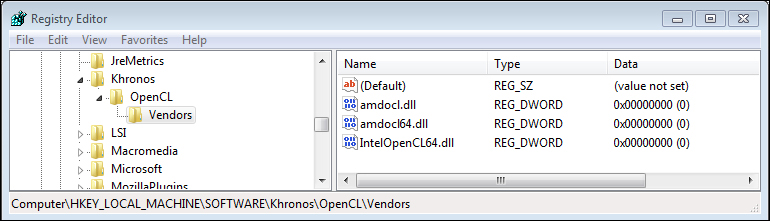
As we have stated earlier, there can be multiple installations of OpenCL in a system. This is possible in OpenCL standard, because all OpenCL applications are linked using a common library called the OpenCL ICD library. Each OpenCL vendor, ships this library and the corresponding OpenCL.dll or libOpenCL.so library in its SDK. This library contains the mechanism to select the appropriate vendor-specific runtimes during runtime. The application developer makes this selection. Let's explain this with an example installation of an AMD and Intel OpenCL SDK. In the following screenshot of the Windows Registry Editor you can see two runtime DLLs. It is one of these libraries which is loaded by the OpenCL.dll library, based on the application developers selection. The following shows the Regedit entry with AMD and Intel OpenCL installations:

Registry Editor screenshot, showing multiple installations
During runtime, the OpenCL.dll library will read the registry details specific to HKEY_LOCAL_MACHINE\SOFTWARE\Khronos (or libOpenCL.so in Linux, will read the value of the vendor-specific library in the ICD file in folder /etc/OpenCL/vendors/*.icd), loads the appropriate library, and assigns the function pointers to the loaded library. An application developer can consider OpenCL.dll or libOpenCL.so as the wrapper around different OpenCL vendor libraries. This makes the application developers life easy and he can link it with OpenCL.lib or libOpenCL.so during link time, and distribute it with his application. This allows the application developer to ship his code for different OpenCL vendors/implementations easily.
SAXPY can be called the "Hello World" of OpenCL. In the simplest terms, the first OpenCL sample shall compute A = alpha*B + C, where alpha is a constant and A, B, and C are vectors of an arbitrary size n. In linear algebra terms, this operation is called SAXPY (Single precision real Alpha X plus Y). You might have understood by now, that each multiplication and addition operation is independent of the other. So this is a data parallel problem.
A simple C program would look something like the following code:
void saxpy(int n, float a, float *b, float *c)
{
for (int i = 0; i < n; ++i)
y[i] = a*x[i] + y[i];
}An OpenCL code consists of the host code and the device code. The OpenCL kernel code is highlighted in the following code. This is the code which is compiled at run time and runs on the selected device. The following sample code computes A = alpha*B + C, where A, B, and C are vectors (arrays) of size given by the VECTOR_SIZE variable:
#include <stdio.h> #include <stdlib.h> #ifdef __APPLE__ #include <OpenCL/cl.h> #else #include <CL/cl.h> #endif #define VECTOR_SIZE 1024 //OpenCL kernel which is run for every work item created. const char *saxpy_kernel = "__kernel \n" "void saxpy_kernel(float alpha, \n" " __global float *A, \n" " __global float *B, \n" " __global float *C) \n" "{ \n" " //Get the index of the work-item \n" " int index = get_global_id(0); \n" " C[index] = alpha* A[index] + B[index]; \n" "} \n"; int main(void) { int i; // Allocate space for vectors A, B and C float alpha = 2.0; float *A = (float*)malloc(sizeof(float)*VECTOR_SIZE); float *B = (float*)malloc(sizeof(float)*VECTOR_SIZE); float *C = (float*)malloc(sizeof(float)*VECTOR_SIZE); for(i = 0; i < VECTOR_SIZE; i++) { A[i] = i; B[i] = VECTOR_SIZE - i; C[i] = 0; } // Get platform and device information cl_platform_id * platforms = NULL; cl_uint num_platforms; //Set up the Platform cl_int clStatus = clGetPlatformIDs(0, NULL, &num_platforms); platforms = (cl_platform_id *) malloc(sizeof(cl_platform_id)*num_platforms); clStatus = clGetPlatformIDs(num_platforms, platforms, NULL); //Get the devices list and choose the device you want to run on cl_device_id *device_list = NULL; cl_uint num_devices; clStatus = clGetDeviceIDs( platforms[0], CL_DEVICE_TYPE_GPU, 0,NULL, &num_devices); device_list = (cl_device_id *) malloc(sizeof(cl_device_id)*num_devices); clStatus = clGetDeviceIDs( platforms[0],CL_DEVICE_TYPE_GPU, num_devices, device_list, NULL); // Create one OpenCL context for each device in the platform cl_context context; context = clCreateContext( NULL, num_devices, device_list, NULL, NULL, &clStatus); // Create a command queue cl_command_queue command_queue = clCreateCommandQueue(context, device_list[0], 0, &clStatus); // Create memory buffers on the device for each vector cl_mem A_clmem = clCreateBuffer(context, CL_MEM_READ_ONLY,VECTOR_SIZE * sizeof(float), NULL, &clStatus); cl_mem B_clmem = clCreateBuffer(context, CL_MEM_READ_ONLY,VECTOR_SIZE * sizeof(float), NULL, &clStatus); cl_mem C_clmem = clCreateBuffer(context, CL_MEM_WRITE_ONLY,VECTOR_SIZE * sizeof(float), NULL, &clStatus); // Copy the Buffer A and B to the device clStatus = clEnqueueWriteBuffer(command_queue, A_clmem, CL_TRUE, 0, VECTOR_SIZE * sizeof(float), A, 0, NULL, NULL); clStatus = clEnqueueWriteBuffer(command_queue, B_clmem, CL_TRUE, 0, VECTOR_SIZE * sizeof(float), B, 0, NULL, NULL); // Create a program from the kernel source cl_program program = clCreateProgramWithSource(context, 1,(const char **)&saxpy_kernel, NULL, &clStatus); // Build the program clStatus = clBuildProgram(program, 1, device_list, NULL, NULL, NULL); // Create the OpenCL kernel cl_kernel kernel = clCreateKernel(program, "saxpy_kernel", &clStatus); // Set the arguments of the kernel clStatus = clSetKernelArg(kernel, 0, sizeof(float), (void *)&alpha); clStatus = clSetKernelArg(kernel, 1, sizeof(cl_mem), (void *)&A_clmem); clStatus = clSetKernelArg(kernel, 2, sizeof(cl_mem), (void *)&B_clmem); clStatus = clSetKernelArg(kernel, 3, sizeof(cl_mem), (void *)&C_clmem); // Execute the OpenCL kernel on the list size_t global_size = VECTOR_SIZE; // Process the entire lists size_t local_size = 64; // Process one item at a time clStatus = clEnqueueNDRangeKernel(command_queue, kernel, 1, NULL, &global_size, &local_size, 0, NULL, NULL); // Read the cl memory C_clmem on device to the host variable C clStatus = clEnqueueReadBuffer(command_queue, C_clmem, CL_TRUE, 0, VECTOR_SIZE * sizeof(float), C, 0, NULL, NULL); // Clean up and wait for all the comands to complete. clStatus = clFlush(command_queue); clStatus = clFinish(command_queue); // Display the result to the screen for(i = 0; i < VECTOR_SIZE; i++) printf("%f * %f + %f = %f\n", alpha, A[i], B[i], C[i]); // Finally release all OpenCL allocated objects and host buffers. clStatus = clReleaseKernel(kernel); clStatus = clReleaseProgram(program); clStatus = clReleaseMemObject(A_clmem); clStatus = clReleaseMemObject(B_clmem); clStatus = clReleaseMemObject(C_clmem); clStatus = clReleaseCommandQueue(command_queue); clStatus = clReleaseContext(context); free(A); free(B); free(C); free(platforms); free(device_list); return 0; }
Downloading the example code
You can download the example code files for all Packt books you have purchased from your account at http://www.PacktPub.com. If you have purchased this book elsewhere, you can visit http://www.PacktPub.com/support and register to have the files e-mailed directly to you.
The preceding code can be compiled on command prompt using the following command:
Linux:
gcc -I $(AMDAPPSDKROOT)/include -L $(AMDAPPSDKROOT)/lib -lOpenCL saxpy.cpp -o saxpy ./saxpy
Windows:
cl /c saxpy.cpp /I"%AMDAPPSDKROOT%\include" link /OUT:"saxpy.exe" "%AMDAPPSDKROOT%\lib\x86_64\OpenCL.lib" saxpy.obj saxpy.exe
If everything is successful, then you will be able to see the result of SAXPY being printed in the terminal. For more ease in compiling the code for different OS platforms and different OpenCL vendors, we distribute the examples in this book with a CMAKE build script. Refer to the documentation of building the samples using the CMAKE build uitility.
By now you should be able to install an OpenCL implementation which your hardware supports. You can now compile and run any OpenCL sample code, on any OpenCL compliant device. You also learned the various parallel programming models and solved a data parallel problem of SAXPY computation.
Next you can try out some exercises on the existing code. Modify the existing program to take different matrix size inputs. Try to use a 2D matrix and perform a similar computation on the matrix.
Every OpenCL code consists of the host-side code and the device code. The host code coordinates and queues the data transfer and kernel execution commands. The device code executes the kernel code in an array of threads called NDRange. An OpenCL C host code does the following steps:
We will discuss the details of each step in the subsequent chapters. Platform and device selection, along with context and command queue creation will be discussed in Chapter 2, OpenCL Architecture. OpenCL buffers are integral parts of any OpenCL program. The creation of these buffers and transferring (copying) buffer data between the host and the device is discussed in Chapter 3, Buffers and Image Objects – Image Processing. Creating an OpenCL kernel object from an OpenCL program object, and setting the kernel arguments is discussed in Chapter 5, OpenCL Program and Kernel Objects.
To make OpenCL run the kernel on the CPU, you can change the enum CL_DEVICE_TYPE_GPU to CL_DEVICE_TYPE_CPU in the call to clGetDeviceIDs. This shows how easy it is to make an OpenCL program run on different compute devices. The first sample source code is self-explanatory and each of the steps are commented. If you are running a multi GPU hardware system, then you will have to modify the code to use the appropriate device ID.
The OpenCL specification is described in terms of the following four models:
We will discuss each model in detail in Chapter 2, OpenCL Architecture.
Finally to conclude this chapter, General Purpose GPU Computing (GPGPU or just GPU computing) is undeniably a hot topic in this decade. We've seen diminishing results in CPU speeds in the past decade compared to the decade before that. Each successive manufacturing node presents greater challenges than the preceding one. The shrink in process technology is nearing an end, and we cannot expect exponential improvements in serial program execution. Hence, adding more cores to the CPU is the way to go, and thereby parallel programming. A popular law called Gustafson's law suggests that computations involving large data sets can be efficiently parallelized.
Change the font size
Change margin width
Change background colour