Sign In Start Free Trial
Account

Add to playlist

Create a Playlist

Modal Close icon
You need to login to use this feature.
  • Book Overview & Buying Less Web Development Essentials (Second Edition)
  • Table Of Contents Toc
Less Web Development Essentials (Second Edition)

Less Web Development Essentials (Second Edition)

By : Jobsen
1 (1)
close
close
Less Web Development Essentials (Second Edition)

Less Web Development Essentials (Second Edition)

1 (1)
By: Jobsen

Overview of this book

If you use CSS for web development tasks and want to learn how to create maintainable and reusable code, this is the book for you. Basic knowledge of web development would be helpful.
Table of Contents (9 chapters)
close
close
6
6. Using the Bootstrap 3 Frontend Framework
8
Index

Box-sizing

The box-sizing property is the one that sets the CSS-box model used for calculating the dimensions of an element. In fact, box-sizing is not new in CSS, but nonetheless, switching your code to box-sizing: border-box will make your work a lot easier. When using the border-box settings, calculation of the width of an element includes border width and padding. So, changing the border of padding won't break your layouts. You can find a copy of the code used in this section in boxsizing.html from the download files.

Nowadays, most web designs use a grid. Grids split your design into columns of equal size. This helps you make things clear and build responsive interfaces. Depending on the available screen size (or width), you can show your content and navigation with a different representation of the same columns.

To handle different screen sizes, some parts of your website will have fluid width or height. Other elements, such as borders, gutters, and the white space, should have a fixed width. The combination of fluid widths as a percentage of the screen width (or viewport) with fixed widths becomes complex. This complexity will be due to the fact that browsers use different calculations for padding and margins of elements.

In order for you to see this, look at the following example. A container of 5300 pixels width has been created. Inside this container, you can add two rows and split the second row into two parts of 50 percent or half of its width.

<div class="wrapper" style="width:300px;">
  <div style="background-color:red;width;100%;">1</div>
  <div style="background-color:green;width:50%;float:left;">2</div>
  <div style="background-color:blue;width:50%;float:right;">3</div>
</div>

The output will now look like the following screenshot:

Box-sizing

An HTML wrapper

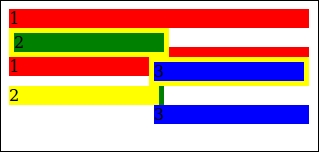
The current structure doesn't show a problem until you add some padding, which is used to construct some space or a border between the two columns in the second row (numbers, 2 and 3, in the screenshot of the HTML wrapper). The padding and the border will break our layout as follows:

<div class="wrapper" style="width:300px;">
  <div style="background-color:red;width:100%;">1</div>
  <div style="background-color:green;width:50%;float:left;border:5px solid yellow;">2</div>
  <div style="background-color:blue;width:50%;border:5px solid yellow;float:right;">3</div>
</div>
<br>
<div class="wrapper" style="width:300px;">
  <div style="background-color:red;width;100%;">1</div>
  <div style="background-color:green;float:left;width:50%;padding-right:5px;"><div style="background-color:yellow;">2</div></div>
  <div style="background-color:blue;width:50%;padding-right:5px;float:right;">3</div>
</div>

Finally, the output of this code should look like the following screenshot:

Box-sizing

A broken layout due to padding and borders

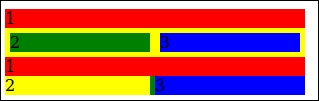
A similar action can be performed, except that the wrappers can be wrapped inside an extra wrapper. The box-sizing: border-box; declaration can then be applied to this. Now, the results should look like the following screenshot:

Box-sizing

A layout with box-sizing: border-box

As you can see, the padding and borders are subtracted by 50 percent from the parent. This will make the calculation a lot easier. Of course, you can do the calculating yourself, once the parent container wrapper has a fixed width. If the parent has 300 pixels, 50 percent of this will be 150 pixels. Taking away the padding and the width of the border will give you the fixed size of a column. This won't work when your parent has a fluid width (the percentage of the viewport). Fluid layouts change their width with the width of the screen. If your screen becomes smaller, all the elements become smaller too and the percentage stays equal. You will quickly realize that doing calculations for all the possible screen sizes to find the real size of a column that allows all of your elements to align, is a long, challenging, and arduous process.

For these reasons, you should make use of box-sizing: border-box; for all the examples in this book. Note that box-sizing also has to be defined by vendor-specific rules, as follows:

-webkit-box-sizing: border-box;
-moz-box-sizing: border-box;
box-sizing: b/'order-box;

In this example, the Less code will be as follows:

// Box sizing mixin
.box-sizing(@boxmodel) {
  -webkit-box-sizing: @boxmodel;
  -moz-box-sizing: @boxmodel;
  box-sizing: @boxmodel;
}
// Reset the box-sizing
*,
*:before,
*:after {
  .box-sizing(border-box);
}

Note

Note that the .box-sizing mixin will become obsolete when you compile your Less code with the Less autoprefix plugin.

With autoprefixing, your Less code can be reduced to the following code:

// Reset the box-sizing
*,
*:before,
*:after {
  box-sizing: border-box;
}

Tip

The preceding code has been added into a separate file called boxsizing.less. From now on, the basics of our Less files will contain the following code:

@import: "normalize.less";@import: "boxsizing.less"

In the next chapters, you will learn more about organizing your Less code into files.

CONTINUE READING
83
Tech Concepts
36
Programming languages
73
Tech Tools
Icon Unlimited access to the largest independent learning library in tech of over 8,000 expert-authored tech books and videos.
Icon Innovative learning tools, including AI book assistants, code context explainers, and text-to-speech.
Icon 50+ new titles added per month and exclusive early access to books as they are being written.
Less Web Development Essentials (Second Edition)
notes
bookmark Notes and Bookmarks search Search in title playlist Add to playlist font-size Font size

Change the font size

margin-width Margin width

Change margin width

day-mode Day/Sepia/Night Modes

Change background colour

Close icon Search
Country selected

Close icon Your notes and bookmarks

Confirmation

Modal Close icon
claim successful

Buy this book with your credits?

Modal Close icon
Are you sure you want to buy this book with one of your credits?
Close
YES, BUY

Submit Your Feedback

Modal Close icon
Modal Close icon
Modal Close icon