-
Book Overview & Buying
-
Table Of Contents
Blazor WebAssembly by Example
By :
As you have seen, the Demo Blazor WebAssembly project created by the Blazor WebAssembly App project template includes quite a few files. In later chapters, we will want to start with an empty Blazor project. So, we will create our own project template that creates an empty Blazor WebAssembly project.
We need to create an empty Blazor WebAssembly project to base our new project template on. We do this as follows:
wwwroot\sample-data folder.Pages folder, except for the Index component.Index.razor file.Index component. Make sure that you do not delete the @page directive at the top of the page.Shared\SurveyPrompt.razor file.Shared\MainLayout.razor file.About link from the top row of the layout by removing the following markup:<a href="http://blazor.net" target="_blank" class="ml-md-auto"> About </a>
Shared\NavMenu.razor file.li elements for the Counter and Fetch data pages. Demo project.The Demo project is now empty. It only contains a blank Home page.
The Export Template Wizard is used to create custom project templates. We will use the empty project that we just created as the basis for a custom project template. We do this as follows:

Figure 2.18 – The Choose Template Type dialog
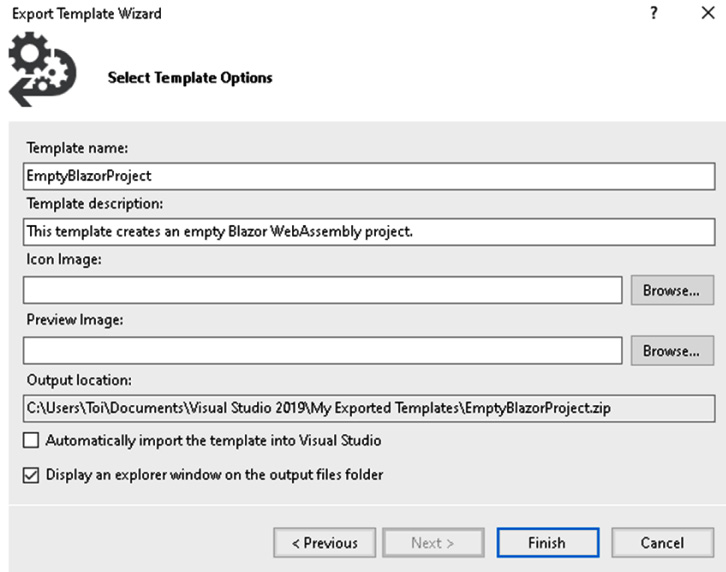
Figure 2.19 – The Select Template Options dialog
After you click the Finish button, your new project template will be saved to the folder indicated in the Output location field on the Select Template Options dialog and the folder will automatically open. The files that comprise your new project template are compressed into a file called EmptyBlazorProject.zip.
We need to make a few updates to our custom project template before it is ready to use. First, we will declare a template parameter for the project's name, and then we will update the metadata. We do this as follows:
EmptyBlazorProject.zip file.The EmptyBlazorProject.zip file contains all of the files from the empty Demo project as well as a MyTemplate.vstemplate file that contains all of the metadata for the project template.
Shared/NavMenu.razor file and replace the word Demo with $projectname$:<a class="navbar-brand" href="">$projectname$</a>
The $projectname$ parameter will be replaced by the name of the project that is provided by the user when the project is created.
Open the _Imports.razor file and replace the word Demo with $projectname$:
@using $projectname$ @using $projectname$.Shared
MyTemplate.vstemplate file.Name element to Empty Blazor WebAssembly App:<Name>Empty Blazor WebAssembly App</Name>
Description element:<LanguageTag>C#</LanguageTag> <ProjectTypeTag>Web</ProjectTypeTag>
Icon element with the following Icon Package element:<Icon Package="{AAB75614-2F8F-4DA6-B0A6-763C6DBB2969}" ID="13"/>ReplaceParameters attribute to true for NavMenu.razor ProjectItem:<ProjectItem ReplaceParameters="true" TargetFileName="NavMenu.razor"> NavMenu.razor </ProjectItem>
ReplaceParameters attribute to true for _Imports.razor ProjectItem:<ProjectItem ReplaceParameters="true" TargetFileName="_Imports.razor"> _Imports.razor </ProjectItem>
EmtpyBlazorProject.zip file with the updated files.EmtpyBlazorProject.zip from the Visual Studio 2019\MyExportedTemplates folder to the Visual Studio 2019\Templates\ProjectTemplates folder.We can use a custom project template the same way that we use any of the built-in project templates. We do this as follows:
Blazor in the Search for templates textbox to locate your new template:
Figure 2.20 – Empty Blazor WebAssembly App template
Sample and click the Create button.We have created a new Sample project by using our custom project template. The only page in the Sample project is the Home page.
We created an empty project by deleting some of the components and code from the Demo project that we created in the previous section. Then, we used the Export Template Wizard to create a custom project template based on the empty project. After we updated some of the files in the custom project template, we copied them into the ProjectTemplates folder. Finally, we used the custom project template to create the Sample project.