-
Book Overview & Buying
-
Table Of Contents
-
Feedback & Rating
ASP.NET Core 9 Web API Cookbook
By :
In this recipe, we will enhance our API’s error handling by leveraging ProblemDetails, a standardized way to provide detailed error information as defined in the HTTP specification.
ProblemDetails allows ApiController to transform error status codes into structured and informative error responses. ProblemDetails is part of the HTTP specification and a great way to return additional error information if something goes wrong with an endpoint. We will explore how to create custom ProblemDetails objects and customize them to include meaningful details, such as including a traceId from HttpContext within the ProblemDetails object itself.
This recipe uses a starter project that includes a basic controller with endpoints already set up and configured. This recipe is not a direct continuation of the preceding recipe.
You can clone the starter project from here: https://github.com/PacktPublishing/ASP.NET-9-Web-API-Cookbook/tree/main/start/chapter01/problemDetails.
Program.cs file. On the line right after AddControllers(), let’s register customization options using AddProblemDetails():builder.Services.AddProblemDetails(options =>
options.CustomizeProblemDetails = (context) =>
{
var httpContext = context.HttpContext;
context.ProblemDetails.Extensions["traceId"] = Activity.
Current?.Id ?? httpContext.TraceIdentifier;
context.ProblemDetails.Extensions["supportContact"] =
"[email protected]";ProblemDetails by adding custom messages for different status codes: if (context.ProblemDetails.Status == StatusCodes.
Status401Unauthorized)
{
context.ProblemDetails.Title = "Unauthorized
Access";
context.ProblemDetails.Detail = "You are not
authorized to access this resource.";
}
else if (context.ProblemDetails.Status == StatusCodes.
Status404NotFound)
{
context.ProblemDetails.Title = "Resource Not Found";
context.ProblemDetails.Detail = "The resource you
are looking for was not found.";
}
else
{
context.ProblemDetails.Title = "An unexpected error
occurred";
context.ProblemDetails.Detail = "An unexpected error
occurred. Please try again later.";
}
});ProductsController.cs, in the Controllers folder. Modify the endpoint that retrieves a product by its ID endpoint. We are going to specify the various responses we expect from the endpoint using the ProducesResponseType attribute and return appropriate ProblemDetails objects for error responses:// GET: /products/{id}
[HttpGet("{id}")]
[ProducesResponseType(StatusCodes.Status200OK, Type = typeof(ProductDTO))]
[ProducesResponseType(StatusCodes.Status404NotFound, Type = typeof(ProblemDetails))]
[ProducesResponseType(StatusCodes.Status401Unauthorized, Type = typeof(ProblemDetails))]
[ProducesResponseType(StatusCodes.Status500InternalServerError, Type = typeof(ProblemDetails))]
public async Task<ActionResult<ProductDTO>> GetAProduct(int id)
{
logger.LogInformation($"Retrieving product with id {id}");try block to attempt to retrieve our product:try
{
var product = await productsService.GetAProductAsync(
id);
if (product == null)
{
return Problem(
detail: $"Product with ID {id} was not found.",
title: "Product not found",
statusCode: StatusCodes.Status404NotFound,
instance: HttpContext.TraceIdentifier
);
}
return Ok(product);
}Unauthorized Access, which will return its own ProblemDetails: catch (UnauthorizedAccessException ex)
{
logger.LogError(ex, "Unauthorized access");
return Problem(
detail: ex.Message,
title: "Unauthorized Access",
statusCode: StatusCodes.Status401Unauthorized,
instance: HttpContext.TraceIdentifier
);
} catch (Exception ex)
{
logger.LogError(ex, $"An error occurred while retrieving product with id {id}");
return Problem(
detail: "An unexpected error occurred while processing your request.",
title: "Internal Server Error",
statusCode: StatusCodes. Status500InternalServerError,
instance: HttpContext.TraceIdentifier
);
}
}dotnet run
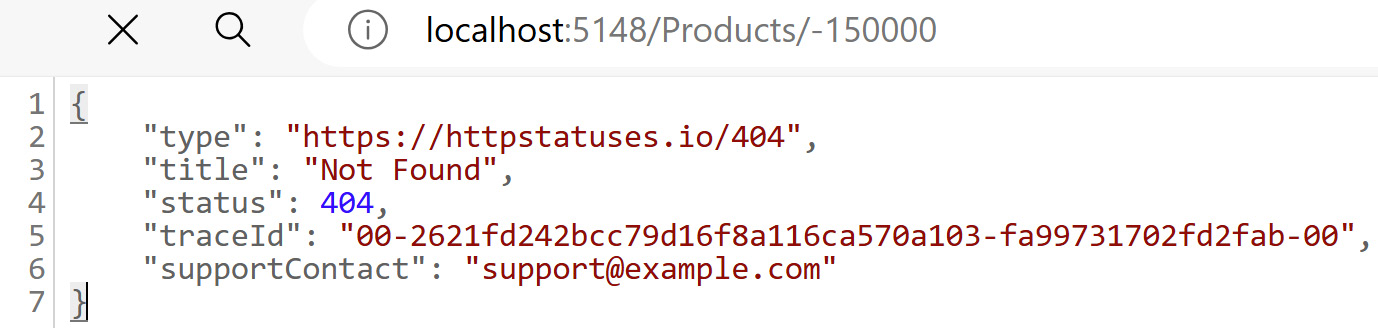
404 "Not Found" URL for a ProductId that cannot exist.Figure 1.1 illustrates trying to get an invalid ID, directly via the web browser:
Figure 1.1 – ProblemDetails returned with traceId and supportContact
In this recipe, we relied on the built-in ProblemDetails support in ASP.NET Core 9 to create custom problem messages when your endpoints return errors.
ProblemDetails objects are automatically generated for some errors. We simply injected AddProblemDetails with the CustomizeProblemDetails class to create custom messages.
In previous versions of ASP.NET Core, we had to rely on external NuGet packages for the meaningful customization of ProblemDetails. ASP.NET Core 9 allows us to have more advanced control over the ProblemDetails response.
By customizing ProblemDetails, we can provide more detailed and useful error information to the clients, including trace IDs and support contact information.
ProblemDetails is not unique to ASP.NET Core—read all about the ProblemDetails HTTP spec here: https://datatracker.ietf.org/doc/html/rfc9457.