Sign In Start Free Trial
Account

Add to playlist

Create a Playlist

Modal Close icon
You need to login to use this feature.
  • Book Overview & Buying ASP.NET Core 9 Web API Cookbook
  • Table Of Contents Toc
ASP.NET Core 9 Web API Cookbook

ASP.NET Core 9 Web API Cookbook

By : Luke Avedon, Garry Cabrera
5 (2)
close
close
ASP.NET Core 9 Web API Cookbook

ASP.NET Core 9 Web API Cookbook

5 (2)
By: Luke Avedon, Garry Cabrera

Overview of this book

Discover what makes ASP.NET Core 9 a powerful and versatile framework for building modern web APIs that are both scalable and secure. This comprehensive, recipe-based guide leverages the authors’ decade-long experience in software development to equip developers with the knowledge to create robust web API solutions using the framework's most powerful features. Designed for intermediate to advanced .NET developers, this cookbook contains hands-on recipes that demonstrate how to efficiently build, optimize, and secure APIs using this cutting-edge technology. You'll master essential topics, such as creating RESTful APIs, implementing advanced data access strategies, securing your APIs, creating custom middleware, and enhancing your logging capabilities. The book goes beyond traditional API development by introducing GraphQL, SignalR, and gRPC, offering insights into how these technologies can extend the reach of your APIs. To prepare you for real-world challenges, the recipes cover testing methodologies, cloud deployment, legacy system integration, and advanced concepts like microservices and Hangfire. By the end of this book, you’ll gain the expertise needed to build and manage enterprise-grade web APIs with ASP.NET Core 9. *Email sign-up and proof of purchase required
Table of Contents (15 chapters)
close
close

Implementing KeySet pagination

It is usually inadvisable to return all the available data from a GET endpoint. You may think you can get away without paging, but non-paged GET endpoints often have a surprisingly bad effect on network load and application performance. They can also prevent your API from scaling. Other resources on this topic often demonstrate OFFSET FETCH style pagination (Skip and Take when using EF Core). While this approach is easy to understand, it has a hidden cost: it forces the database engine to read through every single row leading up to the desired page.

A more efficient technique is to work only with indices and not full data rows. For ordered data, the principle is simple: if a higher ID than exists on your page can be found somewhere in the database, then you know more data is available. This is called keyset pagination.

In this recipe, we will implement keyset pagination in ASP.NET Core using EF Core, harnessing the power of indexes for optimal performance.

Getting ready

Clone the repository available here: /start/chapter01/keyset. You won’t be using any new external dependencies for this endpoint. This project has one non-paged GET endpoint.

How to do it…

  1. In your Models folder, create an abstract base class called PagedResponse.cs:
    namespace cookbook.Models;
    public abstract record PagedResponse<T>
    {
         public IReadOnlyCollection<T> Items { get; init; } = Array.        Empty<T>();
         public int PageSize { get; init; }
         public bool HasPreviousPage { get; init; }
         public bool HasNextPage { get; init; }
    }

An important note on where to place paging logic

At this point, a lot of people would put business logic in HasPreviousPage and HasNextPage. I am not a fan of putting business logic in setters, as this tends to obfuscate the logic. It makes code harder to read as one often forgets that properties are being modified without explicit method calls. If you have to use a setter, it should handle data access and not logic. It’s a personal choice, but it is generally better to place this logic in explicit methods.

  1. Create a PagedProductResponseDTO instance in the PagedProductResponseDTO.cs file that simply inherits from PagedResponseDTO<ProductDTO>:
    namespace cookbook.Models;
    public record PagedProductResponseDTO : PagedResponseDTO<ProductDTO>
    {
    }
  2. Now navigate to the Services folder. Update the IProductsService interface:
    using cookbook.Models;
    namespace cookbook.Services;
    public interface IProductsService {
        Task<IEnumerable<ProductDTO>> GetAllProductsAsync();
        Task<PagedProductResponseDTO> GetPagedProductsAsync(int     pageSize, int? lastProductId = null);
    }
  3. In the ProductsServices.cs file. Implement the GetPagedProductsAsync method. For now, you will just create a queryable on your database context:
    public async Task<PagedProductResponseDTO> GetPagedProductsAsync(int pageSize, int? lastProductId = null)
        {
             var query = context.Products.AsQueryable();
         }
  4. Before you query any data, check that an ID exists in the database that is higher than the ID of the last row you returned:
    public async Task<PagedProductResponseDTO>     GetPagedProductsAsync(int pageSize, int? lastProductId =         null)
        {
             var query = context.Products.AsQueryable();
             if (lastProductId.HasValue)
            {
                query = query.Where(p => p.Id > lastProductId.                                Value);
            }
  5. On the next line, query the remaining indexes in DbContext to get a page of products:
            var pagedProducts = await query
                .OrderBy(p => p.Id)
                .Take(pageSize)
                .Select(p => new ProductDTO
                {
                    Id = p.Id,
                    Name = p.Name,
                    Price = p.Price,
                    CategoryId = p.CategoryId
                })
                .ToListAsync();
  6. Next, calculate the last ID from the page you just retrieved:
    var lastId = pagedProducts.LastOrDefault()?.Id;
  7. Use AnyAsync to see whether any IDs exist higher than the last one you fetched:
    var hasNextPage = await context.Products.AnyAsync(
        p => p.Id > lastId);
  8. Finish the method by returning your results along with the PageSize, HasNextPage, and HasPreviousPage metadata:
            var result = new PagedProductResponseDTO
            {
                Items = pagedProducts.Any() ? pagedProducts: Array.                        Empty<ProductDTO>(),
                PageSize = pageSize,
                HasNextPage = hasNextPage,
                HasPreviousPage = lastProductId.HasValue
            };
            return result;
        }
    }

Important note

It is somewhat expensive to return a TotalCount of results. So, unless there is a clear need for the client to have a TotalCount, it is better to leave it out. You will return more robust pagination data in the next recipe.

  1. Back in your Controller, import the built-in System.Text.Json:
    using System.Text.Json;
  2. Finally, implement a simple controller that returns your paginated data with links to both the previous page and the next page of data. First, return a bad request if no page size is given:
    // GET: /Products
    [HttpGet]
    [ProducesResponseType(StatusCodes.Status200OK, Type = typeof(IEnumerable<ProductDTO>))]
    [ProducesResponseType(StatusCodes.Status204NoContent)]
    [ProducesResponseType(StatusCodes.Status500InternalServerError)]
        public async Task<ActionResult<IEnumerable<ProductDTO>>> GetProducts(int pageSize, int? lastProductId = null)
        {
            if (pageSize <= 0)
            {
                return BadRequest("pageSize must be greater than                                0");
            }
  3. Close the method by returning a paged result:
            var pagedResult = await _productsService.            GetPagedProductsAsync(pageSize, lastProductId);
            var previousPageUrl = pagedResult.HasPreviousPage
                ? Url.Action("GetProducts", new { pageSize,
                    lastProductId = pagedResult.Items.First().Id })
                : null;
            var nextPageUrl = pagedResult.HasNextPage
                ? Url.Action("GetProducts", new { pageSize,
                    lastProductId = pagedResult.Items.Last().Id })
                : null;
            var paginationMetadata = new
            {
                PageSize = pagedResult.PageSize,
                HasPreviousPage = pagedResult.HasPreviousPage,
                HasNextPage = pagedResult.HasNextPage,
                PreviousPageUrl = previousPageUrl,
                NextPageUrl = nextPageUrl
            };
  4. Finally, use Headers.Append so we don’t get yelled at for adding a duplicate header key. This could easily confuse our consuming client. We will also make sure the JSON serializer doesn’t convert our & to its Unicode character:
    var options = new JsonSerializerOptions
            {
                Encoder = System.Text.Encodings.Web.
                    JavaScriptEncoder.UnsafeRelaxedJsonEscaping
            };
            Response.Headers.Append("X-Pagination", 
                JsonSerializer.Serialize(
                    paginationMetadata, options));
            return Ok(pagedResult.Items);
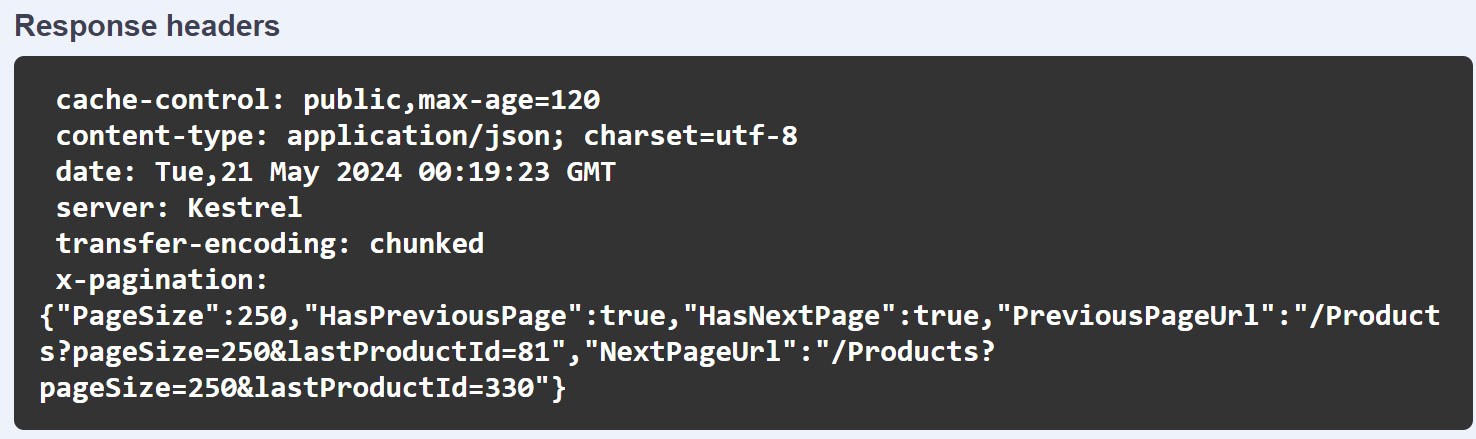
  5. Run the app, go to http://localhost:5148/swagger/index.html, and play with your new paginator. For example, try a pageSize value of 250 and a lastProductId value of 330. Note that the metadata provides the client links to the previous and next page.

    In Figure 1.3, you can see our pagination metadata being returned, via the Swagger UI:

Figure 1.3: Our pagination metadata in the x-pagination header

Figure 1.3: Our pagination metadata in the x-pagination header

How it works…

We implemented a keyset paginator that works with a variable page size. Keyset pagination works with row IDs instead of offsets. When the client requests a page, the client provides both a requested page size and the ID of the last result they have consumed. This approach is more efficient than traditional skip/take pagination because it works directly with indexes rather than sorting and skipping through the entire dataset. The EF Core query behind our GetProducts endpoint avoids the more common skip/take pattern but does use the take method to retrieve the page of data. We leveraged EF Core’s AnyAsync method to directly check whether any products exist after the one fetched for the current page. We then generated URLs for the previous and next pages using Url.Action. Finally, we returned this information in a pagination metadata object to help clients navigate through the data.

See also

CONTINUE READING
83
Tech Concepts
36
Programming languages
73
Tech Tools
Icon Unlimited access to the largest independent learning library in tech of over 8,000 expert-authored tech books and videos.
Icon Innovative learning tools, including AI book assistants, code context explainers, and text-to-speech.
Icon 50+ new titles added per month and exclusive early access to books as they are being written.
ASP.NET Core 9 Web API Cookbook
notes
bookmark Notes and Bookmarks search Search in title playlist Add to playlist download Download options font-size Font size

Change the font size

margin-width Margin width

Change margin width

day-mode Day/Sepia/Night Modes

Change background colour

Close icon Search
Country selected

Close icon Your notes and bookmarks

Confirmation

Modal Close icon
claim successful

Buy this book with your credits?

Modal Close icon
Are you sure you want to buy this book with one of your credits?
Close
YES, BUY

Submit Your Feedback

Modal Close icon
Modal Close icon
Modal Close icon