-
Book Overview & Buying
-
Table Of Contents
ASP.NET Core 9 Web API Cookbook
By :
In this recipe, we’ll expand our keyset pagination implementation to efficiently handle first and last page access by leveraging EF Core’s entity tracking and Find method. Users often navigate directly to the first or last page of paginated results, so these pages should load as quickly as possible, while still remaining reasonably fresh.
This recipe builds on the two preceding recipes. You can clone the starter project here: https://github.com/PacktPublishing/ASP.NET-9-Web-API-Cookbook/tree/main/start/chapter01/firstLastPage.
Program.cs file. Register an in-memory cache on the line after AddControllers();:builder.Services.AddMemoryCache();
PagedResponse.cs file inside the Models folder. Update your PagedResponse model to include TotalPages:namespace cookbook.Models;
public abstract record PagedResponse<T>
{
public IReadOnlyCollection<T> Items { get; init; } = Array. Empty<T>();
public int PageSize { get; init; }
public bool HasPreviousPage { get; init; }
public bool HasNextPage { get; init; }
public int TotalPages { get; init; }
}ProductReadService.cs in the Services folder. At the bottom of the class, create a new helper method for retrieving and caching total pages. When it is time to recalculate the total pages count, we are going to take that opportunity to clear EF Core’s change tracker—forcing a fresh first and last page:public async Task<int> GetTotalPagesAsync(int pageSize)
{
if (!cache.TryGetValue(TotalPagesKey, out int totalPages))
{
context.ChangeTracker.Clear();
var totalCount = await context.Products.CountAsync();
totalPages = (int)Math.Ceiling(totalCount / (double) pageSize);
cache.Set(TotalPagesKey, totalPages,
TimeSpan.FromMinutes(2));
}
return totalPages;
}Important note
We have used a basic ResponseCache in the controller previously, but this is the first time we are introducing caching to the service layer.
public void InvalidateCache()
{
Cache.Remove(TotalPagesKey);
}ProductReadService.cs file, scroll up to the top of the file, and add the constant for our cached TotalPages key at the top of the ProductReadService class, after the class definition:using Microsoft.Extensions.Caching.Memory;
public class ProductReadService(AppDbContext context, IMemoryCache cache) : IProductReadService
{
private const string TotalPagesKey = "TotalPages";ProductReadService.cs file, delete the entire GetPagedProductsAsync method implementation. We’ll rebuild it to leverage EF Core’s entity tracking and Find method.ProductReadService.cs, let’s start rebuilding GetPagedProductsAsyncMethod. Start with the method signature and variables we will need:public async Task<PagedProductResponseDTO> GetPagedProductsAsync(int pageSize, int? lastProductId = null)
{
var totalPages = await GetTotalPagesAsync(pageSize);
List<Product> products;
bool hasNextPage;
bool hasPreviousPage;Find:if (lastProductId == null)
{
products = new List<Product>();
for (var i = 1; i <= pageSize; i++)
{
var product = await context.Products.FindAsync(i);
if (product != null)
{
products.Add(product);
}
}
hasNextPage = products.Count == pageSize;
hasPreviousPage = false;
}else if (lastProductId == ((totalPages - 1) * pageSize))
{
products = new List<Product>();
for (var i = lastProductId.Value; i < lastProductId.Value + pageSize; i++)
{
var product = await context.Products.FindAsync(i);
if (product != null)
{
products.Add(product);
}
}
hasNextPage = false;
hasPreviousPage = true;
}ChangeTracker so a fresh first and last pages will be returned. On the next line, place this:else
{
context.ChangeTracker.Clear();AsNoTracking() in our query:IQueryable<Product> query = context.Products; query = query.Where(p => p.Id > lastProductId.Value); products = await query .OrderBy(p => p.Id) .Take(pageSize) .ToListAsync(); var lastId = products.LastOrDefault()?.Id; hasNextPage = lastId.HasValue && await context.Products.AnyAsync(p => p.Id > lastId); hasPreviousPage = true; }
return statement and close the GetPagedProductsAsync method:return new PagedProductResponseDTO
{
Items = products.Select(p => new ProductDTO
{
Id = p.Id,
Name = p.Name,
Price = p.Price,
CategoryId = p.CategoryId
}).ToList(),
PageSize = pageSize,
HasPreviousPage = hasPreviousPage,
HasNextPage = hasNextPage,
TotalPages = totalPages
};
}ProductsController.cs file in the Controller folder. Let’s modify the pagination in the GetProducts action method to include FirstPageUrl and LastPageUrl after NextPageUrl:var paginationMetadata = new
{
PageSize = pagedResult.PageSize,
HasPreviousPage = pagedResult.HasPreviousPage,
HasNextPage = pagedResult.HasNextPage,
TotalPages = pagedResult.TotalPages,
PreviousPageUrl = pagedResult.HasPreviousPage
? Url.Action("GetProducts", new { pageSize, lastProductId = pagedResult.Items.First().Id })
: null,
NextPageUrl = pagedResult.HasNextPage
? Url.Action("GetProducts", new { pageSize, lastProductId = pagedResult.Items.Last().Id })
: null,
FirstPageUrl = Url.Action("GetProducts", new { pageSize }),
LastPageUrl = Url.Action("GetProducts", new { pageSize, lastProductId = (pagedResult.TotalPages - 1) * pageSize })
};
// method continuesdotnet run
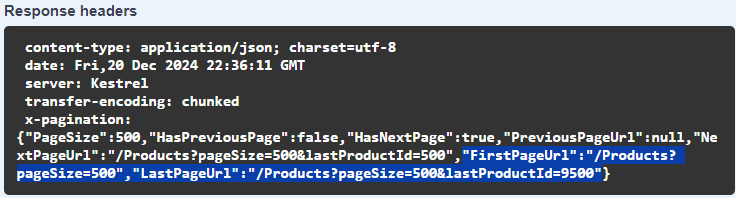
http://localhost:<yourport>/swagger/index.html. Try the Products endpoint. Note the first- and last-page URLs in the X-Pagination header as shown in the following screenshot:
Figure 1.5 – FirstPageUrl and LastPageUrl
To navigate to the last page, try entering the page size and product ID into the Swagger boxes representing query parameters. If you are using a debugger, you’ll see Find retrieving products from the change tracker without hitting the database.
This recipe leverages EF Core’s entity tracking system and Find method to efficiently serve the first and last page. We used IMemoryCache to cache only the total page calculation. We did not use IMemoryCache to cache the actual product data (which is the approach we would take with output caching). Instead, we let EF Core’s change tracker handle entity caching through Find. Note that Find will not execute a database query if the entity is already loaded into the change tracker. To prevent stale data, we clear the change tracker at two strategic points: during regular pagination and when recalculating the total page count every two minutes. This dual invalidation strategy ensures that while the first and last pages can be served quickly from the tracker, no tracked entity can be stale for more than two minutes. Since the total count typically changes less frequently than individual records, the total count is a better candidate for formal caching in IMemoryCache compared to caching the entire result set.
Change the font size
Change margin width
Change background colour