Sign In Start Free Trial
Account

Add to playlist

Create a Playlist

Modal Close icon
You need to login to use this feature.
  • Book Overview & Buying Real-World Web Development with .NET 9
  • Table Of Contents Toc
  • Feedback & Rating feedback
Real-World Web Development with .NET 9

Real-World Web Development with .NET 9

By : Mark J. Price
3.5 (4)
close
close
Real-World Web Development with .NET 9

Real-World Web Development with .NET 9

3.5 (4)
By: Mark J. Price

Overview of this book

Real-World Web Development with .NET 9 equips you to build professional websites and services using proven technologies like ASP.NET Core MVC, Web API, and OData—trusted by organizations for delivering robust web applications. You’ll learn to design and build efficient web applications with ASP.NET Core MVC, creating well-structured, maintainable code that follows industry best practices. From there, you’ll focus on Web API, building RESTful services that are both secure and scalable. Along the way, you’ll also explore testing, authentication, and containerization for deployment, ensuring that your solutions are fully production ready. In the final part of the book, you will be introduced to Umbraco CMS, a popular content management system for .NET. By mastering this tool, you’ll learn how to empower users to manage website content independently. By the end of this book, you'll not only have a solid grasp of controller-based development but also the practical know-how to build dynamic, content-driven websites using a popular .NET CMS.
Table of Contents (17 chapters)
close
close

Making good use of the GitHub repository for this book

Git is a commonly used source code management system. GitHub is a company, website, and desktop application that makes it easier to manage Git. Microsoft purchased GitHub in 2018, so it will continue to get closer integration with Microsoft tools.

I created a GitHub repository for this book, and I use it for the following:

  • To store the solution code for the book that can be maintained after the print publication date.
  • To provide extra materials that extend the book, like errata fixes, small improvements, lists of useful links, and optional sections about topics that cannot fit in the printed book.
  • To provide a place for readers to get in touch with me if they have issues with the book.

    Good Practice: I strongly recommend that all readers review the errata, improvements, post-publication changes, and common errors pages before attempting any coding task in this book. You can find them at https://github.com/markjprice/web-dev-net9/blob/main/docs/errata/README.md.md.

Understanding the solution code on GitHub

The solution code in the GitHub repository for this book can be opened with any of the following code editors:

  • Visual Studio or Rider: Open the MatureWeb.sln solution file.
  • VS Code: Open the MatureWeb.sln folder.

All the chapters in this book share a single solution file named MatureWeb.sln.

All the code solutions can be found at the following link:

https://github.com/markjprice/web-dev-net9/tree/main/code

If you are new to .NET development, then the GitHub repository has step-by-step instructions for three code editors (Visual Studio, VS Code, and Rider), along with additional screenshots:

https://github.com/markjprice/web-dev-net9/tree/main/docs/code-editors/

Downloading solution code from the GitHub repository

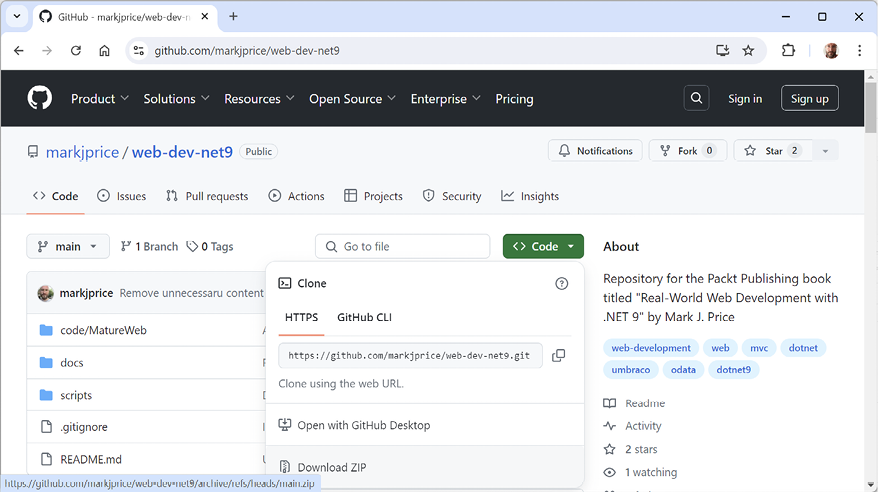
If you just want to download all the solution files without using Git, click the green Code button and then select Download ZIP, as shown in Figure 1.5:

Figure 1.5: Downloading the repository as a ZIP file

Good Practice: It is best to clone or download the code solutions to a short folder path, like C:\web-dev-net9\ or C:\book\, to avoid build-generated files exceeding the maximum path length. You should also avoid special characters like #. For example, do not use a folder name like C:\C# projects\. That folder name might work for a simple console app project but once you start adding features that automatically generate code, you are likely to have strange issues. Keep your folder names short and simple.

Using Git with VS Code and the command prompt

VS Code has integrations with Git, but it will use your operating system’s Git installation, so you must install Git 2 or later first before you get these features.

You can install Git from the following link:

https://git-scm.com/download

If you like to use a GUI, you can download GitHub Desktop from the following link:

https://desktop.github.com

Cloning the book solution code repository

Let’s clone the book solution code repository. In the steps that follow, you will use the VS Code terminal, but you could enter the commands at any command prompt or terminal window:

  1. Create a folder named Repos-vscode in your User or Documents folder, or wherever you want to store your Git repositories.
  2. Open the Repos-vscode folder at the command prompt or terminal, and then enter the following command:
    git clone https://github.com/markjprice/web-dev-net9.git
    

Note that cloning all the solutions for all the chapters will take a minute or so, so please be patient.

Visually different images
CONTINUE READING
83
Tech Concepts
36
Programming languages
73
Tech Tools
Icon Unlimited access to the largest independent learning library in tech of over 8,000 expert-authored tech books and videos.
Icon Innovative learning tools, including AI book assistants, code context explainers, and text-to-speech.
Icon 50+ new titles added per month and exclusive early access to books as they are being written.
Real-World Web Development with .NET 9
notes
bookmark Notes and Bookmarks search Search in title playlist Add to playlist download Download options font-size Font size

Change the font size

margin-width Margin width

Change margin width

day-mode Day/Sepia/Night Modes

Change background colour

Close icon Search
Country selected

Close icon Your notes and bookmarks

Confirmation

Modal Close icon
claim successful

Buy this book with your credits?

Modal Close icon
Are you sure you want to buy this book with one of your credits?
Close
YES, BUY

Submit Your Feedback

Modal Close icon
Modal Close icon
Modal Close icon