-
Book Overview & Buying
-
Table Of Contents
-
Feedback & Rating
C# 14 and .NET 10 – Modern Cross-Platform Development Fundamentals - Tenth Edition
By :
Let’s get started by introducing you to the code solutions, structure, and content of this book.
You can complete all the coding tasks just from reading this book because all the code statements that you need to enter are shown in the pages. You do not need to download or clone the solution code to complete this book. The solution code is provided in the GitHub repository only so that you can view it if you get stuck working from the book, and to save you time from entering long files yourself. It is also more reliable to copy from an actual code file than from a PDF or other e-book format.
The GitHub repository for this book has solutions that use full application projects for all code tasks and exercises, found at the following link:
https://github.com/markjprice/cs14net10.
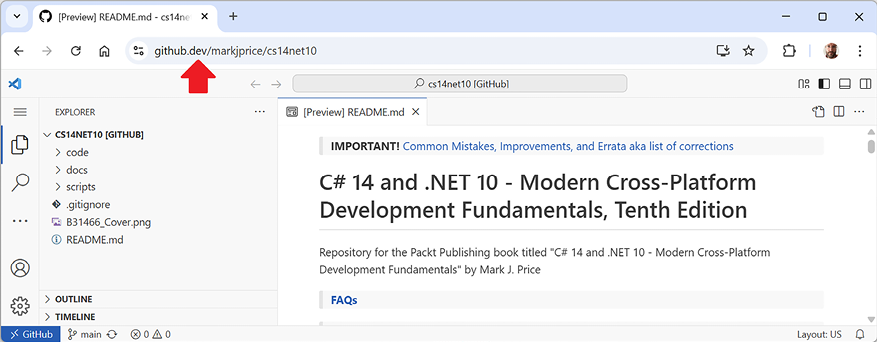
After navigating to the GitHub repository in your web browser, you can press the . (dot) key on your keyboard, or manually change .com to .dev in the link to convert the repository into a live code editor based on VS Code, called GitHub Codespaces, as shown in Figure 1.1:

Figure 1.1: GitHub Codespaces viewing the book’s GitHub repository
Warning! When you access a repository using GitHub Codespaces, its GitHub Repositories extension will attempt to download the repository’s index. By default, the maximum size can be up to 50 MB, but the repository exceeds this limit, so you will see the following warning message: Repository exceeds download size limit! Continuing with partial text services. You can ignore this message because you are not using the full features.
VS Code in a web browser is great to run alongside your chosen local code editor as you work through the book’s coding tasks. You can compare your code to the solution code and easily copy and paste parts if needed.
You do not need to use or know anything about Git to get the solution code of this book. You can download a ZIP file containing all the code solutions by using the following direct link and then extracting the ZIP file into your local filesystem: https://github.com/markjprice/cs14net10/archive/refs/heads/main.zip.
Throughout this book, I use the term modern .NET to refer to .NET 10 and its predecessors, like .NET 6, that derive from .NET Core. I use the term legacy .NET to refer to .NET Framework, Mono, Xamarin, and .NET Standard. Modern .NET is a unification of those legacy platforms and standards.
Most people learn complex topics best by imitation and repetition, rather than reading a detailed explanation of the theory; therefore, I will not overload you with detailed explanations of every step throughout this book. The idea is to get you to write some code and see it run.
You don’t need to know all the nitty-gritty details immediately. That will be something that comes with time as you build your own apps and go beyond what any book can teach you.
In the words of Samuel Johnson, author of the English dictionary in 1755, I have committed “a few wild blunders, and risible absurdities, from which no work of such multiplicity is free.” I take sole responsibility for these and hope you appreciate the challenge of my attempt to lash the wind by writing this book about rapidly evolving technologies, like C# and .NET, and the apps that you can build with them.
If you have a complaint about this book, then please contact me before writing a negative review on Amazon. Authors cannot respond to Amazon reviews, so I cannot contact you to resolve the problem and help you, or listen to your feedback and try to do better in the next edition. Please ask a question on the Discord channel for this book at https://packt.link/cs14net10, email me at [email protected], or raise an issue in the GitHub repository for the book at the following link: https://github.com/markjprice/cs14net10/issues.
The following topics are covered in this book:
This book, C# 14 and .NET 10 – Modern Cross-Platform Development Fundamentals, is best read linearly, chapter by chapter, because it builds up fundamental skills and knowledge.
Now that you know what this book covers, let’s review what the other three books in the quartet cover.
The following topics are available in a companion book, Real-World Web Development with .NET 10:
The first half of this book should be read linearly, and the second half can be read more like a cookbook, so if you are especially interested in building web services using FastEndpoints, then you can read that chapter without the preceding chapters about ASP.NET Core OData web services.
The following topics are available in a companion book, Apps and Services with .NET 10:
This book can be read like a cookbook, so if you are especially interested in building gRPC services, then you can read that chapter without the preceding chapters about ASP.NET Core Minimal API web services.
The following topics are available in a companion book, Tools and Skills for .NET 10:
This book can be read like a cookbook.
I use my personal GitHub repository to store shared content that is relevant to all my books. Useful sections include the following:
For example, now that Rider is free for non-commercial use, its popularity has grown more than VS Code, as shown at the following link:
So, in this 10th edition, I have streamlined this book by moving most VS Code content online and focusing on Visual Studio, which is by far still the most popular IDE for .NET developers, especially beginners.
To see a list of all the books I have published with Packt, you can use the following link:
https://subscription.packtpub.com/search?query=mark+j.+price.
A similar list is available on Amazon:
https://www.amazon.com/Mark-J-Price/e/B071DW3QGN/.
You can search other book-selling sites for my books, too.