-
Book Overview & Buying
-
Table Of Contents
-
Feedback & Rating
C# 14 and .NET 10 – Modern Cross-Platform Development Fundamentals - Tenth Edition
By :
“Those who cannot remember the past are condemned to repeat it.”
– George Santayana
.NET, .NET Core, .NET Framework, .NET Standard, and Xamarin are related and overlapping platforms for developers used to build applications and services.
If you are not familiar with the history of .NET, then I will introduce you to each of these .NET concepts at the following link:
https://github.com/markjprice/cs14net10/blob/main/docs/ch01-dotnet-history.md.
As time moves on, more and more readers already know the history of .NET, so it would be a waste of space in the book to continue to include it. But if you are new to it, then make sure you read all the extras that I provide online, like the preceding one.
.NET versions are either Long-Term Support (LTS), Standard-Term Support (STS) (formerly known as Current), or Preview, as described in the following list:
STS and LTS releases receive critical patches throughout their lifetime for security and reliability.
There is no difference in quality between an LTS and an STS release. LTS releases do not have fewer bugs than STS releases. The teams plan what features they want to add, implement them, and release them. STS releases are no more likely to include experimental features than LTS releases. Literally the only difference between LTS and STS releases is how long Microsoft promises to support the release. In September 2025, Microsoft announced that STS support would be extended from 18 months to 24 months. You can read about this at the following link: https://devblogs.microsoft.com/dotnet/dotnet-sts-releases-supported-for-24-months/.
Good practice: You must stay up to date with the latest patches to get support. For example, if a system is running on .NET Runtime version 10.0.0 and then version 10.0.1 is released, you must install version 10.0.1 to get support. These updates are released on the second Tuesday of each month, aka Patch Tuesday.
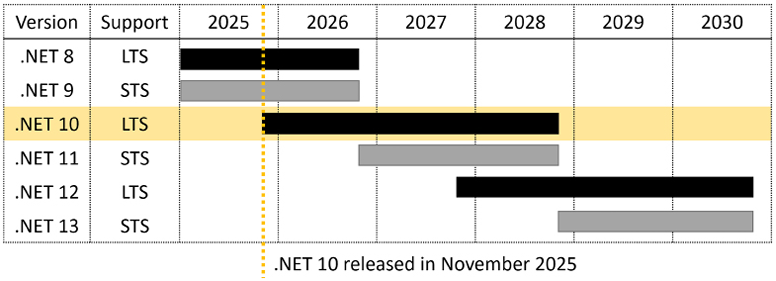
To better understand your choices of STS and LTS releases, it is helpful to see their support durations visualized, with 3-year-long black bars for LTS releases, and 2-year-long gray bars for STS releases, as shown in Figure 1.3:

Figure 1.3: Support durations for recent and planned STS and LTS releases
During the lifetime of .NET 10, .NET 8 and .NET 9 will still be supported (for a while), and .NET 11 and .NET 12 will be released. I have tried to be cognizant that you might choose to use future versions like .NET 11 or .NET 12 with this book; however, obviously, the book cannot cover those new features, since I don’t know what they will be!
If you have existing .NET 8 and .NET 9 projects, then you should start work on migrating them to .NET 10 as soon as possible.
If you need LTS from Microsoft, then set your new .NET projects to target .NET 10 today and then migrate to .NET 12 after it is released in November 2027. This is because .NET 11 will be an STS release, and therefore, it will lose support in November 2028, on the same day that .NET 10 reaches its end-of-life. As soon as .NET 12 is released, start upgrading your .NET 10 projects to it. You will have a year to do so before .NET 10 and .NET 11 reach their end-of-life date.
Good practice: Remember that with all releases, you must upgrade to bug-fix releases like .NET Runtime 10.0.1 and .NET SDK 10.0.101, which are expected to be released in December 2025, as updates are released every month.
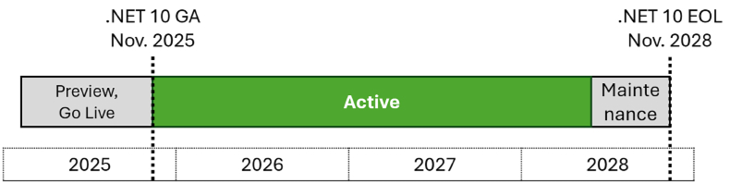
The lifetime of a version of .NET passes through several phases, during which they have varying levels of support, as described in the following list and as shown in Figure 1.4:

Figure 1.4: .NET 10 support phases from preview to maintenance
End of support or end of life (EOL) means the date after which bug fixes, security updates, or technical assistance are no longer available from Microsoft.
At the time of publishing in November 2025, all versions of modern .NET have reached their EOL, except those shown in the following list:
You can check which .NET versions are currently supported and when they will reach EOL at the following link: https://github.com/dotnet/core/blob/main/releases.md.
When .NET 8 and .NET 9 reach their end of support in November 2026, you can expect the following:
NETSDK1138 build warnings when targeting .NET 8 or .NET 9 from recent SDKs like the .NET 10 SDKIf you have not built a standalone app, then the .NET Runtime is the minimum you need to install so that an operating system can run a .NET application. The .NET SDK includes the .NET Runtime, as well as the compilers and other tools needed to build .NET code and apps.
.NET Runtime versioning follows semantic versioning, that is, a major increment indicates breaking changes, minor increments indicate new features, and patch increments indicate bug fixes.
.NET SDK versioning does not follow semantic versioning. The major and minor version numbers are tied to the runtime version they are matched with. The third number follows a convention that indicates the minor and patch versions of the SDK. The third number starts at 100 for the initial version (equivalent to 0.0 for the minor and patch numbers). The first digit increments with minor increments, and the other two digits increment with patch increments.
You can see an example of this in Table 1.3:
|
Change |
.NET Runtime |
.NET SDK |
|
Initial release |
10.0.0 |
10.0.100 |
|
SDK bug fix |
10.0.0 |
10.0.101 |
|
Runtime and SDK bug fix |
10.0.1 |
10.0.102 |
|
SDK new feature |
10.0.1 |
10.0.200 |
Table 1.3: Examples of changes and versions for a .NET Runtime and .NET SDK
All future versions of the .NET 10 runtime are compatible with its major version. For example, if a project targets net10.0, then you can upgrade the .NET Runtime to future versions like 10.0.1, 10.0.2, and so on. In fact, you must upgrade the .NET Runtime every month to maintain support.
All future versions of the .NET SDK maintain the ability to build projects that target previous versions of the runtime. For example, if a project targets net10.0 and you initially build it using .NET SDK 10.0.100, then you can upgrade the .NET SDK to future bug-fix versions, like 10.0.101, or a major version, like 11.0.100, and that SDK can still build the project for the older targeted version. This means that you can safely remove all older versions of any .NET SDKs, like 8.0.100, 9.0.100, or 10.0.100, after you’ve installed a .NET SDK 11 or later. You will still be able to build all your old projects that target those older versions.
You can see which SDKs and runtimes are currently installed using the following commands:
dotnet --list-sdks
dotnet --list-runtimes
dotnet --info
Good practice: To make it easier to enter commands at the command prompt or terminal, the following link lists all commands throughout the book that can be easily copied and pasted: https://github.com/markjprice/cs14net10/blob/main/docs/command-lines.md.
On Windows, use the Apps & features section to remove .NET SDKs.
On Linux, there is no single mechanism, but you can learn more at the following link:
https://learn.microsoft.com/en-us/dotnet/core/install/remove-runtime-sdk-versions?pivots=os-linux.
You could use a third-party tool like Dots, the friendly .NET SDK manager, found at the following link: https://johnnys.news/2023/01/Dots-a-dotnet-SDK-manager. At the time of writing, you must build the app from source on its GitHub repository, so I only recommend that for advanced developers.
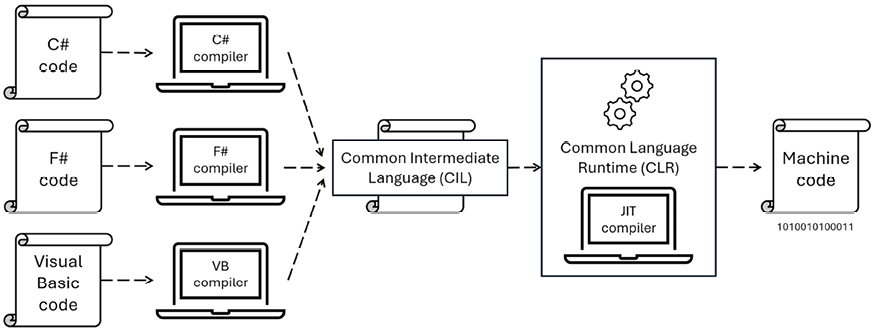
.NET and C# are closely related technologies. C# is a programming language that compiles to Common Intermediate Language (CIL), aka IL code. IL code can then be loaded by the Common Language Runtime (CLR) that is part of the .NET Runtime and Just In Time (JIT) compiled to native CPU instructions, aka machine code, that are executed by your computer.
There are other languages, like Visual Basic .NET and F#, that can also be compiled to IL code, so they are alternatives to C# that can create .NET assemblies (libraries and executables), as shown in Figure 1.5:

Figure 1.5: How C# and other languages are related to .NET
You can build .NET projects without C#, but C# can only build projects for .NET. In theory, since C# is an open standard, someone could create a C# compiler that builds projects for other platforms, but in practice, no one has done this.
If you are a C# programmer, then you always build .NET projects. If you are a .NET programmer, then you most likely use C#, or you could use F# or Visual Basic. Despite Microsoft’s support for multiple languages within the .NET ecosystem, including C#, F#, and Visual Basic, C# has maintained a dominant position. According to JetBrains’ 2023 Developer Ecosystem survey, 99% of .NET developers use C#, while 7% use Visual Basic, and 3% use F#. While F# and Visual Basic have their dedicated user bases and specific use cases, C# remains the overwhelmingly preferred language among .NET developers.
.NET has a two-step compilation process, as shown in Figure 1.5. In the first step, the C# compiler (named Roslyn) used by the dotnet CLI tool converts your C# source code into intermediate language (IL) code and stores the IL in an assembly (a DLL or EXE file). IL code statements are like assembly language instructions, which are executed by .NET’s virtual machine, known as CoreCLR, the newer name for the CLR in modern .NET. The legacy .NET Framework has a CLR that is Windows-only, and modern .NET has one for each OS, like Windows, macOS, and Linux. These days, they are all commonly referred to as CLRs.
In the second step, usually at runtime, CoreCLR loads the IL code from the assembly, the JIT compiler compiles it into native CPU instructions, and then it is executed by the CPU on your machine.
The benefit of this two-step compilation process (C# to IL, then IL to native CPU instructions) is that Microsoft can create CLRs for Linux and macOS, as well as for Windows. The same IL code runs everywhere because of the second compilation step, which generates code for the native operating system and CPU instruction set.
Regardless of which language the source code is written in (for example, C#, Visual Basic, or F#), all .NET applications use IL code for their instructions stored in an assembly. Microsoft and others provide disassembler tools that can open an assembly and reveal this IL code, such as the ILSpy .NET Decompiler extension. You will learn more about this in Chapter 7, Packaging and Distributing .NET Types, in an online section found at the following link: https://github.com/markjprice/cs14net10/blob/main/docs/ch07-decompiling.md.
So, the compilation process typically involves translating source code into IL, which is then compiled into machine code at runtime by the CLR using JIT compilation. Ahead-of-Time (AOT) compilation is an alternative to this approach, and you will learn about it in Chapter 7, Packaging and Distributing .NET Types.
We can summarize and compare the current .NET technologies, as shown in Table 1.4:
|
Technology |
Description |
Host operating systems |
|
.NET |
A modern feature set, with full C# 8 to C# 14 language support. It can be used to port existing apps or create new desktop, mobile, and web apps and services. |
Windows, macOS, Linux, Android, iOS, tvOS, and Tizen |
|
.NET Framework |
A legacy feature set with limited C# 8 support and no C# 9 or later support. It should be used to maintain existing applications only. |
Windows only |
Table 1.4: Comparison of .NET technologies
Now that we’ve covered a lot of theory, let’s move on to some practical tasks, like building your first project and learning how to manage multiple projects in a solution. Visual Studio, Rider, and even VS Code (with the C# Dev Kit extension installed) all have a concept called a solution that allows you to open and manage multiple projects simultaneously. We will use a solution to manage the two projects that you will create in this chapter.
Change the font size
Change margin width
Change background colour