Sign In Start Free Trial
Account

Add to playlist

Create a Playlist

Modal Close icon
You need to login to use this feature.
  • Book Overview & Buying Advanced UFT 12 for Test Engineers Cookbook
  • Table Of Contents Toc
Advanced UFT 12 for Test Engineers Cookbook

Advanced UFT 12 for Test Engineers Cookbook

4 (3)
close
close
Advanced UFT 12 for Test Engineers Cookbook

Advanced UFT 12 for Test Engineers Cookbook

4 (3)

Overview of this book

This advanced cookbook is designed for software testers and engineers with previous automation experience and teaches UFT (QTP) developers advanced programming approaches. Knowledge of software testing and basic coding (with VBScript in particular) and familiarity with programming concepts are prerequisites.
Table of Contents (13 chapters)
close
close
12
Index

Creating a DataTable parameter

DataTable is a UFT object that acts as a wrapper to an MS Excel file, and its scope is global. This means that it can be accessed from any action within a test, as well as from function libraries that were attached to the test. When you create a new test or open an existing UFT test, you will notice that the DataTable pane will always show a global and local datasheet, one for each existing action within the test. In this section, we will see how to create a DataTable parameter.

How to do it...

Perform the following steps to create the DataTable parameter LocalParam1 for the local sheet:

  1. From the File menu, navigate to New | Test or use the Ctrl + N shortcut. When a new test dialog opens, choose GUI Test and then click on the Create button.
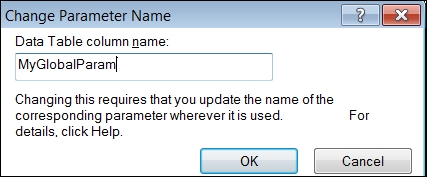
  2. We will create a DataTable parameter in the Action1 local sheet from the UFT data pane by double-clicking on the column header and entering the parameter name LocalParam1 in the dialog that opens, as shown in the following screenshot:
    How to do it...

    Similarly, for the test global sheet we will create a parameter named GlobalParam1.

  3. Next, we need to enter our input data in the remaining cells of the parameter column in the global or local sheet, according to the requirements.

How it works...

If we open the Default.xls file in the test folder (which, as its name suggests, is the default data source for a new test), we will notice that there are two worksheets, namely, Global and Action1. In each of these, the first row holds the name of the parameters, so we will see GlobalParam1 in the Global worksheet and LocalParam1 in the Action1 worksheet. You will also notice that the used rows have borders at the bottom of the worksheet (the borders have no real function; UFT identifies the used range by the number of used rows and columns based on the content range).

See also

For information about setting and retrieving values for a DataTable parameter, refer to the next two recipes, Retrieving data from a DataTable and Storing data in a DataTable.

Visually different images
CONTINUE READING
83
Tech Concepts
36
Programming languages
73
Tech Tools
Icon Unlimited access to the largest independent learning library in tech of over 8,000 expert-authored tech books and videos.
Icon Innovative learning tools, including AI book assistants, code context explainers, and text-to-speech.
Icon 50+ new titles added per month and exclusive early access to books as they are being written.
Advanced UFT 12 for Test Engineers Cookbook
notes
bookmark Notes and Bookmarks search Search in title playlist Add to playlist font-size Font size

Change the font size

margin-width Margin width

Change margin width

day-mode Day/Sepia/Night Modes

Change background colour

Close icon Search
Country selected

Close icon Your notes and bookmarks

Confirmation

Modal Close icon
claim successful

Buy this book with your credits?

Modal Close icon
Are you sure you want to buy this book with one of your credits?
Close
YES, BUY

Submit Your Feedback

Modal Close icon
Modal Close icon
Modal Close icon