
Sign In Start Free Trial
Account

Add to playlist

Create a Playlist

Modal Close icon
You need to login to use this feature.
  • Book Overview & Buying Google Cloud Platform Administration
  • Table Of Contents Toc
Google Cloud Platform Administration

Google Cloud Platform Administration

By : Ranjit Singh Thakurratan
close
close
Google Cloud Platform Administration

Google Cloud Platform Administration

By: Ranjit Singh Thakurratan

Overview of this book

On-premise data centers are costly to manage. If you need a data center but don’t want to deal with a physical one, Google Cloud Platform (GCP) is the solution. With GCP, you can build, test, and deploy applications on Google’s infrastructure. Google Cloud Platform Administration begins with GCP fundamentals, with the help of which you will deploy your first app and gain an understanding of Google Cloud architecture and services. Furthermore, you will learn how to manage Compute, networking, and storage resources. As you make your way through the book, you will learn how to track and manage GCP’s usage, monitoring, and billing access control. You will also be able to manage your GCP's access and permissions. In the concluding chapters, you will explore a list of different developer tools for managing and interacting with the GCP platform. By the end of this book, you will have learned how to effectively deploy workloads on GCP.
Table of Contents (11 chapters)
close
close

Stackdriver profiler

The Stackdriver profiler helps gather CPU usage and memory allocation information from your applications. This is different than Stackdriver monitoring, because with the Stackdriver profiler, you can tie the CPU usage and memory allocation attributes back to your application's source code. This helps you identify parts of your application that consume the most resources and also allows you to check the performance of your code:

Let's go over a hands-on exercise to explore and understand the Stackdriver profiler. In this lab, we will download a sample Go program and run it with the profiler enabled. We will then explore and use the profiler interface to capture data.

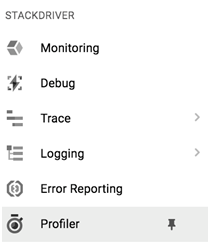
Let's log into our GCP console and select a project. Go to the Stackdriver | Profiler tab on the side bar and click on it:
You will see the Stackdriver Profiler main page:
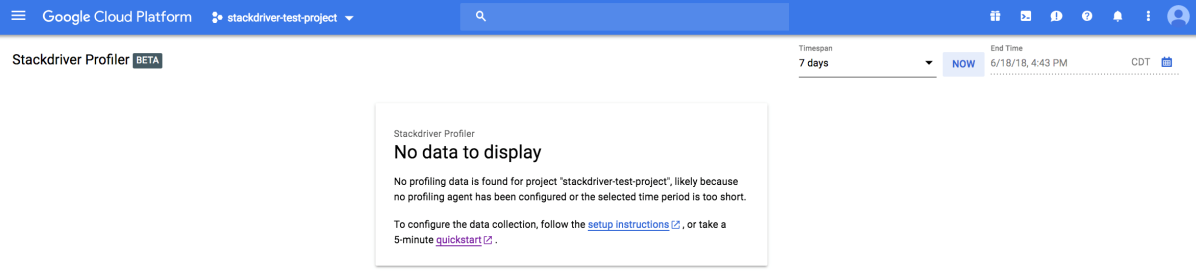
The...

CONTINUE READING
83
Tech Concepts
36
Programming languages
73
Tech Tools
Icon Unlimited access to the largest independent learning library in tech of over 8,000 expert-authored tech books and videos.
Icon Innovative learning tools, including AI book assistants, code context explainers, and text-to-speech.
Icon 50+ new titles added per month and exclusive early access to books as they are being written.
Google Cloud Platform Administration
notes
bookmark Notes and Bookmarks search Search in title playlist Add to playlist font-size Font size

Change the font size

margin-width Margin width

Change margin width

day-mode Day/Sepia/Night Modes

Change background colour

Close icon Search
Country selected

Close icon Your notes and bookmarks

Confirmation

Modal Close icon
claim successful

Buy this book with your credits?

Modal Close icon
Are you sure you want to buy this book with one of your credits?
Close
YES, BUY

Submit Your Feedback

Modal Close icon
Modal Close icon
Modal Close icon