

Task Manager is a tool that has existed in all Windows operating systems since the first days of the graphical interface, but it has evolved quite a bit over the years. One of the goals for Windows Server 2019 is to be even more useful and reliable than any previous version of Windows Server has been. So, it only makes sense that we finally remove Task Manager altogether, since it simply won't be needed anymore, right?
I'm kidding, of course! While Server 2019 will hopefully prove itself to indeed be the most stable and least needy operating system we have ever seen from Microsoft, Task Manager still exists and will still be needed by server administrators everywhere. If you haven't taken a close look at Task Manager in a while, it has changed significantly over the past few releases.
Task Manager is still typically invoked by either a Ctrl + Alt + Del on your keyboard then clicking on Task Manager, or by right-clicking on the taskbar and then choosing Task Manager. You can also launch Task Manager with the key combination Ctrl + Shift + Esc, or typing taskmgr inside the Run or Search dialog boxes. The first thing you'll notice is that very little information exists in this default view, only a simple list of applications that are currently running. This is a useful interface for forcing an application to close which may be hung up, but not for much else. Go ahead and click on the More details link, and you will start to see the real information provided in this powerful interface.
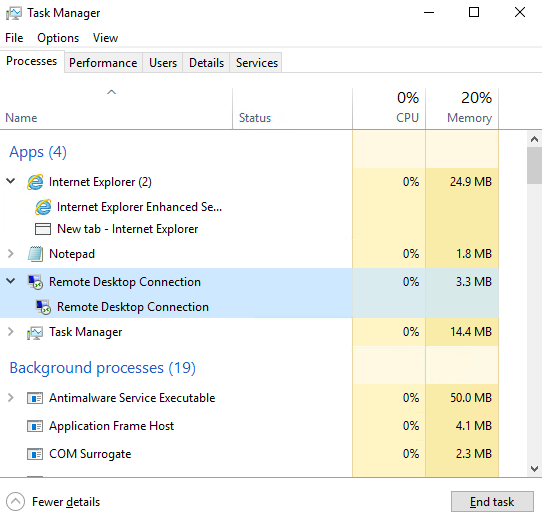
We immediately notice that the displayed information is more user-friendly than in previous years, with both Apps and Background processes being categorized in a more intuitive way, and multiple instances of the same application being condensed down for easy viewing. This gives a faster overhead view at what is going on with our system, while still giving the ability to expand each application or process to see what individual components or windows are running within the application, such as in the following screenshot:
Make sure to check out the other tabs available inside Task Manager as well. Users will show us a list of currently logged-in users and the amounts of hardware resources that their user sessions are consuming. This is a nice way to identify on a Remote Desktop Session Host server, for example, an individual who might be causing a slowdown on the server. The Details tab is a little bit more traditional view of the Processes tab, splitting out much of the same information but in the older style way we were used to seeing in versions of the operating system long ago. Then, the Services tab is pretty self-explanatory; it shows you the Windows services currently installed on the server, their status, and the ability to start or stop these services as needed, without having to open the Services console separately.
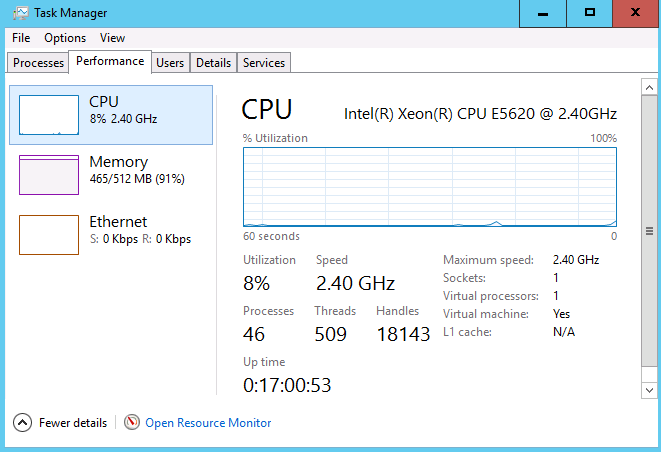
The tab that I skipped over so that I could mention it more specifically here is the Performance tab. This is a pretty powerful one. Inside, you can quickly monitor CPU, memory, and Ethernet utilization. As you can see in the following screenshot, I haven't done a very good job of planning resources on this particular virtual machine, as my CPU is hardly being touched but I am almost out of system memory:
If you are interested in viewing more in-depth data about server performance, there is a link at the bottom of this Task Manager window where you can Open Resource Monitor. Two technologies provided inside Server 2019 for monitoring system status, particularly for hardware performance, are Resource Monitor and Performance Monitor. Definitely open up these tools and start testing them out, as they can provide both troubleshooting information and essential baseline data when you spin up a new server. This baseline can then be compared against future testing data so that you can monitor how new applications or services installed onto a particular server have affected their resource consumption.
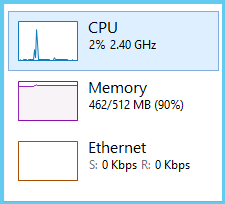
Moving back to Task Manager, there is just one other little neat trick I would like to test. Still inside the Performance tab, go ahead and right-click on any particular piece of data that you are interested in. I will right-click on the CPU information near the left side of the window. This opens up a dialog box with a few options, of which I am going to click on Summary view. This condenses the data that was previously taking up about half of my screen real-estate, into a tiny little window, which I can move to the corner of my screen. This is a nice way to keep hardware utilization data on the screen at all times as you navigate through and work on your server so that you can watch for any spikes or increases in resource consumption when making changes to the system: