Sign In Start Free Trial
Account

Add to playlist

Create a Playlist

Modal Close icon
You need to login to use this feature.
  • Book Overview & Buying Implementing CI/CD Using Azure Pipelines
  • Table Of Contents Toc
Implementing CI/CD Using Azure Pipelines

Implementing CI/CD Using Azure Pipelines

By : Piti Champeethong, Roberto Mardeni
4.6 (7)
close
close
Implementing CI/CD Using Azure Pipelines

Implementing CI/CD Using Azure Pipelines

4.6 (7)
By: Piti Champeethong, Roberto Mardeni

Overview of this book

Continuous integration and continuous delivery (CI/CD) are ubiquitous concepts in modern development. Azure Pipelines is one of the most popular services that you can utilize for CI/CD, and this book shows you how it works by taking you through the process of building and automating CI/CD systems using Azure Pipelines and YAML, simplifying integration with Azure resources and reducing human error. You’ll begin by getting an overview of Azure Pipelines and why you should use it. Next, the book helps you get to grips with build and release pipelines, and then builds upon this by introducing the extensive power of YAML syntax, which you can use to implement and configure any task you can think of. As you advance, you’ll discover how to integrate Infrastructure as Code tools, such as Terraform, and perform code analysis with SonarQube. In the concluding chapters, you’ll delve into real-life scenarios and hands-on implementation tasks with Microsoft Azure services, AWS, and cross-mobile application with Flutter, Google Firebase, and more. By the end of this book, you’ll be able to design and build CI/CD systems using Azure Pipelines with consummate ease, write code using YAML, and configure any task that comes to mind.
Table of Contents (18 chapters)
close
close
1
Part 1:Getting Started with Azure Pipelines
6
Part 2:Azure Pipelines in Action
11
Part 3:CI/CD for Real-World Scenarios
15
Chapter 12: Navigating Common Pitfalls and Future Trends in Azure Pipelines

Setting up deployment groups

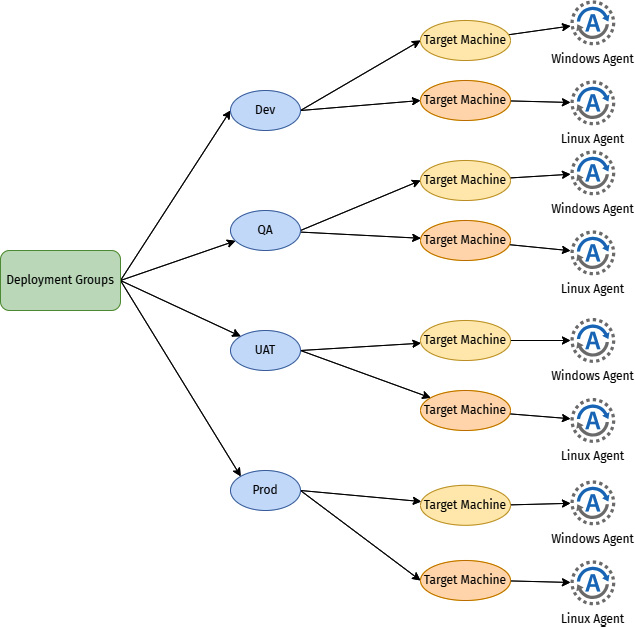
Deployment groups are logical agent groupings for application deployment on target machines based on environments – they are typically named based on your project needs and promotion levels before they go to production. Agents are installed in each environment. Each agent under the deployment groups supports only Windows and Linux.

These deployment groups can be divided based on environments, such as development (Dev), quality assurance (QA), user acceptance testing (UAT), and production (Prod), as shown in the following figure:

Figure 1.24 – Deployment groups concept

Figure 1.24 – Deployment groups concept

To create a deployment group, follow these instructions:

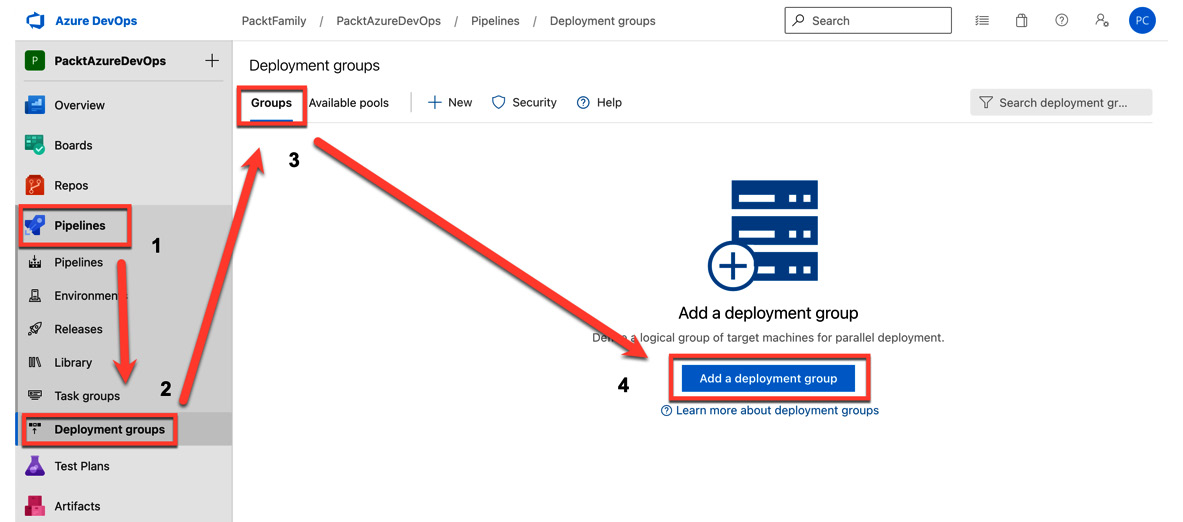
  1. Navigate to Pipelines | Deployment groups | Groups | Add a deployment group:
Figure 1.25 – Adding a deployment group

Figure 1.25 – Adding a deployment group

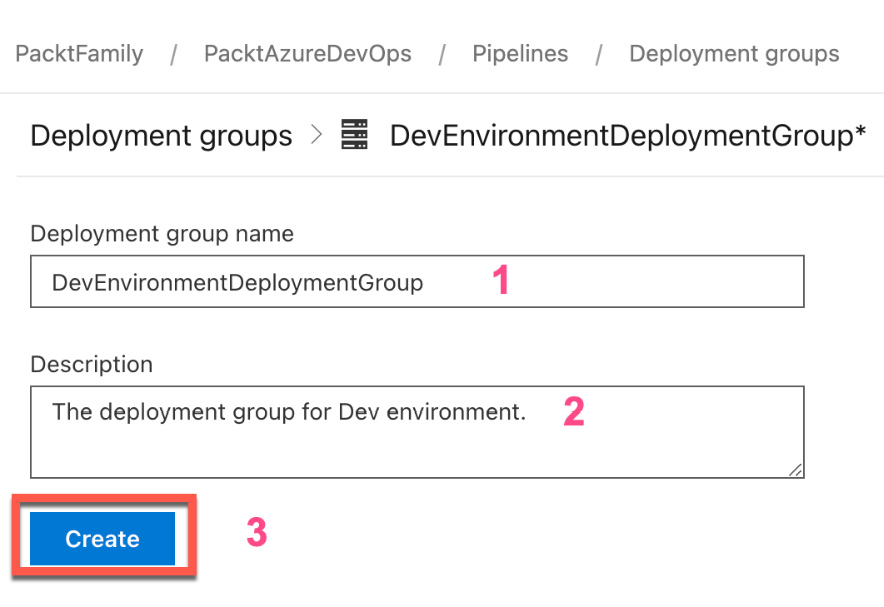
  1. Enter the required information and click Create:
Figure 1.26 – Entering deployment group information

Figure 1.26 – Entering deployment group information

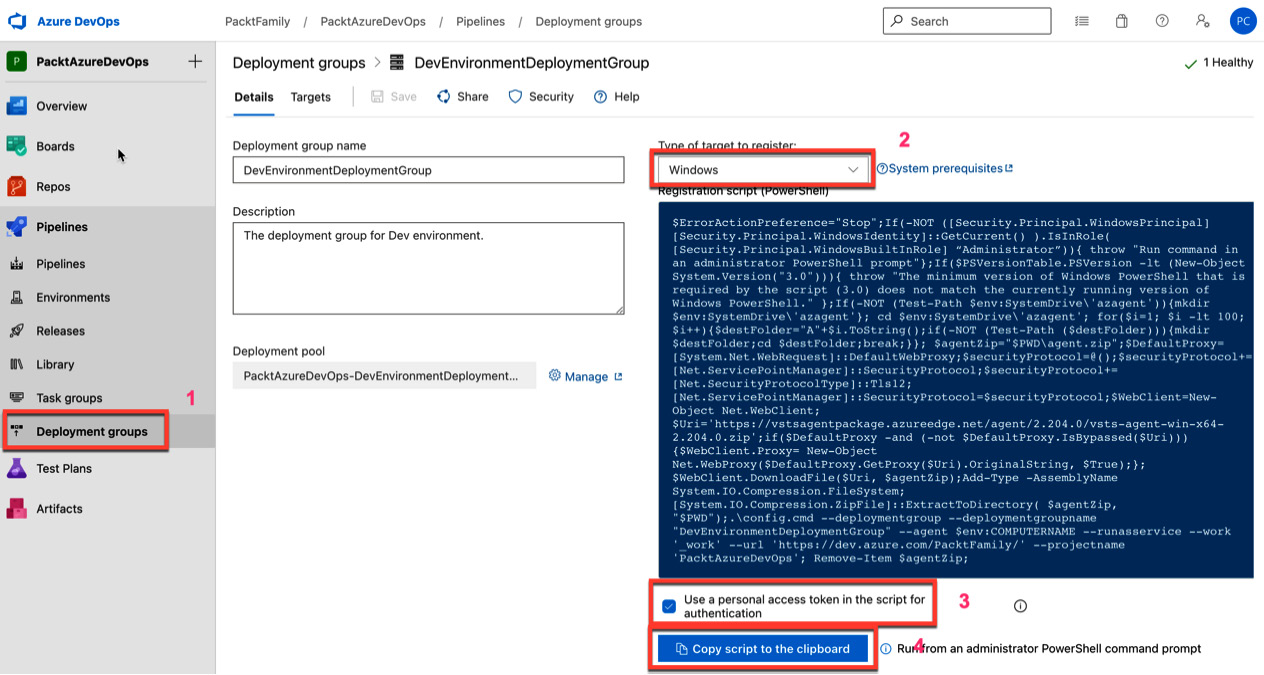
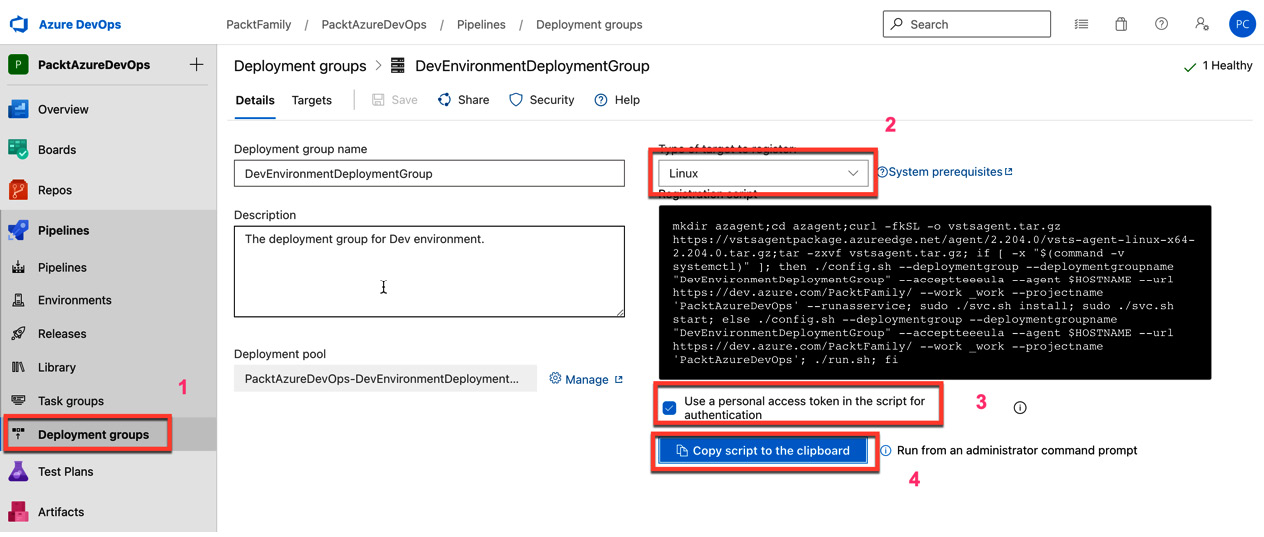
  1. After creating the deployment group, you must set up the deployment agent under your deployment group. There are two operating systems the deployment agents support:
    • Windows users can install an agent of the deployment group by copying the PowerShell script and running it with an administrator command prompt:
  Figure 1.27 – Script to deploy an agent on Windows

Figure 1.27 – Script to deploy an agent on Windows

  • Linux users can install an agent of the deployment group by copying the bash shell script and running it with an administrator command prompt:
  Figure 1.28 – Script to deploy an agent on Linux

Figure 1.28 – Script to deploy an agent on Linux

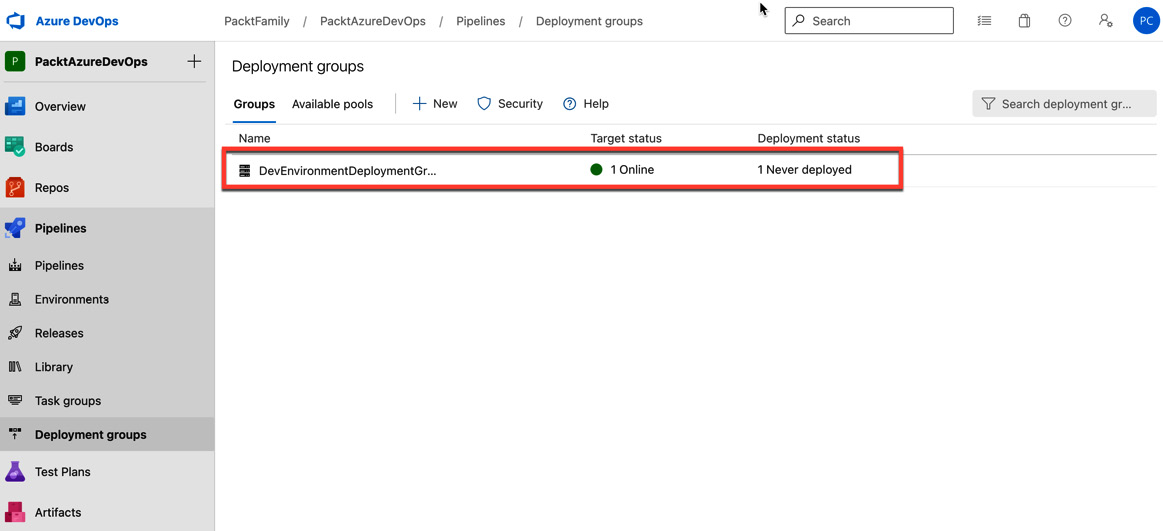
  1. After setting up the agent for deployment groups, you will see that the build agent of the deployment group is online:
Figure 1.29 – The deployment agent is online

Figure 1.29 – The deployment agent is online

After setting up the build and deployment agent on a self-hosted computer, you are ready to create your first Azure pipeline.

Visually different images
CONTINUE READING
83
Tech Concepts
36
Programming languages
73
Tech Tools
Icon Unlimited access to the largest independent learning library in tech of over 8,000 expert-authored tech books and videos.
Icon Innovative learning tools, including AI book assistants, code context explainers, and text-to-speech.
Icon 50+ new titles added per month and exclusive early access to books as they are being written.
Implementing CI/CD Using Azure Pipelines
notes
bookmark Notes and Bookmarks search Search in title playlist Add to playlist download Download options font-size Font size

Change the font size

margin-width Margin width

Change margin width

day-mode Day/Sepia/Night Modes

Change background colour

Close icon Search
Country selected

Close icon Your notes and bookmarks

Confirmation

Modal Close icon
claim successful

Buy this book with your credits?

Modal Close icon
Are you sure you want to buy this book with one of your credits?
Close
YES, BUY

Submit Your Feedback

Modal Close icon
Modal Close icon
Modal Close icon