Sign In Start Free Trial
Account

Add to playlist

Create a Playlist

Modal Close icon
You need to login to use this feature.
  • Book Overview & Buying Instant Migration from Windows Server 2008 and 2008 R2 to 2012 How-to
  • Table Of Contents Toc
  • Feedback & Rating feedback
Instant Migration from Windows Server 2008 and 2008 R2 to 2012 How-to

Instant Migration from Windows Server 2008 and 2008 R2 to 2012 How-to

By : Santhosh Sivarajan
4.4 (9)
close
close
Instant Migration from Windows Server 2008 and 2008 R2 to 2012 How-to

Instant Migration from Windows Server 2008 and 2008 R2 to 2012 How-to

4.4 (9)
By: Santhosh Sivarajan

Overview of this book

Migrating to a new server involves a lot of decision making and planning. Windows Server 2012 comes with exciting new features and ease of use. This book will help you migrate to your new server in no time. "Instant Migration from Windows Server 2008 and 2008 R2 to 2012 How-to" provides you with many practical and real world scenarios in a step-by-step guide. It is designed to lead you through the entire process of migration.Beginning with an introduction to Windows Server 2012, the author then takes you through the installation and configuration of the server, before continuing on to migrate the existing services to Windows Server and how to decommission old servers. The ‚Äúhow-to‚Äù migration scenarios described are based on the author's own field experiences, guaranteeing real-world solutions. The scenarios include Active Directory, enabling a Remote Desktop, Print Server, and Hyper-V migration details. From the planning to  theimplementation phase, "Instant Migration from Windows Server 2008 and 2008 R2 to 2012 How-to" is your comprehensive guide for completing migration solutions.
Table of Contents (2 chapters)
close
close

Working with Server Manager properties (Should know)

In Windows Server 2012, understanding the Server Manager dashboard and its capabilities are essential for an administrator to efficiently manage the servers. The Server Manager starts automatically on a Windows Server 2012 server when the user has local administrator permission. You can change this default behavior by modifying the properties. These details are explained in the following recipe.

If the Server Manager does not open automatically, you can manually open it from the taskbar by clicking on the Server Manager icon as shown in the following screenshot:

Working with Server Manager properties (Should know)

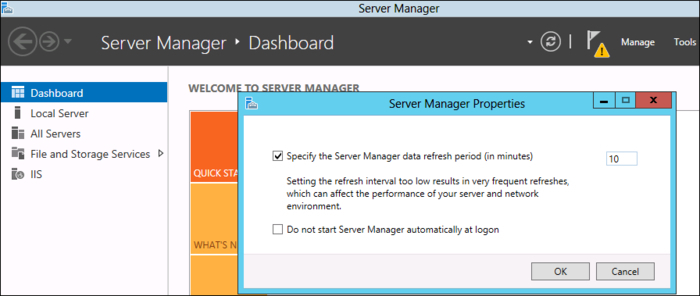
By default, the Server Manager polls the information every 10 minutes. However, you can change this configuration from the Server Manager Properties window as explained in the following recipe.

How to do it...

  1. Open Server Manager.
  2. From the Manage tab on the top–right section of the screen, select Server Manager Properties.
  3. In the Server Manager Properties window, you can change the refresh period in minutes.
  4. You will also see an option to disable the Server Manager startup option during the system restart.
    How to do it...

    Note

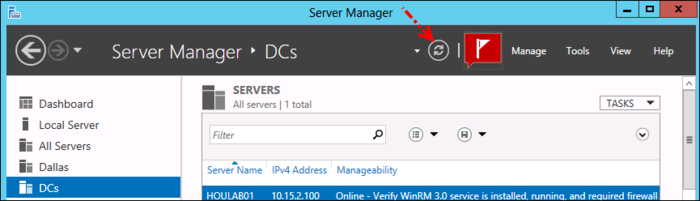
    You can manually refresh the status by using the refresh button on the Dashboard.

    How to do it...

How it works...

The Server Manager Properties window allows you to change the default time interval. The allowed values are from 1 to 14400 minutes. If you want to get a real-time alert, you can decrease the value.

There′s more...

You can manage Windows Server 2008 and Windows Server 2008 R2 from the Windows Server 2012 management console. However, the functionality will be limited. The Windows .NET Framework 4 and Management Framework 3 should be installed on the server running the Windows Server 2008 or Windows Server 2008 R2 operating system in order to get the update from these servers onto the new Server Manager.

Visually different images
CONTINUE READING
83
Tech Concepts
36
Programming languages
73
Tech Tools
Icon Unlimited access to the largest independent learning library in tech of over 8,000 expert-authored tech books and videos.
Icon Innovative learning tools, including AI book assistants, code context explainers, and text-to-speech.
Icon 50+ new titles added per month and exclusive early access to books as they are being written.
Instant Migration from Windows Server 2008 and 2008 R2 to 2012 How-to
notes
bookmark Notes and Bookmarks search Search in title playlist Add to playlist font-size Font size

Change the font size

margin-width Margin width

Change margin width

day-mode Day/Sepia/Night Modes

Change background colour

Close icon Search
Country selected

Close icon Your notes and bookmarks

Confirmation

Modal Close icon
claim successful

Buy this book with your credits?

Modal Close icon
Are you sure you want to buy this book with one of your credits?
Close
YES, BUY

Submit Your Feedback

Modal Close icon
Modal Close icon
Modal Close icon