-
Book Overview & Buying
-
Table Of Contents
Codeless Deep Learning with KNIME
By :
We will mainly be working with two KNIME products: KNIME Analytics Platform and KNIME Server. KNIME Analytics Platform includes ML and deep learning algorithms and data operations needed for data science projects. KNIME Server, on the other hand, provides the IT infrastructure for easy and secure deployment, as well as model monitoring over time.
We'll concentrate on KNIME Analytics Platform first and provide an overview of what it can accomplish.
KNIME Analytics Platform is an open source piece of software for all your data needs. It is free to download from the KNIME website (https://www.knime.com/downloads) and free to use. It covers all the main data wrangling and machine learning techniques available at the time of writing, and it is based on visual programming.
Visual programming is a key feature of KNIME Analytics Platform for quick prototyping. It makes the tool very easy to use. In visual programming, a Graphical User Interface (GUI) guides you through all the necessary steps for building a pipeline (workflow) of dedicated blocks (nodes). Each node implements a given task; each workflow of nodes takes your data from the beginning to the end of the designed journey. A workflow substitutes a script; a node substitutes one or more script lines.
Without extensive coverage when it comes to commonly used data wrangling techniques, machine learning algorithms, and data types and formats, and without integration with most common database software, data sources, reporting tools, external scripts, and programming languages, the software's ease of use would be limited. For this reason, KNIME Analytics Platform has been designed to be open to different data formats, data types, data sources, and data platforms, as well as external tools such as Python and R.
We'll start by looking at a few ML algorithms. KNIME Analytics Platform covers most machine learning algorithms: from decision trees to random forest and gradient boosted trees, from recommendation engines to a number of clustering techniques, from Naïve Bayes to linear and logistic regression, from neural networks to deep learning. Most of these algorithms are native to KNIME Analytics Platform, though some can be integrated from other open source tools such as Python and R.
To train different deep learning architectures, such as RNNs, autoencoders, and CNNs, KNIME Analytics Platform has integrated the Keras deep learning library through the KNIME Deep Learning - Keras Integration extension (https://www.knime.com/deeplearning/keras). Through this extension, it is possible to drag and drop nodes to define complex neural architectures and train the final network without necessarily writing any code.
However, defining the network is just one of the many steps that must be taken. Ensuring the data is in the right form to train the network is another crucial step. For this, a very large number of nodes are available so that we can implement a myriad of Data Wrangling techniques. By combining nodes dedicated to small tasks, you can implement very complex data transformation operations.
KNIME Analytics Platform also connects to most of the required data sources: from databases to cloud repositories, from big data platforms to files.
But what if all of this is not enough? What if you need a specific procedure for a specific domain? What if you need a specific network manipulation function from Python? Where KNIME Analytics Platform and its extensions cannot reach, you can integrate with other scripting and programming languages, such as Python, R, Java, and Javascript, just to mention a few. In addition, KNIME Analytics Platform has seamless integration with BIRT, a business intelligence and reporting tool. Integrations with other reporting platforms such as Tableau, QlickView, PowerBI, and Spotfire are also available.
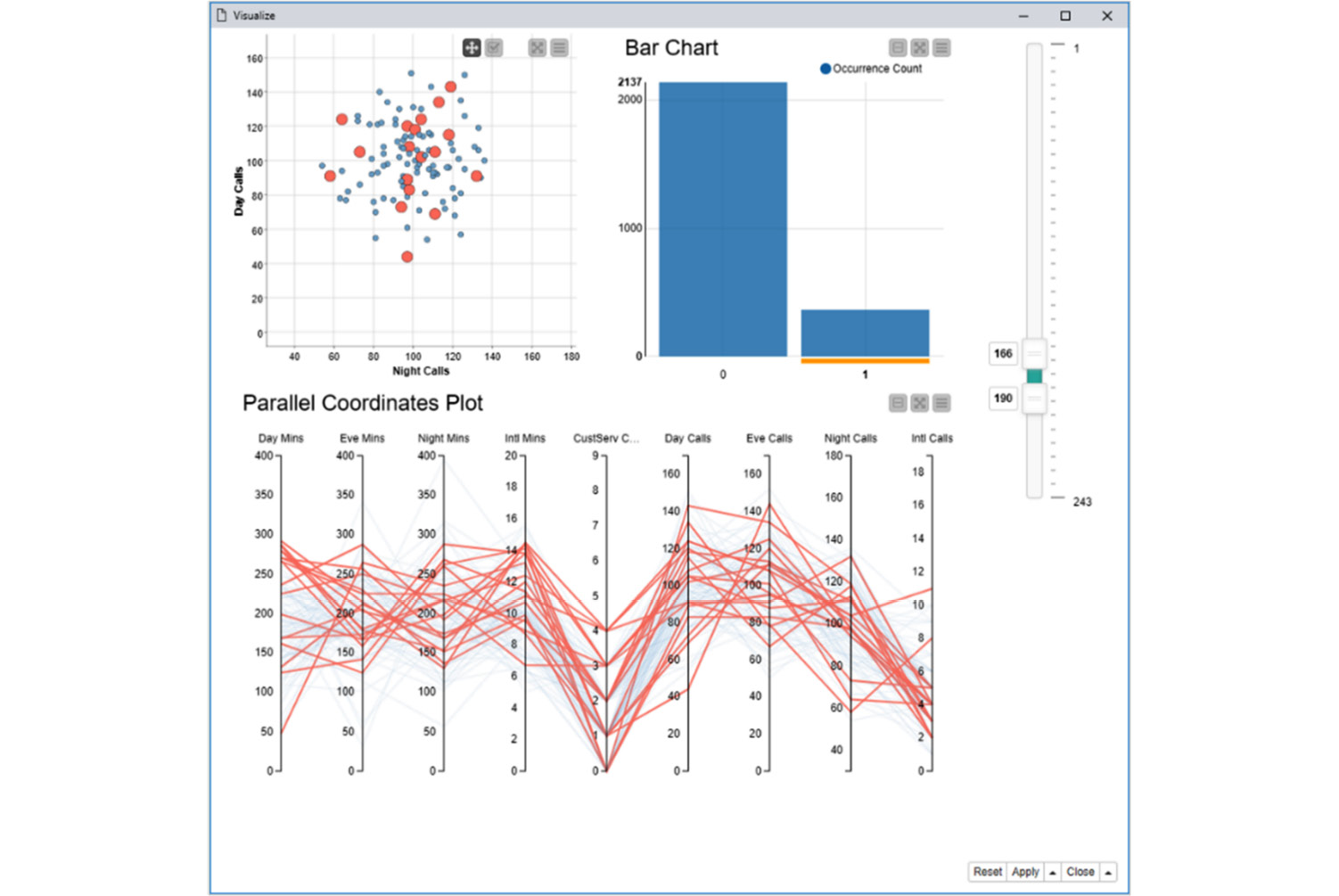
Several JavaScript-based nodes are dedicated to implementing data visualization plots and charts: from a simple scatter plot to a more complex sunburst chart, from a simple histogram to a parallel coordinate plot, and more. These nodes seem simple but are potentially quite powerful. If you combine them within a component, you can interactively select data points across multiple charts. By doing this, the component inherits and combines all the views from the contained nodes and connects them in a way that, if the points are selected and visualized in one chart, they can also be selected and visualized in the other charts of the component's composite view.
Figure 1.1 shows an example of a composite view:
Figure 1.1 – Composite view of a component containing a scatter plot, a bar chart, and a parallel coordinate plot
Figure 1.1 shows the composite view of a component containing a scatter plot, a bar chart, and a parallel coordinate plot. The three plots visualize the same data and are connected in a way that, by selecting data in the bar chart, it selects and optionally visualizes the data that's been selected in the other two charts.
When it comes to creating a data science solution, KNIME Analytics Platform provides everything you need. However, KNIME Server offers a few additional features to ease your job when it comes to moving the solution to production.
The last step in any data science cycle is to deploy the solution to production – and in the case of an enterprise, providing an easy, comfortable, and secure deployment.
This process of moving the application into the real world is called moving into production. The process of including the trained model in this final application is called deployment. Both phases are deeply connected and can be quite problematic since all the errors that occurred in the application design show up at this stage.
It is possible, though limited, to move an application into production using KNIME Analytics Platform. If you, as a lone data scientist or a data science student, do not regularly deploy applications and models, KNIME Analytics Platform is probably enough for your needs. However, if you are just a bit more involved in an enterprise environment, where scheduling, versioning, access rights, disaster recovery, web applications and REST services, and all the other typical functions of a production server are needed, then just using KNIME Analytics Platform for production can be cumbersome.
In this case, KNIME Server, which comes with an annual license fee, can make your life easier. First of all, it is going to fit the governance of the enterprise's IT environment better. It also offers a protected collaboration environment for your group and the entire data science lab. And of course, its main advantage consists of making model deployment and moving it into production easier and safer since it uses the integrated deployment feature and allows you to use one-click deployment into production. End users can then run the application from a KNIME Analytics Platform client or – even better – from a web browser.
Remember those composite views that offer interactive interconnected views of selected points? These become fully formed web pages when the application is executed on a web browser via KNIME Server's WebPortal.
Using the components as touchpoints within the workflow, we get a Guided Analytics () application within the web browser. Guided analytics inserts touchpoints to be consumed by the end user from a web browser within the flow of the application. The end user can take advantage of these touchpoints to insert knowledge or preferences and to steer the analysis in the desired direction.
Now, let's download KNIME Analytics Platform and give it a try!
Change the font size
Change margin width
Change background colour