Sign In Start Free Trial
Account

Add to playlist

Create a Playlist

Modal Close icon
You need to login to use this feature.
  • Book Overview & Buying Data Science with Python[Instructor Edition]
  • Table Of Contents Toc
Data Science with Python[Instructor Edition]

Data Science with Python[Instructor Edition]

By : Mohamed Noordeen Alaudeen, Rohan Chopra, Aaron England, Lakshay Sharma
3 (1)
close
close
Data Science with Python[Instructor Edition]

Data Science with Python[Instructor Edition]

3 (1)
By: Mohamed Noordeen Alaudeen, Rohan Chopra, Aaron England, Lakshay Sharma

Overview of this book

Data Science with Python begins by introducing you to data science and then teaches you to install the packages you need to create a data science coding environment. You will learn three major techniques in machine learning: unsupervised learning, supervised learning, and reinforcement learning. You will also explore basic classification and regression techniques, such as support vector machines, decision trees, and logistic regression. As you make your way through lessons, you will study the basic functions, data structures, and syntax of the Python language that are used to handle large datasets with ease. You will learn about NumPy and pandas libraries for matrix calculations and data manipulation, study how to use Matplotlib to create highly customizable visualizations, and apply the boosting algorithm XGBoost to make predictions. In the concluding lessons, you will explore convolutional neural networks (CNNs), deep learning algorithms used to predict what is in an image. You will also understand how to feed human sentences to a neural network, make the model process contextual information, and create human language processing systems to predict the outcome. By the end of this course, you will be able to understand and implement any new data science algorithm and have the confidence to experiment with tools or libraries other than those covered in the course.
Table of Contents (10 chapters)
close
close

Data Integration

So far, we've made sure to remove the impurities in data and make it clean. Now, the next step is to combine data from different sources to get a unified structure with more meaningful and valuable information. This is mostly used if the data is segregated into different sources. To make it simple, let's assume we have data in CSV format in different places, all talking about the same scenario. Say we have some data about an employee in a database. We can't expect all the data about the employee to reside in the same table. It's possible that the employee's personal data will be located in one table, the employee's project history will be in a second table, the employee's time-in and time-out details will be in another table, and so on. So, if we want to do some analysis about the employee, we need to get all the employee data in one common place. This process of bringing data together in one place is called data integration. To do data integration, we can merge multiple pandas DataFrames using the merge function.

Let's solve an exercise based on data integration to get a clear understanding of it.

Exercise 5: Integrating Data

In this exercise, we'll merge the details of students from two datasets, namely student.csv and marks.csv. The student dataset contains columns such as Age, Gender, Grade, and Employed. The marks.csv dataset contains columns such as Mark and City. The Student_id column is common between the two datasets. Follow these steps to complete this exercise:

Note

The student.csv dataset can be found at this location: https://github.com/TrainingByPackt/Data-Science-with-Python/blob/master/Chapter01/Data/student.csv.

The marks.csv dataset can be found at this location: https://github.com/TrainingByPackt/Data-Science-with-Python/blob/master/Chapter01/Data/mark.csv.

  1. Open a Jupyter notebook and add a new cell. Write the following code to import pandas and load the student.csv and marks.csv datasets into the df1 and df2 pandas DataFrames:

    import pandas as pd

    dataset1 = "https://github.com/TrainingByPackt/Data-Science-with-Python/blob/master/Chapter01/Data/student.csv"

    dataset2 = "https://github.com/TrainingByPackt/Data-Science-with-Python/blob/master/Chapter01/Data/mark.csv"

    df1 = pd.read_csv(dataset1, header = 0)

    df2 = pd.read_csv(dataset2, header = 0)

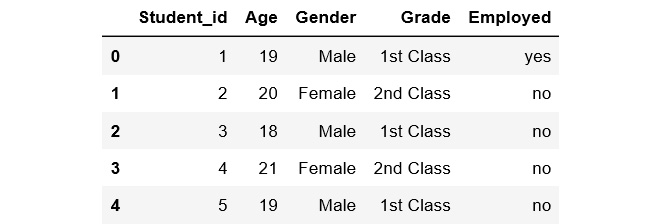
  2. To print the first five rows of the first DataFrame, add the following code:

    df1.head()

    The preceding code generates the following output:

    Figure 1.25: The first five rows of the first DataFrame
    Figure 1.25: The first five rows of the first DataFrame
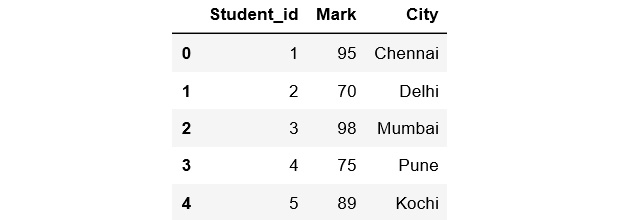
  3. To print the first five rows of the second DataFrame, add the following code:

    df2.head()

    The preceding code generates the following output:

    Figure 1.26: The first five rows of the second DataFrame
    Figure 1.26: The first five rows of the second DataFrame
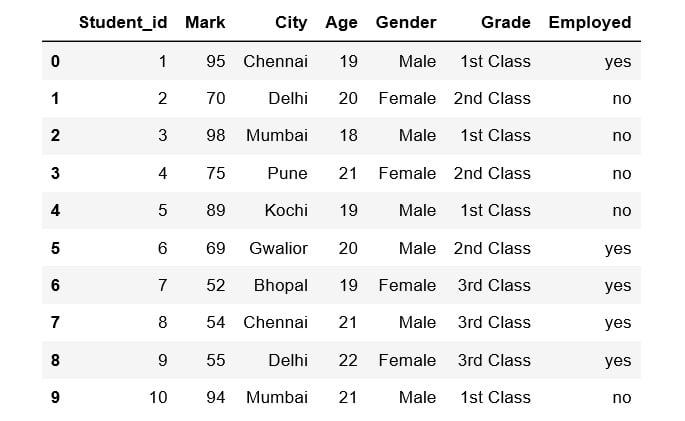
  4. Student_id is common to both datasets. Perform data integration on both the DataFrames with respect to the Student_id column using the pd.merge() function, and then print the first 10 values of the new DataFrame:

    df = pd.merge(df1, df2, on = 'Student_id')

    df.head(10)

Figure 1.27: First 10 rows of the merged DataFrame

Here, the data of the df1 DataFrame is merged with the data of the df2 DataFrame. The merged data is stored inside a new DataFrame called df.

We have now learned how to perform data integration. In the next section, we'll explore another pre-processing task, data transformation.

CONTINUE READING
83
Tech Concepts
36
Programming languages
73
Tech Tools
Icon Unlimited access to the largest independent learning library in tech of over 8,000 expert-authored tech books and videos.
Icon Innovative learning tools, including AI book assistants, code context explainers, and text-to-speech.
Icon 50+ new titles added per month and exclusive early access to books as they are being written.
Data Science with Python[Instructor Edition]
notes
bookmark Notes and Bookmarks search Search in title playlist Add to playlist download Download options font-size Font size

Change the font size

margin-width Margin width

Change margin width

day-mode Day/Sepia/Night Modes

Change background colour

Close icon Search
Country selected

Close icon Your notes and bookmarks

Confirmation

Modal Close icon
claim successful

Buy this book with your credits?

Modal Close icon
Are you sure you want to buy this book with one of your credits?
Close
YES, BUY

Submit Your Feedback

Modal Close icon
Modal Close icon
Modal Close icon