
Sign In Start Free Trial
Account

Add to playlist

Create a Playlist

Modal Close icon
You need to login to use this feature.
  • Book Overview & Buying Scientific Computing with Python
  • Table Of Contents Toc
Scientific Computing with Python

Scientific Computing with Python - Second Edition

By : Claus Führer, Claus Fuhrer, Jan Erik Solem, Olivier Verdier
4.5 (14)
close
close
Scientific Computing with Python

Scientific Computing with Python

4.5 (14)
By: Claus Führer, Claus Fuhrer, Jan Erik Solem, Olivier Verdier

Overview of this book

Python has tremendous potential within the scientific computing domain. This updated edition of Scientific Computing with Python features new chapters on graphical user interfaces, efficient data processing, and parallel computing to help you perform mathematical and scientific computing efficiently using Python. This book will help you to explore new Python syntax features and create different models using scientific computing principles. The book presents Python alongside mathematical applications and demonstrates how to apply Python concepts in computing with the help of examples involving Python 3.8. You'll use pandas for basic data analysis to understand the modern needs of scientific computing, and cover data module improvements and built-in features. You'll also explore numerical computation modules such as NumPy and SciPy, which enable fast access to highly efficient numerical algorithms. By learning to use the plotting module Matplotlib, you will be able to represent your computational results in talks and publications. A special chapter is devoted to SymPy, a tool for bridging symbolic and numerical computations. By the end of this Python book, you'll have gained a solid understanding of task automation and how to implement and test mathematical algorithms within the realm of scientific computing.
Table of Contents (23 chapters)
close
close
20
About Packt
22
References

2.1 Variables

Variables are references to Python objects. They are created by assignments, for example:

a = 1
diameter = 3.
height = 5.
cylinder = [diameter, height] # reference to a list

Variables take names that consist of any combination of capital and small letters, the underscore _, and digits. A variable name must not start with a digit. Note that variable names are case sensitive. A good naming of variables is an essential part of documenting your work, so we recommend that you use descriptive variable names.

Python has 33 reserved keywords, which cannot be used as variable names (see Table 2.1). Any attempt to use such a keyword as a variable name would raise a syntax error:
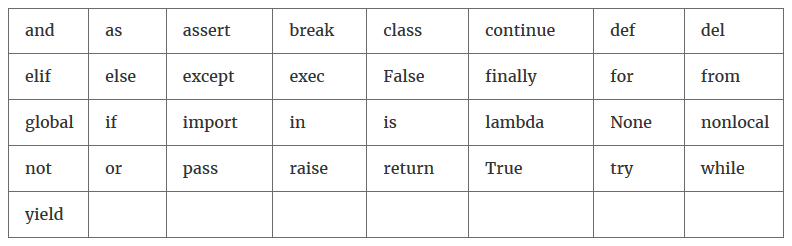
Table 2.1: Reserved Python keywords

As opposed to other programming languages, variables require no type declaration in Python. The type is automatically deduced:

x = 3 # integer (int)
y = 'sunny' # string (str)

You can create several variables with a multiple assignment statement:

a = b = c = 1 # a, b and c get the same value 1

Variables can also be altered after their definition:

a = 1 
a = a + 1 # a gets the value 2
a = 3 * a # a gets the value 6

The last two statements can be written by combining the two operations with an assignment directly by using increment operators:

a += 1 # same as a = a + 1 
a *= 3 # same as a = 3 * a
CONTINUE READING
83
Tech Concepts
36
Programming languages
73
Tech Tools
Icon Unlimited access to the largest independent learning library in tech of over 8,000 expert-authored tech books and videos.
Icon Innovative learning tools, including AI book assistants, code context explainers, and text-to-speech.
Icon 50+ new titles added per month and exclusive early access to books as they are being written.
Scientific Computing with Python
notes
bookmark Notes and Bookmarks search Search in title playlist Add to playlist download Download options font-size Font size

Change the font size

margin-width Margin width

Change margin width

day-mode Day/Sepia/Night Modes

Change background colour

Close icon Search
Country selected

Close icon Your notes and bookmarks

Confirmation

Modal Close icon
claim successful

Buy this book with your credits?

Modal Close icon
Are you sure you want to buy this book with one of your credits?
Close
YES, BUY

Submit Your Feedback

Modal Close icon
Modal Close icon
Modal Close icon