Sign In Start Free Trial
Account

Add to playlist

Create a Playlist

Modal Close icon
You need to login to use this feature.
  • Book Overview & Buying matplotlib Plotting Cookbook
  • Table Of Contents Toc
matplotlib Plotting Cookbook

matplotlib Plotting Cookbook

By : Alexandre Devert
3.7 (10)
close
close
matplotlib Plotting Cookbook

matplotlib Plotting Cookbook

3.7 (10)
By: Alexandre Devert

Overview of this book

Table of Contents (15 chapters)
close
close
matplotlib Plotting Cookbook
Credits
About the Author
About the Reviewers
www.PacktPub.com
Preface
1
Index

Using NumPy


NumPy is not required to use matplotlib. However, many matplotlib tricks, code samples, and examples use NumPy. A short introduction to NumPy usage will show you the reason.

Getting ready

Along with having Python and matplotlib installed, you also have NumPy installed. You have a text editor and a command terminal.

How to do it...

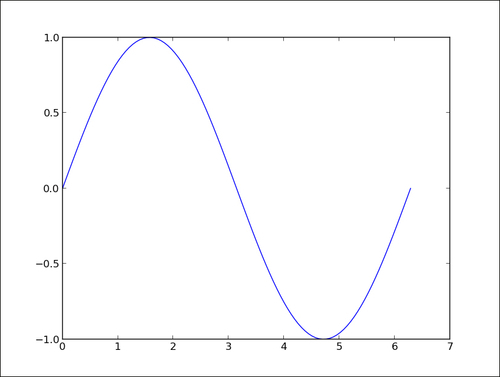
Let's plot another curve, sin(x), with x in the [0, 2 * pi] interval. The only difference with the preceding script is the part where we generate the point coordinates. Type and save the following script as sin-1.py:

import math
import matplotlib.pyplot as plt

T = range(100)
X = [(2 * math.pi * t) / len(T) for t in T]
Y = [math.sin(value) for value in X]

plt.plot(X, Y)
plt.show()

Then, type and save the following script as sin-2.py:

import numpy as np
import matplotlib.pyplot as plt
X = np.linspace(0, 2 * np.pi, 100)
Y = np.sin(X)

plt.plot(X, Y)
plt.show()

Running either sin-1.py or sin-2.py will show the following graph exactly:

How it works...

The first script, sin-1.py, generates the coordinates for a sinusoid using only Python's standard library. The following points describe the steps we performed in the script in the previous section:

  1. We created a list T with numbers from 0 to 99—our curve will be drawn with 100 points.

  2. We computed the x coordinates by simply rescaling the values stored in T so that x goes from 0 to 2 pi (the range() built-in function can only generate integer values).

  3. As in the first example, we generated the y coordinates.

The second script sin-2.py, does exactly the same job as sin-1.py—the results are identical. However, sin-2.py is slightly shorter and easier to read since it uses the NumPy package.

Tip

NumPy is a Python package for scientific computing. matplotlib can work without NumPy, but using NumPy will save you lots of time and effort. The NumPy package provides a powerful multidimensional array object and a host of functions to manipulate it.

The NumPy package

In sin-2.py, the X list is now a one-dimensional NumPy array with 100 evenly spaced values between 0 and 2 pi. This is the purpose of the function numpy.linspace. This is arguably more convenient than computing as we did in sin-1.py. The Y list is also a one-dimensional NumPy array whose values are computed from the coordinates of X. NumPy functions work on whole arrays as they would work on a single value. Again, there is no need to compute those values explicitly one-by-one, as we did in sin-1.py. We have a shorter yet readable code compared to the pure Python version.

There's more...

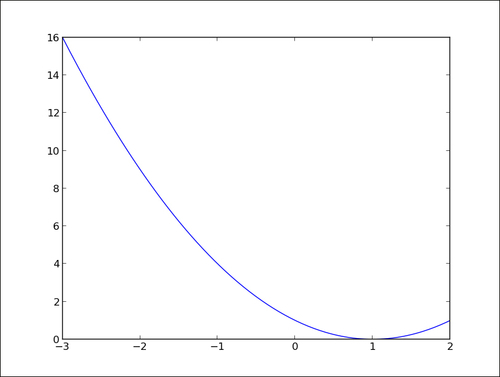
NumPy can perform operations on whole arrays at once, saving us much work when generating curve coordinates. Moreover, using NumPy will most likely lead to much faster code than the pure Python equivalent. Easier to read and faster code, what's not to like? The following is an example where we plot the binomial x^2 -2x +1 in the [-3,2] interval using 200 points:

import numpy as np
import matplotlib.pyplot as plt

X = np.linspace(-3, 2, 200)
Y = X ** 2 - 2 * X + 1.

plt.plot(X, Y)
plt.show()

Running the preceding script will give us the result shown in the following graph:

Again, we could have done the plotting in pure Python, but it would arguably not be as easy to read. Although matplotlib can be used without NumPy, the two make for a powerful combination.

CONTINUE READING
83
Tech Concepts
36
Programming languages
73
Tech Tools
Icon Unlimited access to the largest independent learning library in tech of over 8,000 expert-authored tech books and videos.
Icon Innovative learning tools, including AI book assistants, code context explainers, and text-to-speech.
Icon 50+ new titles added per month and exclusive early access to books as they are being written.
matplotlib Plotting Cookbook
notes
bookmark Notes and Bookmarks search Search in title playlist Add to playlist font-size Font size

Change the font size

margin-width Margin width

Change margin width

day-mode Day/Sepia/Night Modes

Change background colour

Close icon Search
Country selected

Close icon Your notes and bookmarks

Confirmation

Modal Close icon
claim successful

Buy this book with your credits?

Modal Close icon
Are you sure you want to buy this book with one of your credits?
Close
YES, BUY

Submit Your Feedback

Modal Close icon
Modal Close icon
Modal Close icon