Sign In Start Free Trial
Account

Add to playlist

Create a Playlist

Modal Close icon
You need to login to use this feature.
  • Book Overview & Buying matplotlib Plotting Cookbook
  • Table Of Contents Toc
matplotlib Plotting Cookbook

matplotlib Plotting Cookbook

By : Alexandre Devert
3.7 (10)
close
close
matplotlib Plotting Cookbook

matplotlib Plotting Cookbook

3.7 (10)
By: Alexandre Devert

Overview of this book

Table of Contents (15 chapters)
close
close
matplotlib Plotting Cookbook
Credits
About the Author
About the Reviewers
www.PacktPub.com
Preface
1
Index

Plotting boxplots


Boxplot allows you to compare distributions of values by conveniently showing the median, quartiles, maximum, and minimum of a set of values.

How to do it...

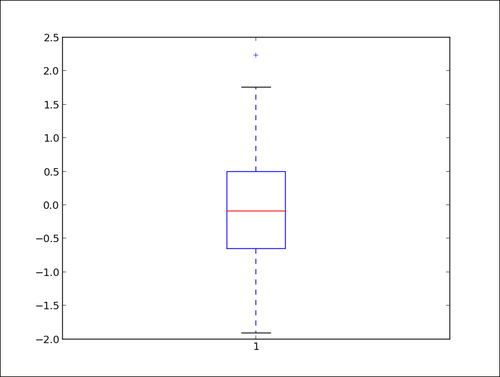
The following script shows a boxplot for 100 random values drawn from a normal distribution:

import numpy as np
import matplotlib.pyplot as plt

data = np.random.randn(100)

plt.boxplot(data)
plt.show()

A boxplot will appear that represents the samples we drew from the random distribution. Since the code uses a randomly generated dataset, the resulting figure will change slightly every time the script is run.

The preceding script will display the following graph:

How it works...

The data = [random.gauss(0., 1.) for i in range(100)] variable generates 100 values drawn from a normal distribution. For demonstration purposes, such values are typically read from a file or computed from other data. The plot.boxplot() function takes a set of values and computes the mean, median, and other statistical quantities on its own. The following points describe the preceding boxplot:

  • The red bar is the median of the distribution.

  • The blue box includes 50 percent of the data from the lower quartile to the upper quartile. Thus, the box is centered on the median of the data.

  • The lower whisker extends to the lowest value within 1.5 IQR from the lower quartile.

  • The upper whisker extends to the highest value within 1.5 IQR from the upper quartile.

  • Values further from the whiskers are shown with a cross marker.

There's more...

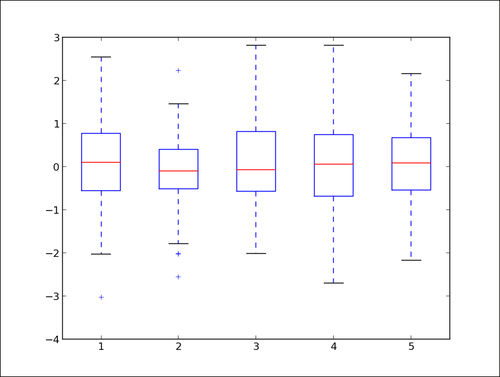
To show more than one boxplot in a single graph, calling pyplot.boxplot() once for each boxplot is not going to work. It will simply draw the boxplots over each other, making a messy, unreadable graph. However, we can draw several boxplots with just one single call to pyplot.boxplot() as follows:

import numpy as np
import matplotlib.pyplot as plt

data = np.random.randn(100, 5)

plt.boxplot(data)
plt.show()

The preceding script displays the following graph:

The pyplot.boxplot() function accepts a list of lists as the input, rendering a boxplot for each sublist.

CONTINUE READING
83
Tech Concepts
36
Programming languages
73
Tech Tools
Icon Unlimited access to the largest independent learning library in tech of over 8,000 expert-authored tech books and videos.
Icon Innovative learning tools, including AI book assistants, code context explainers, and text-to-speech.
Icon 50+ new titles added per month and exclusive early access to books as they are being written.
matplotlib Plotting Cookbook
notes
bookmark Notes and Bookmarks search Search in title playlist Add to playlist font-size Font size

Change the font size

margin-width Margin width

Change margin width

day-mode Day/Sepia/Night Modes

Change background colour

Close icon Search
Country selected

Close icon Your notes and bookmarks

Confirmation

Modal Close icon
claim successful

Buy this book with your credits?

Modal Close icon
Are you sure you want to buy this book with one of your credits?
Close
YES, BUY

Submit Your Feedback

Modal Close icon
Modal Close icon
Modal Close icon