Sign In Start Free Trial
Account

Add to playlist

Create a Playlist

Modal Close icon
You need to login to use this feature.
  • Book Overview & Buying Android NDK Game Development Cookbook
  • Table Of Contents Toc
Android NDK Game Development Cookbook

Android NDK Game Development Cookbook

By : Sergey Kosarevsky, Viktor Latypov
4 (5)
close
close
Android NDK Game Development Cookbook

Android NDK Game Development Cookbook

4 (5)
By: Sergey Kosarevsky, Viktor Latypov

Overview of this book

Android NDK is used for multimedia applications which require direct access to a system's resources. Android NDK is also the key for portability, which in turn provides a reasonably comfortable development and debugging process using familiar tools such as GCC and Clang toolchains. If your wish to build Android games using this amazing framework, then this book is a must-have.This book provides you with a number of clear step-by-step recipes which will help you to start developing mobile games with Android NDK and boost your productivity debugging them on your computer. This book will also provide you with new ways of working as well as some useful tips and tricks that will demonstrably increase your development speed and efficiency.This book will take you through a number of easy-to-follow recipes that will help you to take advantage of the Android NDK as well as some popular C++ libraries. It presents Android application development in C++ and shows you how to create a complete gaming application. You will learn how to write portable multithreaded C++ code, use HTTP networking, play audio files, use OpenGL ES, to render high-quality text, and how to recognize user gestures on multi-touch devices. If you want to leverage your C++ skills in mobile development and add performance to your Android applications, then this is the book for you.
Table of Contents (11 chapters)
close
close
10
Index

Installing Android development tools on Windows

To start developing games for Android you will need some essential tools to be installed on your system.

Getting ready

Here is the list of all the prerequisites you will need to start developing games for Android:

Former versions of SDK/NDK for Windows required a Cygwin environment, a Linux-like environment for Windows, to be installed. Up-to-date versions of these tools can run natively on Windows without any intermediate layer. We will focus on the Cygwin-less environment and will do all of the development without IDE. You heard it right, we will just use the command line. All the examples in this book were written and debugged on a Windows PC.

To compile native Windows applications presented in this book, you will need a decent C++ compiler, such as the MinGW package with a GCC toolchain. Using Microsoft Visual Studio is also possible.

Note

Minimalist GNU for Windows (MinGW) is a minimalist development environment for Windows applications using a port of GNU Compiler Collection (GCC).

How to do it...

  1. Android SDK and NDK should be installed into folders that do not contain any whitespaces in their names.

    Note

    This requirement comes from the limitations of scripts in Android SDK. There is a nice discussion on StackOverflow which explains some reasons behind these limitations at http://stackoverflow.com/q/6603194/1065190.

  2. Other tools can be installed to their default locations. We used the following paths in our Windows 7 system:

Tools

Path

Android SDK

D:\android-sdk-windows

Android NDK

D:\ndk

Apache Ant

D:\ant

Java Development Kit

C:\Program Files\Java\jdk1.6.0_33

All tools have pretty decent GUI installers (see the following image, that shows the Android SDK Manager from SDK R21) so you don't have to use the command line.

How to do it...

For the Windows environment, you need the MinGW GCC toolchain. The easy to install all-in-one package can be found at http://www.equation.com, in the Programming Tools section, Fortran, C, C++ subsection. Alternatively, you can download the official installer from http://www.mingw.org. We will use the one from www.equation.com

There's more...

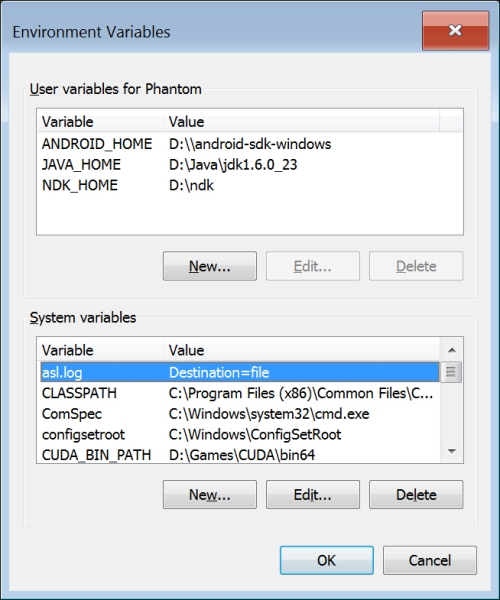
You need to set some environment variables to let the tools know where the files are located. The JAVA_HOME variable should point to the Java Development Kit folder. The NDK_HOME variable should point to the Android NDK installation folder, and ANDROID_HOME should point to the Android SDK folder (note the double backslash). We used the following environment variable values:

JAVA_HOME=D:\Java\jdk1.6.0_23

NDK_HOME=D:\ndk

ANDROID_HOME=D:\\android-sdk-windows

The final configuration looks similar to the one shown in the following screenshot, which shows the Windows Environment Variables dialog box:

There's more...

After MinGW has been successfully installed, you should also add the bin folder from its installation folder to the PATH environment variable. For example, if MinGW is installed to C:\MinGW, then PATH should contain the C:\MinGW\bin folder.

CONTINUE READING
83
Tech Concepts
36
Programming languages
73
Tech Tools
Icon Unlimited access to the largest independent learning library in tech of over 8,000 expert-authored tech books and videos.
Icon Innovative learning tools, including AI book assistants, code context explainers, and text-to-speech.
Icon 50+ new titles added per month and exclusive early access to books as they are being written.
Android NDK Game Development Cookbook
notes
bookmark Notes and Bookmarks search Search in title playlist Add to playlist font-size Font size

Change the font size

margin-width Margin width

Change margin width

day-mode Day/Sepia/Night Modes

Change background colour

Close icon Search
Country selected

Close icon Your notes and bookmarks

Confirmation

Modal Close icon
claim successful

Buy this book with your credits?

Modal Close icon
Are you sure you want to buy this book with one of your credits?
Close
YES, BUY

Submit Your Feedback

Modal Close icon
Modal Close icon
Modal Close icon