Sign In Start Free Trial
Account

Add to playlist

Create a Playlist

Modal Close icon
You need to login to use this feature.
  • Book Overview & Buying Java EE 5 Development with NetBeans 6
  • Table Of Contents Toc
Java EE 5 Development with NetBeans 6

Java EE 5 Development with NetBeans 6

4 (5)
close
close
Java EE 5 Development with NetBeans 6

Java EE 5 Development with NetBeans 6

4 (5)

Overview of this book

This book is written as a tutorial, leading you through examples to illuminate the main theory and get you working with the Entity Framework as quickly as possible. This book is for C# developers who want an easier way to create their data access layer. You will need to be comfortable with ADO.NET, but you don't need to know anything about the Entity Framework. Along the way we will create some ASP.NET applications, so being familiar with this will also help.
Table of Contents (17 chapters)
close
close
Java EE 5 Development with NetBeans 6
Credits
About the Author
About the Reviewers
Preface
1
Debugging Enterprise Applications with the NetBeans Debugger
2
Identifying Performance Issues with NetBeans Profiler
Downloading NetBeans

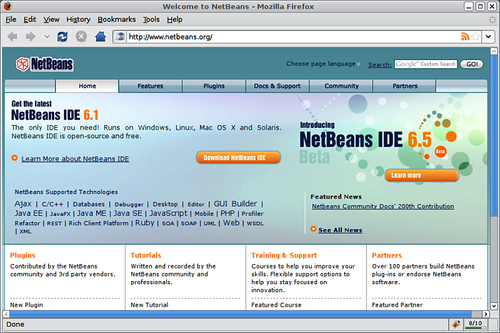
NetBeans can be downloaded from http://www.netbeans.org.

Downloading NetBeans

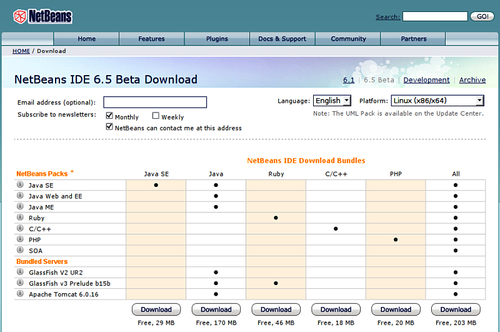
At the time of writing, NetBeans 6.5 is in beta, by publication time it should be the current version. To download NetBeans we need to click on the button labeled Download NetBeans IDE.Clicking on this button will take us to a page displaying all of NetBeans download bundles.

Downloading NetBeans

NetBeans download bundles contain different NetBeans Packs that provide different levels of functionality. The following table summarizes the different available NetBeans packs and describes the functionality they provide.

Note

These packs can also be installed at a later date into an existing NetBeans installation by installing the appropriate plugins.

NetBeans Pack

Description

Java

Includes features for development of Java Standard Edition applications, as well as web and Java Enterprise Edition and mobile applications.

Ruby

Includes features for development of applications written in the Ruby language.

C/C++

Includes features for development of applications written in the C or C++ languages.

PHP

Includes features for development of PHP applications.

All

Includes functionality of all NetBeans packs.

To follow the examples in this book, either the Java or the All Pack is needed.

Note

The screenshots in this book were taken with the All Pack. NetBeans may look slightly different if the Java Pack is used, particularly, some menu items might be missing.

The following platforms are officially supported:

  • Windows 2000/XP/Vista
  • Linux x86
  • Linux x64
  • Solaris x86
  • Solaris x64
  • Mac OS X

Additionally, NetBeans can be used under any platform containing JDK 5.0 or newer. To download a version of NetBeans to be used under one of these platforms, an OS independent version of NetBeans is available for download.

Note

Although the OS-independent version of NetBeans can be executed in all of the supported platforms, it is recommended to obtain the platform-specific version of NetBeans for your platform.

The NetBeans download page should detect the operating system being used to access it, and the appropriate platform should be selected by default. If this is not the case, or if you are downloading NetBeans with the intention of installing it in another workstation on another platform, the correct platform can be selected from the drop-down labeled, appropriately enough, Platform.

Once the correct platform has been selected, we need to click on the appropriate download button for the NetBeans pack we wish to install; for Java EE development, we need either the Java or the All Pack. NetBeans will then be downloaded to a directory of our choosing.

Note

Java EE applications need to be deployed to an application server. Several application servers exist in the market, both the Java and the All NetBeans Packs come with GlassFish bundled. GlassFish is a 100 percent Java EE compliant application server. We will be using the bundled GlassFish application server to deploy and execute our examples.

CONTINUE READING
83
Tech Concepts
36
Programming languages
73
Tech Tools
Icon Unlimited access to the largest independent learning library in tech of over 8,000 expert-authored tech books and videos.
Icon Innovative learning tools, including AI book assistants, code context explainers, and text-to-speech.
Icon 50+ new titles added per month and exclusive early access to books as they are being written.
Java EE 5 Development with NetBeans 6
notes
bookmark Notes and Bookmarks search Search in title playlist Add to playlist download Download options font-size Font size

Change the font size

margin-width Margin width

Change margin width

day-mode Day/Sepia/Night Modes

Change background colour

Close icon Search
Country selected

Close icon Your notes and bookmarks

Confirmation

Modal Close icon
claim successful

Buy this book with your credits?

Modal Close icon
Are you sure you want to buy this book with one of your credits?
Close
YES, BUY

Submit Your Feedback

Modal Close icon
Modal Close icon
Modal Close icon