Sign In Start Free Trial
Account

Add to playlist

Create a Playlist

Modal Close icon
You need to login to use this feature.
  • Book Overview & Buying Java EE 5 Development with NetBeans 6
  • Table Of Contents Toc
Java EE 5 Development with NetBeans 6

Java EE 5 Development with NetBeans 6

4 (5)
close
close
Java EE 5 Development with NetBeans 6

Java EE 5 Development with NetBeans 6

4 (5)

Overview of this book

This book is written as a tutorial, leading you through examples to illuminate the main theory and get you working with the Entity Framework as quickly as possible. This book is for C# developers who want an easier way to create their data access layer. You will need to be comfortable with ADO.NET, but you don't need to know anything about the Entity Framework. Along the way we will create some ASP.NET applications, so being familiar with this will also help.
Table of Contents (17 chapters)
close
close
Java EE 5 Development with NetBeans 6
Credits
About the Author
About the Reviewers
Preface
1
Debugging Enterprise Applications with the NetBeans Debugger
2
Identifying Performance Issues with NetBeans Profiler
Developing Our first JSF Application


From an application developer's point of view, a JSF application consists of a series of JSP pages containing custom JSF tags, one or more JSF managed beans, and a configuration file named faces-config.xml. The faces-config.xml file declares the managed beans in the application, as well as the navigation rules to follow when navigating from one JSF page to another.

Creating a New JSF Project

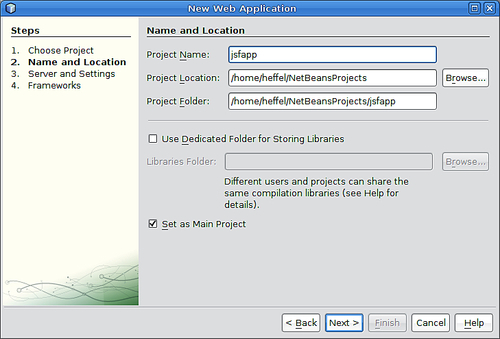
To create a new JSF project, we need to go to File | New Project, select the Java Web project category, and Web Application as the project type.

After clicking Next>, we need to enter a Project Name, and optionally change other information for our project, although NetBeans provides sensible defaults.

On the next page in the wizard, we can select the Server, Java EE Version, and Context Path of our application. In our example we will simply pick the default values.

On the next page of the new project wizard, we can select what frameworks our web application will...

CONTINUE READING
83
Tech Concepts
36
Programming languages
73
Tech Tools
Icon Unlimited access to the largest independent learning library in tech of over 8,000 expert-authored tech books and videos.
Icon Innovative learning tools, including AI book assistants, code context explainers, and text-to-speech.
Icon 50+ new titles added per month and exclusive early access to books as they are being written.
Java EE 5 Development with NetBeans 6
notes
bookmark Notes and Bookmarks search Search in title playlist Add to playlist download Download options font-size Font size

Change the font size

margin-width Margin width

Change margin width

day-mode Day/Sepia/Night Modes

Change background colour

Close icon Search
Country selected

Close icon Your notes and bookmarks

Confirmation

Modal Close icon
claim successful

Buy this book with your credits?

Modal Close icon
Are you sure you want to buy this book with one of your credits?
Close
YES, BUY

Submit Your Feedback

Modal Close icon
Modal Close icon
Modal Close icon