-
Book Overview & Buying
-
Table Of Contents
Oracle E-Business Suite R12 Core Development and Extension Cookbook
By :
In our first recipe, we are going to create an executable and then define a concurrent program that launches the executable. The executable in this example is a PL/SQL package that we want to run. We will start off with a little introduction and look at the types of concurrent programs we can create, the location of executable files on the server, and how to find the output and log files. We will then register a custom application which we need to register our executable and concurrent programs with. Therefore, this recipe will comprise of the following:
We do not need any additional development tools to configure a concurrent program. However, the executable that we will be launching will have been developed using the appropriate development tool — Reports Developer, SQL Developer, Java, and so on.
There are a number of different types of executables that can be triggered using concurrent programs. We are going to briefly discuss each one as a bit of background before we get started.
The different types of concurrent programs that we can create are as follows:
errbuf and retcode. The errbuf parameter is used to return error messages. The retcode is used to return the status of the concurrent program. PL/SQL procedures are stored on the database in the apps schema so this is where Oracle will look for the stored procedure at runtime. The recipes in this chapter have examples of PL/SQL concurrent programs so we will explain this in detail throughout the chapter. BIN ($PROD_TOP/bin) directory. Oracle, by default, uses the first four parameters so any parameters used in the shell script will need to start with the fifth parameter ($5, $6 ... , and so on). We will go through this in more detail later in the chapter as we will be creating a concurrent program calling a host file in one of the examples.It is worth noting that at runtime the executable will need to be placed at a specific location. Files are stored in the $PRODUCT_TOP of the application they are registered with. Under this directory, they will be in the directory related to the type of program it is. The following are a few examples of where executables will need to be stored:
$AP_TOP/bin directory. $AR_TOP/bin directory. $XXHR_TOP/sql directory. If you are unfamiliar with the custom top discussed here then do not worry as we will discuss this throughout the book. $INV_TOP/Reports/Lang directory.Throughout the chapter we will be looking at the output and log files generated by Oracle EBS when we run a concurrent program. These files are produced during execution and we can write log messages or output messages throughout processing. The output file is used to produce output for the user to see what has been processed and the log file is used to write more technical or debugging messages, which may not necessarily be understood by the end user. An additional way to debug is to use APIs to write to the FND_LOG_MESSAGES table.
The location of log files can be found by querying the FND_CONCURRENT_REQUESTS table. The two columns you are looking for are logfile_name and outfile_name:
SELECT logfile_name, outfile_name FROM FND_CONCURRENT_REQUESTS WHERE request_id = <request_id>
The results of this query will give you the location of the output files for a given request_id. Alternatively, you can search for the files manually in the directory listed in the UTL_FILE_DIR parameter in the init.ora file. The log file will start with an l and the output file with an o. Both will be followed by the request_id and both will have a .req file extension.
Downloading the example code
You can download the example code files for all Packt books you have purchased from your account at http://www.packtpub.com. If you purchased this book elsewhere, you can visit http://www.packtpub.com/support and register to have the files e-mailed directly to you.
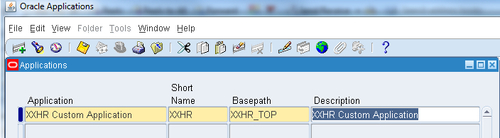
We must register a new application in Oracle E-Business Suite to register our custom configuration with. A new application allows us to isolate custom code and/or configuration from the standard Oracle Applications code and configuration. When we define a custom application, we register the custom application name, application short name, application basepath, and application description with the Oracle Application Object Library. This is used to configure custom application objects such as responsibilities and forms as belonging to our custom application. This identification with the custom application allows any extensions to be preserved during upgrades. The application basepath is an operating system profile variable that points to the directories where the application object library will look to find the files associated with the custom application. At this point we are just going to configure our custom application. We will create the file structure and create a custom schema later in the book.
To register an application, perform the following steps:

|
Application: |
XXHR Custom Application |
|
Short Name : |
XXHR |
|
Basepath : |
XXHR_TOP |
|
Description : |
XXHR Custom Application |
We have now registered a custom application called XXHR Custom Application. We can see that the application short name and the base path are defined here.
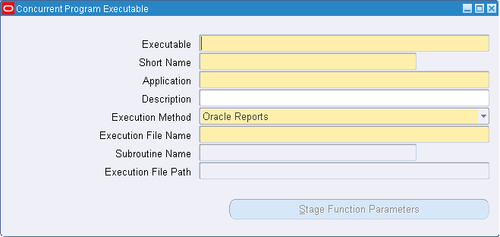
We will now configure the executable that our concurrent program will execute at runtime.
The responsibility we need to configure the concurrent program is Application Developer. The code for the following recipe is available in the following files: XXHREEBS_1_1.pks (specification) and XXHREEBS_1_1.pkb (body). Follow the readme_1_1.txt to install this package.

|
Item name |
Item value |
|---|---|
|
Executable |
XXHR1001 |
|
Short Name |
XXHR1001 |
|
Application |
XXHR Custom Application |
|
Description |
Executable created for concurrent program recipe |
|
Execution Method |
PL/SQL Stored Procedure |
|
Execution File Name |
|
Please note that any fields that are not specified in this table should be left as their default value.
We have defined an executable that will be launched by the concurrent program we are about to configure next. The executable has to be created before we can configure the concurrent program. This executable is calling a database package which at present has very little in it. When calling a PL/SQL package from a concurrent program there are two mandatory parameters. These are errbuf and retcode. We must return a value that represents a completion status and this is done by assigning a value to the retcode parameter. If we look at the package specification we can see that there are three constant variables defined, called SUCCESS, WARNING, and FAILED. These are set to 0, 1, and 2 respectively and we will assign a constant variable to the retcode out parameter to return a value to the concurrent manager upon completion. Valid return values for the retcode parameter are as follows:
0 - Success 1 - Success & warning 2 - Error
We have assigned constant variables to make the code easier to read. The other parameter that is returned is the errbuf parameter. We can assign text to this parameter so that we can return error messages if any occur at runtime back to the concurrent program, so it will be displayed in the log file.
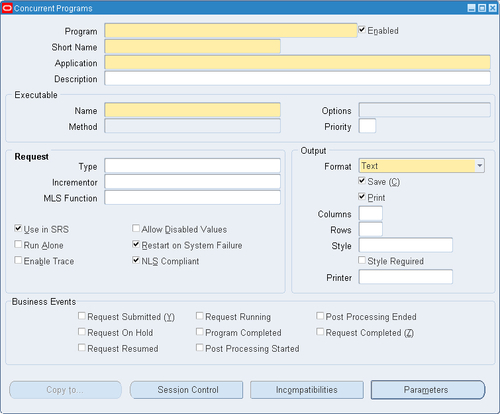
In this recipe, we will configure our first concurrent program. The concurrent program will run the executable that we have just defined.

|
Item name |
Item value |
|---|---|
|
Program |
XXHR First Concurrent Program |
|
Short Name |
|
|
Application |
XXHR Custom Application |
|
Description |
XXHR First Concurrent Program |
|
Executable Name |
XXHR1001 |
Please note that any fields that are not defined in this table should be left as their default value.
So now we have configured the executable and also defined the concurrent program that launches the executable. These are the basic steps required to configure a concurrent program. As you will see there are a number of other regions on the screen and some buttons, and we will be looking at some of these later in the chapter. The next step is to run the concurrent program.
Change the font size
Change margin width
Change background colour