-
Book Overview & Buying
-
Table Of Contents
Oracle E-Business Suite R12 Core Development and Extension Cookbook
By :
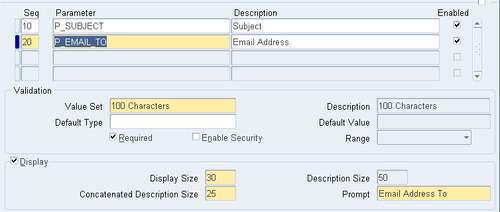
In this recipe, we are going to create two concurrent programs. The first concurrent program will call the second concurrent program through PL/SQL. The first concurrent program will also generate a file and place it in a directory on the database server. The second concurrent program will call a host program that will get the file we just created and will e-mail it to an e-mail account. To complete the recipe we will perform the following tasks:
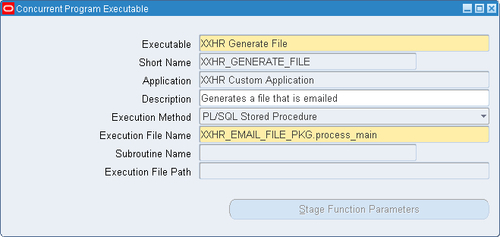
The first thing we will do is create an executable that calls a PL/SQL package called xxhr_email_file_pkg.process_main. We will look into what the package does later on, so for now we just want to configure it.
To create the executable to call a database package perform the following steps:
|
Item name |
Item value |
|---|---|
|
Executable |
XXHR Generate File |
|
Short Name |
|
|
Application |
XXHR Custom Application |
|
Description |
Generates a file that is emailed |
|
Execution Method |
PL/SQL Stored Procedure |
|
Execution File Name |
|
Note: Any fields that are not specified in this table should be left as their default value.

We have now created a concurrent program executable that will launch a PL/SQL package called xxhr_email_file_pkg.process_main.
In the following recipe, we will configure our concurrent program that calls the executable we have just defined.
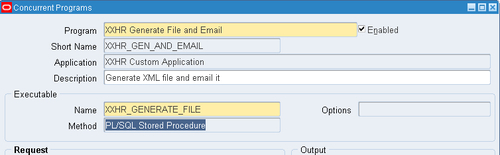
To configure the concurrent program, perform the following:
|
Item name |
Item value |
|---|---|
|
Program |
XXHR Generate File and Email |
|
Short Name |
|
|
Application |
XXHR Custom Application |
|
Description |
Generate XML file and email it |
|
Executable Name |
|
Note: Any fields that are not defined in this table should be left as their default value.

|
Item name |
Value |
|---|---|
|
Seq |
10 |
|
Parameter |
|
|
Description |
Subject |
|
Enabled |
![]()
|
|
Value Set |
240 Characters |
|
Required |
![]()
|
|
Display |
![]()
|
|
Display Size |
30 |
|
Description Size |
50 |
|
Concatenated Description Size |
25 |
|
Prompt |
Subject |

|
Item name |
Value |
|---|---|
|
Seq |
20 |
|
Parameter |
|
|
Description |
Email Address |
|
Enabled |
![]()
|
|
Value Set |
100 Characters |
|
Required |
![]()
|
|
Display |
![]()
|
|
Display Size |
30 |
|
Description Size |
50 |
|
Concatenated Description Size |
25 |
|
Prompt |
Email Address To |

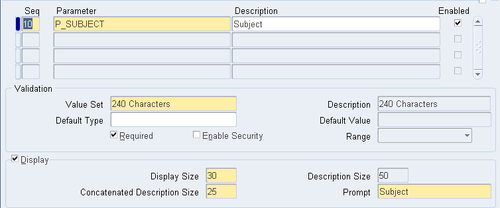
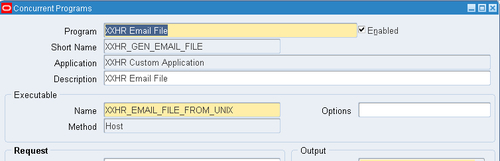
Okay, so now we have configured the executable and also defined the concurrent program that launches the executable.
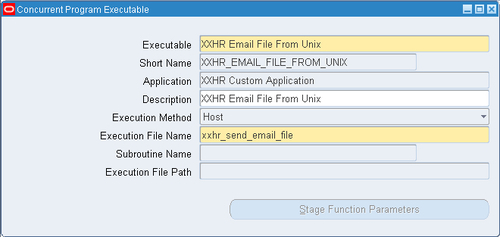
Now we will create an executable that calls a HOST file called xxhr_send_email_file. The name is case sensitive so ensure it is in lower case. Also the host file does not have any extension.
To create the executable to call a HOST file, perform the following:
|
Item name |
Item value |
|---|---|
|
Executable |
XXHR Email File From Unix |
|
Short Name |
|
|
Application |
XXHR Custom Application |
|
Description |
XXHR Email File From Unix |
|
Execution Method |
Host |
|
Execution File Name |
|
Note: Any fields that are not specified in this table should be left as their default value.

We have now created a concurrent program executable that will launch a HOST file called xxhr_send_email_file.
In the following recipe, we will configure our concurrent program that calls the executable we have just defined.
To configure the concurrent program, perform the following:
|
Item name |
Item value |
|---|---|
|
Program |
XXHR Email File |
|
Short Name |
|
|
Application |
XXHR Custom Application |
|
Description |
XXHR Email File |
|
Executable Name |
|
Note: Any fields that are not defined in this table should be left as their default value.

|
Item name |
Value |
|---|---|
|
Seq |
10 |
|
Parameter |
Subject |
|
Description |
Subject |
|
Enabled |
![]()
|
|
Value Set |
240 Characters |
|
Default Type |
Constant |
|
Default Value |
Email Generated from EBS |
|
Required |
![]()
|
|
Display |
![]()
|
|
Display Size |
30 |
|
Description Size |
50 |
|
Concatenated Description Size |
25 |
|
Prompt |
Subject |
|
Item name |
Value |
|---|---|
|
Seq |
20 |
|
Parameter |
Email Address |
|
Description |
Email Address |
|
Enabled |
![]()
|
|
Value Set |
100 Characters |
|
Required |
![]()
|
|
Display |
![]()
|
|
Display Size |
30 |
|
Description Size |
50 |
|
Concatenated Description Size |
25 |
|
Prompt |
Email Address |
|
Item name |
Value |
|---|---|
|
Seq |
30 |
|
Parameter |
Filename |
|
Description |
Filename |
|
Enabled |
![]()
|
|
Value Set |
240 Characters |
|
Required |
![]()
|
|
Display |
![]()
|
|
Display Size |
30 |
|
Description Size |
50 |
|
Concatenated Description Size |
25 |
|
Prompt |
Filename |
|
Item name |
Value |
|---|---|
|
Seq |
40 |
|
Parameter |
Directory |
|
Description |
Directory |
|
Enabled |
![]()
|
|
Value Set |
240 Characters |
|
Required |
![]()
|
|
Display |
![]()
|
|
Display Size |
30 |
|
Description Size |
50 |
|
Concatenated Description Size |
25 |
|
Prompt |
Directory |
|
Item name |
Value |
|---|---|
|
Seq |
50 |
|
Parameter |
Sent From |
|
Description |
Sent From |
|
Enabled |
![]()
|
|
Value Set |
240 Characters |
|
Required |
![]()
|
|
Display |
![]()
|
|
Display Size |
30 |
|
Description Size |
50 |
|
Concatenated Description Size |
25 |
|
Prompt |
Sent From |

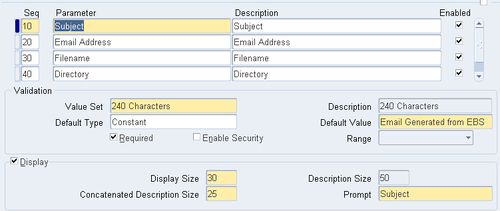
Okay, so now we have configured the executable and also defined the concurrent program that launches the executable. The concurrent program has five parameters which will be passed into the host file.
When we defined our responsibility called XXEBS Extending e-Business Suite we assigned a request group to it called XXHR Request Group. We are going to add our concurrent programs, so that they will be available from the responsibility.
To update our request group perform the following steps:
|
Type |
Name |
Application |
|---|---|---|
|
Program |
XXHR Generate File and Email |
XXHR Custom Application |
|
Program |
XXHR Email File |
XXHR Custom Application |
We have now added the concurrent programs to the request group used by the XXEBS Extending e-Business Suite responsibility. Our concurrent programs will appear in a list of concurrent programs when we want to run a request. The responsibility only has access to the programs in the request set assigned to it.
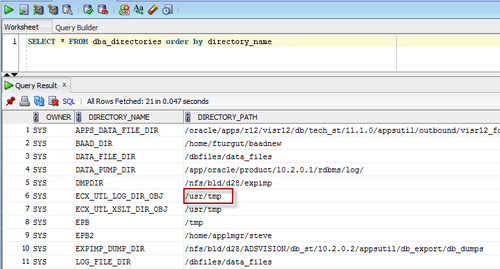
Our PL/SQL package uses a PL/SQL utility called UTL_FILE. We are going to write a file to the database server using this utility but we first need to see which directories we have access to. We will then create a name for a directory that we can use as a name for that directory.
To create a named directory, perform the following:
SELECT * FROM dba_directories order by directory_name

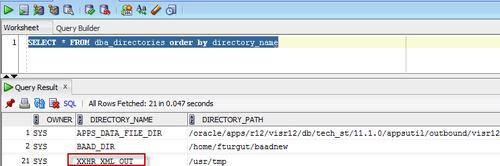
/usr/tmp, which is the one we will use to write our file to.CREATE OR REPLACE DIRECTORY XXHR_XML_OUT AS '/usr/tmp'
/
dba_directories, as shown in the following screenshot:
We have created a name for a directory path that we will use to write a file to in our PL/SQL package later on. The name XXHR_XML_OUT is used instead of having to code the file path in our code, and if we need to change the directory we will not have to change our PL/SQL package.
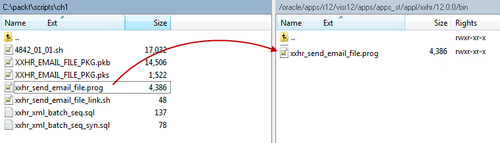
We are now going to transfer our file over to the application tier in the $APPLBIN directory under the PRODUCT TOP directory. We will then make a symbolic link using the execution filename (without an extension) to fndcpesr, which is located in the $FND_TOP/$APPLBIN directory.
To install our host file, perform the following:
xxhr_send_email_file.prog to the $XXHR_TOP/$APPLBIN directory on the application tier as shown in the following screenshot:
$XXHR_TOP/$APPLBIN directory by typing the following command:APPS Tier> cd $XXHR_TOP/$APPLBIN
xxhr_send_email_prog file with the following command:APPS Tier> chmod 775 xxhr_send_email_prog
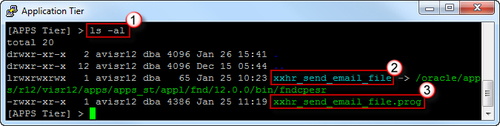
APPS Tier> ln -s $FND_TOP/bin/fndcpesr xxhr_send_email_file
APPS Tier> ls -al

We have copied our host program over to the bin directory of the application we registered the executable with. We have given correct permissions to the .prog file and then created a symbolic link for the file.
We are now going to test the concurrent program but before we do we will take a look at some of the code in the package and the host program we have configured, to see what is happening.
The concurrent program XXHR Generate File and Email will execute the PL/SQL package called XXHR_EMAIL_FILE_PKG.process_main. This package calls three procedures in the following order:
generate_xml: This procedure is called first and creates an XML message and stores the message in a CLOB variable.create_xml_file: This procedure is called next and takes the data in the CLOB and creates a file on the server for the named directory we created earlier called XXHR_XML_OUT.email_xml_file: This procedure is called last and submits a concurrent program through a PL/SQL command. The concurrent program that it runs is the XXHR Email File we created to call our host program. The host program gets the file from the server and e-mails it using the UNIX uuencode command.The host concurrent program called XXHR Email File launches the host file we created on the application tier. The first four parameters in the host file are reserved for oracle. Therefore, the first parameter that we pass from our concurrent program is actually the fifth parameter in the host file. The host file validates the parameters that we pass in and then sends an e-mail using the UNIX uuencode utility. Now we want to run the concurrent program testing that the file is generated on the server and then e-mailed by calling the second concurrent program.
Note: The concurrent program that uses the UTL_FILE utility will write to a directory on the database server. However, the host program accesses the application tier. Therefore, we must write the file to a directory that is shared by the application tier and the database tier.
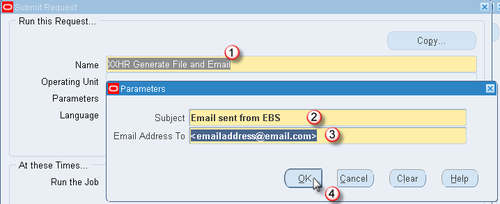
To run the concurrent program, do the following:
|
Subject |
Email sent from EBS |
|---|---|
|
Email Address To |
<enter your email address here> |
Note: you will need to enter your own e-mail address in the Email Address To parameter.


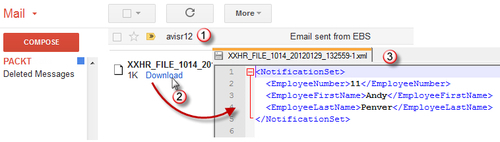
We can see from the following screenshot that the e-mail has been received at the e-mail address passed as a parameter when we launched the concurrent program:

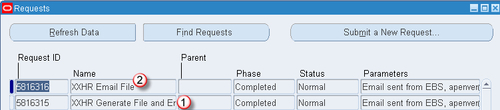
We have run the concurrent program XXHR Generate File and Email, which in turn launched the XXHR Email File concurrent program. Both concurrent programs appear in the Requests screen. The file was generated on the database server and the host program picked up the file and e-mailed it to the e-mail address passed in as a parameter.
Change the font size
Change margin width
Change background colour