-
Book Overview & Buying
-
Table Of Contents
Oracle E-Business Suite R12 Core Development and Extension Cookbook
By :
In this next recipe, we are going to create a new parameter but this time we are going to make it dependent upon the parameter we created in the previous recipe.
We will be adding a parameter to the concurrent program we have already created. We will also be looking to change the package XXHREEBS so we will need to use SQL Developer to make these changes. The following tasks will be performed in this recipe:
We are now going to create a dependent value set. It will select a list of employees who belong to the organization chosen in the Organization parameter.
Perform the following steps to create the value set:
|
Item name |
value |
|---|---|
|
Value Set Name |
|
|
Description |
List of HR person records dependent upon organization |
|
List Type |
List of Values |
|
Security Type |
No Security |
|
Format Type |
|
|
Maximum Size |
20 |
|
Validation Type |
Table |
|
Item name |
value |
Type |
Size |
|---|---|---|---|
|
Table Application |
Human Resources | ||
|
Table Name |
| ||
|
Value |
|
|
20 |
|
Meaning |
|
|
240 |
|
ID |
|
|
10 |
|
Where/Order By |
|
We should just examine the syntax in the Where/Order By field. The clause joins the two tables we have defined in the table name field. The syntax I want to focus on is the following line:
AND paf.organization_id = :$FLEX$.XXHR_ORG_LIST_VS
The $FLEX$ indicates that we want to base this upon another value set. It is followed by the name of the value set we want this to be dependent upon. A parameter that uses the value set must exist in another parameter defined in the concurrent program.
We have created a value set that is dependent upon another value set. We have already defined the p_org_id parameter that uses the XXHR_ORG_LIST_VS value set. When we run the concurrent program the parameter that uses this value set will appear disabled until a value has been entered in the dependent parameter.
We are now going to add a new parameter called person_id and use the value set we have just created for the parameter.
Perform the following steps to add the new parameter:
|
Item name |
Value |
|---|---|
|
Seq |
30 |
|
Parameter |
|
|
Description |
Person ID |
|
Enabled |
![]()
|
|
Value Set |
|
|
Default Type | |
|
Required |
![]()
|
|
Display |
![]()
|
|
Display Size |
20 |
|
Description Size |
50 |
|
Concatenated Description Size |
25 |
|
Prompt |
Person |
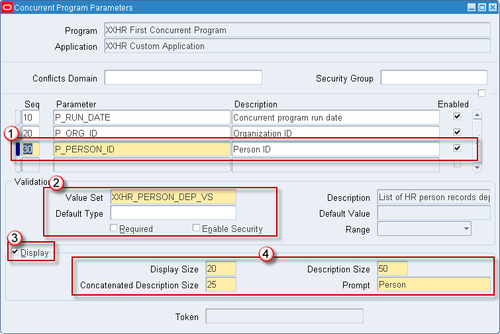
The parameter should now look like the following screenshot:

We have configured the P_PERSON_ID parameter that is dependent upon the organization parameter. This can be achieved by referencing the Organization value set with the :$FLEX$.XXHR_ORG_LIST_VS syntax.
We are now going to add the parameter to the executable, which is the package called XXHREEBS.First_Concurrent_Program. If you wish to view the code then it can be found in the files XXHREEBS_1_4.pks and XXHREEBS_1_4.pkb. You can compile the package provided or use the following instructions to add the parameter manually.
To add the new parameter to the code, perform the following steps:
XXHREEBS package. First_Concurrent_Program procedure definition. p_org_id parameter. The program definition will look like the following:PROCEDURE First_Concurrent_Program (errbuf OUT VARCHAR2, retcode OUT NUMBER, p_run_date IN VARCHAR2, p_org_id IN VARCHAR2, p_person_id IN NUMBER);
p_person_id parameter to the body. First_Concurrent_Program procedure definition and add p_person_id to the list of parameters, as shown in the following code:PROCEDURE First_Concurrent_Program (errbuf OUT VARCHAR2, retcode OUT NUMBER, p_run_date IN VARCHAR2, p_org_id IN VARCHAR2, p_person_id IN NUMBER) IS
First_Concurrent_Program package body.We have added the new parameter to the package specification and body. When we run the concurrent program the Person parameter will be dependent upon the organization that is selected.
Now we want to run the concurrent program testing that the concurrent program still runs successfully if the person_id parameter is passed in.
To run the concurrent program, perform the following:
Run Date parameter set to the default date (which is the current date).You will notice that the Person parameter is disabled. This is because it is dependent upon the Organization field and will remain disabled until an organization has been entered.
Organization parameter and then click OK. (If using a Vision instance select 'Vision Corporation', for example.) Person parameter and then click OK.We have now added the dependent parameter to the concurrent program. This allows us to control values that are entered by the users.
Change the font size
Change margin width
Change background colour