-
Book Overview & Buying
-
Table Of Contents
Oracle E-Business Suite R12 Core Development and Extension Cookbook
By :
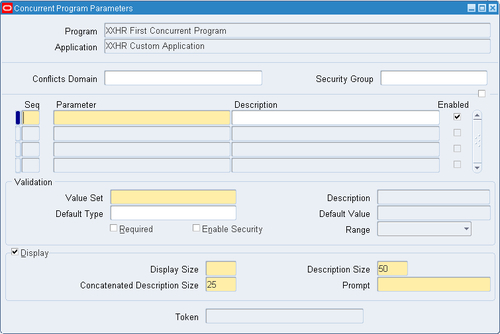
In this recipe, we are going to add a parameter to the concurrent program XXHR First Concurrent Program. Parameters allow the users to pass values into the concurrent program. This can be used by the executable to impact the way it performs the intended task. We are going to add the parameter to the PL/SQL package and then change the return code based upon the value we pass in.
We will be adding a parameter to the concurrent program we have already created. We will also need to add the parameter to the code in the XXHREEBS package and we will use SQL Developer to make these changes. The following tasks will be performed in this recipe:
XXHREEBS package to add the new parameter XXHREEBS to change the completion status of the concurrent programWe are now going to add a parameter to the concurrent program to pass the date on which the request was run.
To add a parameter, perform the following steps:


|
Item name |
Item value |
|---|---|
|
Seq |
10 |
|
Parameter |
|
|
Description |
Concurrent program run date |
|
Enabled |
![]()
|
|
Value Set |
|
|
Default Type |
Current Date |
|
Required |
![]()
|
|
Display |
![]()
|
|
Display Size |
11 |
|
Description Size |
50 |
|
Concatenated Description Size |
25 |
|
Prompt |
Run Date |
The value entered in the Parameter field is the name of the parameter we will define in the PL/SQL package in the next task.
The value entered in the Value Set field is a pre-defined value set. It is for selecting a date and we are going to re-use this rather than create our own.
We have now added a date parameter to the concurrent request. When we run the concurrent request, Oracle uses the records entered here to dynamically create a parameter screen. We can add parameters that are mandatory and based on a list of values if we wish. Also, we can hide a parameter to the user by checking the Display checkbox if required. We are going to add some more parameters to the concurrent program in the next few tasks but first we must add the parameter we just created to the procedure we call in the executable.
Now we are going to amend the XXHREEBS package to accept the new parameter we have configured. The parameter we configured is P_RUN_DATE.
We will need to use SQL Developer to amend the package so if you have not already done so, install SQL Developer. You can download SQL Developer from http://www.oracle.com/technetwork/developer-tools/sql-developer/downloads/index-098778.html.
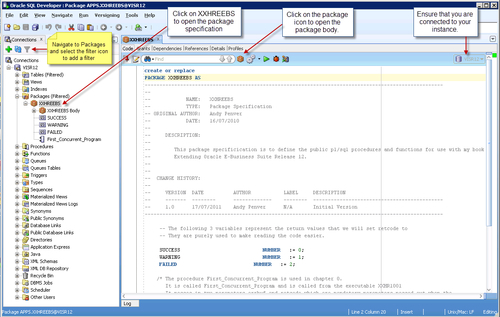
We are now going to amend the database package to add the parameter we have just configured, as follows:
XXHREEBS package.You can add a filter on the Packages node in SQL Developer which will refresh the list much quicker. To do this highlight the Packages node and click on the filter icon. In the Filter window, select Name | Like | XXHR% in the filter criteria region and click ok.


First_Concurrent_Program procedure definition, shown as follows:PROCEDURE First_Concurrent_Program (errbuf OUT VARCHAR2, retcode OUT NUMBER);
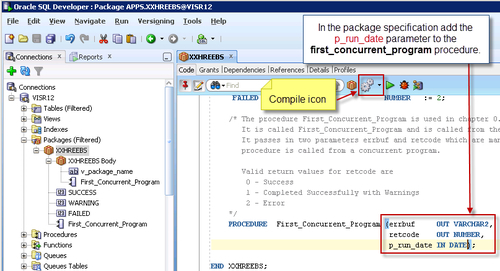
errbuf and retcode. The program definition will look like the following:PROCEDURE First_Concurrent_Program (errbuf OUT VARCHAR2, retcode OUT NUMBER, p_run_date IN VARCHAR2);
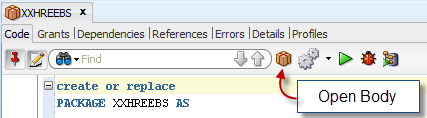
)in the editor toolbar.


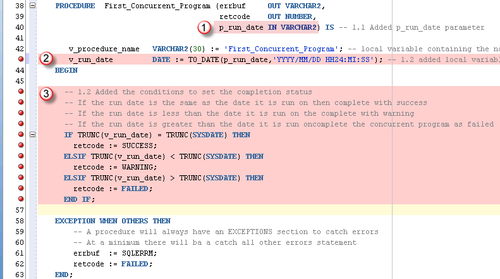
First_Concurrent_Program procedure definition and add the p_run_date parameter to the list of parameters, shown as follows:PROCEDURE First_Concurrent_Program (errbuf OUT VARCHAR2, retcode OUT NUMBER, p_run_date IN VARCHAR2) IS
First_Concurrent_Program package body.Now we have created a new parameter and added it to our PL/SQL package executed by our concurrent program.
We are now going to add some code to the package to change the return status of the concurrent program. We will return a status of success if the date parameter we enter when we run the concurrent program is equal to the current date. When the date parameter is before the current date we will return a status of warning and if the date parameter is after today's date then we will return an error status.
We are going to amend the XXHREEBS package body to determine the return status of the concurrent program based upon the date parameter P_RUN_DATE that is passed in. The code for the following recipe is available in the following files: XXHREEBS_1_2.pks (specification) and XXHREEBS_1_2.pkb (body). The following are the steps taken to add the code to the existing XXHREEBS package.
To amend the package, perform the following steps:
XXHREEBS package.v_run_date DATE := TO_DATE(p_run_date,'YYYY/MM/DD HH24:MI:SS');
First_Concurrent_Program procedure by replacing the line of code retcode := SUCCESS; with the following code after the BEGIN statement:IF TRUNC(v_run_date) = TRUNC(SYSDATE) THEN retcode := SUCCESS; ELSIF TRUNC(v_run_date) < TRUNC(SYSDATE) THEN retcode := WARNING; ELSIF TRUNC(v_run_date) > TRUNC(SYSDATE) THEN retcode := FAILED; END IF;
Downloading example code
You can download the example code files for all Packt books you have purchased from your account at http://www.packtpub.com. If you purchased this book elsewhere, you can visit http://www.packtpub.com/support and register to have the files e-mailed directly to you.

First_Concurrent_Program package body.We have edited the package to add some rules, so that the concurrent program will complete either with success, a warning, or an error depending upon the value of the date parameter we run the concurrent program with.
Now we want to run the concurrent program testing the logic we have added in the PL/SQL code. If the run date parameter is entered as the current date then the concurrent program will complete successfully. If the concurrent program runs with a run date prior to today then the concurrent program will complete with a warning. If the concurrent program runs with a future date then it will complete with an error.
To test the logic we have added, perform the following steps:
Run Date parameter to the default date (which is the current date) and click OK.We have tested that we have been able to add the parameter to the concurrent program. We have also tested that it still completes successfully.
Now we want to test the other conditions so try submitting the concurrent program again but enter a date less than the current date. The program should complete with a warning. Finally, run the program again with a future date and the concurrent program should complete with an error.
Change the font size
Change margin width
Change background colour