Sign In Start Free Trial
Account

Add to playlist

Create a Playlist

Modal Close icon
You need to login to use this feature.
  • Book Overview & Buying Domino 7 Application Development
  • Table Of Contents Toc
Domino 7 Application Development

Domino 7 Application Development

5 (1)
close
close
Domino 7 Application Development

Domino 7 Application Development

5 (1)

Overview of this book

Written by Lotus insiders, the book provides a practical guide to developing applications making use of the important features and enhancements introduced in Notes/Domino 7. These experienced experts use their own experiences to map out the benefits you could gain, and the dangers you may face, as you develop Domino applications in your business. Written by specific experts, edited and overseen by Lotus content generator Dick McCarrick, this book is the definitive guide to developing Domino 7 applications. TECHNOLOGY Domino is an application server that can be used as a standalone web server or as the server component of IBM's Lotus Domino product which provides a powerful collaborative platform for development of customized business applications. It also provides enterprise-grade email, messaging, and scheduling capabilities.
Table of Contents (18 chapters)
close
close
Domino 7 Application Development
Credits
Foreword
About the Authors
About the Reviewer
Preface
Lock Free Chapter
1
A Short History of Notes and Domino

Lotus Notes 7


The Lotus Notes client includes a large set of new features. Details on these features are described in our previous book, Upgrading to Lotus Notes and Domino 7, from Packt Publishing. This section takes a quick review of many of these new features.

You can now, with a single click, close all open windows. Also, you can save the state of your work. Use this ability to save the window state for Lotus Notes to remember where you were working by permanently setting the window state to the currently opened windows.

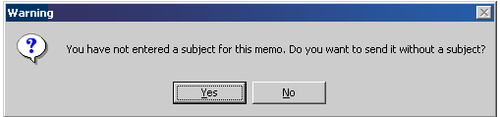
Notes now offers the ability to be prompted when you send a message with no subject:

There are new client follow-up actions to help with messaging tracking and workflow. (This displays with the right mouse button.)

There are new mail rules for spam management. For those looking for a quick status on digital message signatures and encryption, there are new status bar icons that will display this status. And there are improved workspace wizards.

One of the best new client...

CONTINUE READING
83
Tech Concepts
36
Programming languages
73
Tech Tools
Icon Unlimited access to the largest independent learning library in tech of over 8,000 expert-authored tech books and videos.
Icon Innovative learning tools, including AI book assistants, code context explainers, and text-to-speech.
Icon 50+ new titles added per month and exclusive early access to books as they are being written.
Domino 7 Application Development
notes
bookmark Notes and Bookmarks search Search in title playlist Add to playlist font-size Font size

Change the font size

margin-width Margin width

Change margin width

day-mode Day/Sepia/Night Modes

Change background colour

Close icon Search
Country selected

Close icon Your notes and bookmarks

Confirmation

Modal Close icon
claim successful

Buy this book with your credits?

Modal Close icon
Are you sure you want to buy this book with one of your credits?
Close
YES, BUY

Submit Your Feedback

Modal Close icon
Modal Close icon
Modal Close icon