Sign In Start Free Trial
Account

Add to playlist

Create a Playlist

Modal Close icon
You need to login to use this feature.
  • Book Overview & Buying EdX E-Learning Course Development
  • Table Of Contents Toc
EdX E-Learning Course Development

EdX E-Learning Course Development

By : Matthew A. Gilbert
4.3 (4)
close
close
EdX E-Learning Course Development

EdX E-Learning Course Development

4.3 (4)
By: Matthew A. Gilbert

Overview of this book

If you are an educator creating a course for edX or a corporate trainer using Open edX for large-scale learning and development initiatives, then edX E-Learning Course Development is the ideal book for you.
Table of Contents (10 chapters)
close
close
9
Index

Course sections

A section is the top-level category of content in your edX course. It can represent a time period, a chapter in your textbook, a course concept, or another organizing principle. It might contain one or more subsections, each with any number of units.

Students see sections in the Courseware tab on the left-hand side of the screen (in the accordion). They can expand one section at a time to see its contents. Adding a section is simple and straightforward, as follows:

  1. Log in to Studio at https://studio.edx.org/.
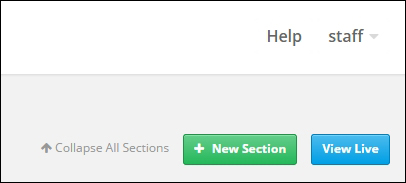
  2. Click on the green + New section button in the top-right corner:
    Course sections
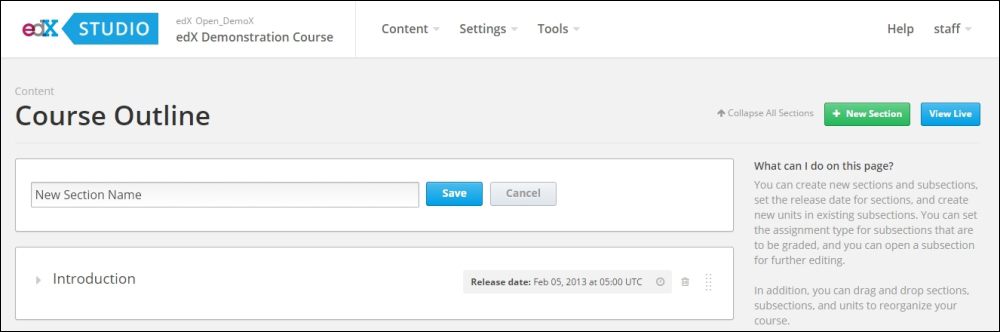
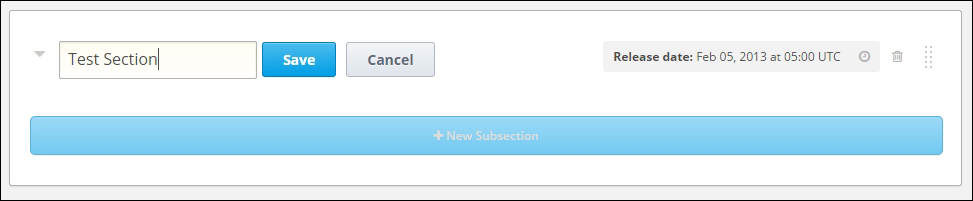
  3. Enter New Section Name and click on the blue Save button:
    Course sections
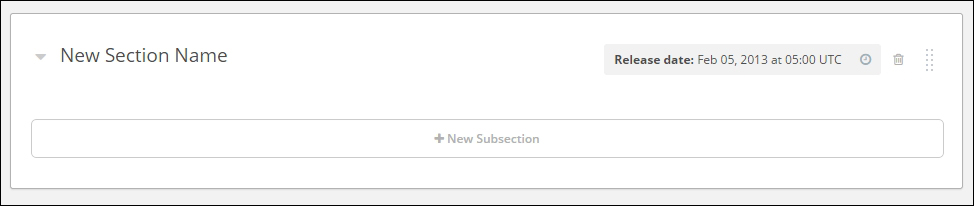
  4. View the newly created section at the bottom of Course Outline:
    Course sections
  5. Change the default section title from New Section Name by by typing a new section name and clicking on the blue Save button:
    Course sections
  6. Change the section's release date and time by clicking on the clock icon in the Release Date area (it will turn blue when you hover over it):

    Note

    Release Time of...

CONTINUE READING
83
Tech Concepts
36
Programming languages
73
Tech Tools
Icon Unlimited access to the largest independent learning library in tech of over 8,000 expert-authored tech books and videos.
Icon Innovative learning tools, including AI book assistants, code context explainers, and text-to-speech.
Icon 50+ new titles added per month and exclusive early access to books as they are being written.
EdX E-Learning Course Development
notes
bookmark Notes and Bookmarks search Search in title playlist Add to playlist font-size Font size

Change the font size

margin-width Margin width

Change margin width

day-mode Day/Sepia/Night Modes

Change background colour

Close icon Search
Country selected

Close icon Your notes and bookmarks

Confirmation

Modal Close icon
claim successful

Buy this book with your credits?

Modal Close icon
Are you sure you want to buy this book with one of your credits?
Close
YES, BUY

Submit Your Feedback

Modal Close icon
Modal Close icon
Modal Close icon