Using .NET for web development is a powerful way to build professional-grade websites and services. But moving from a basic project to a full-scale, production-ready system takes more than just business logic and views—it requires a deep understanding of architecture, maintainability, and scalability. Real-World Web Development with .NET 10 bridges that gap, guiding developers who want to build robust, secure, and maintainable web solutions using battle-tested .NET technologies.
You’ll start by designing structured websites using ASP.NET Core MVC, separating concerns, managing dependencies, and writing clean, testable code. From there, you’ll build RESTful services with Web API and use OData for rich, queryable endpoints. The book walks you through testing strategies and containerizing your applications. The final section introduces Umbraco CMS, showing you how to integrate content management into your site so end users can manage content independently.
By the end of the book, you'll be ready to build controller-based websites and services that are scalable, secure, and ready for real-world use while mastering Umbraco’s flexible, content-driven solutions—skills that are increasingly in demand across organizations and industries.
*Email sign-up and proof of purchase required
To understand ASP.NET Core, it is useful to first see where it came from.
A brief history of ASP.NET Core
ASP.NET Core is part of a 30-year history of Microsoft technologies used to build websites and services that work with data that have evolved over the decades:
ActiveX Data Objects (ADO) was released in 1996 and was Microsoft’s attempt to provide a single set of Component Object Model (COM) components for working with data. With the release of .NET Framework in 2002, an equivalent was created named ADO.NET, which is still today the fastest method to work with data in .NET with its core classes, DbConnection, DbCommand, and DbDataReader. ORMs like EF Core use ADO.NET internally. For example, EF Core for SQL Server references the Microsoft.Data.SqlClient package that implements ADO.NET for SQL Server. Even if you don’t use the rest of ADO.NET, its classes, like SqlConnectionBuilder, can be used to dynamically and safely construct connection strings to SQL Server databases.
Active Server Pages (ASP) was released in 1996 and was Microsoft’s first attempt at a platform for dynamic server-side execution of website code. The file extension for the page files is .asp. I include this bullet so that you understand where the ASP initialism comes from because it is still used today in modern ASP.NET Core.
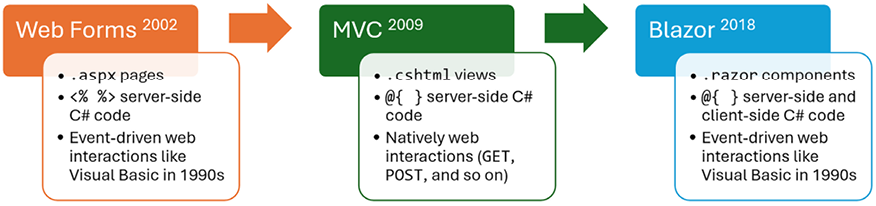
ASP.NET Web Forms was released in 2002 with .NET Framework and was designed to enable non-web developers, such as those familiar with Visual Basic, to quickly create websites by dragging and dropping visual components and writing event-driven code in Visual Basic or C#, as shown in Figure 1.2. Web Forms page files have the .aspx file extension. Web Forms is not available on modern .NET, and it should be avoided for new web projects, even with .NET Framework, due to limitations on cross-platform compatibility and modern development practices.
Windows Communication Foundation (WCF) was released in 2006 and enables developers to build SOAP and REST services. SOAP is powerful but complex, so it should be avoided in new projects unless you need advanced features, such as distributed transactions and complex messaging topologies. SOAP is still widely used in existing enterprise solutions, so you may come across it. I would be interested in hearing from you about this, since I am considering adding a chapter in a future edition of this book if there is enough interest.
ASP.NET MVC was released in 2009 to cleanly separate the concerns of web developers between the models, which temporarily store the data; the views, which present the data using various formats in the UI; and the controllers, which fetch the model and pass it to a view. This separation enables improved reuse and unit testing, and fits more naturally with web development without hiding the reality with an additional complex layer of event-driven user interface.
ASP.NET Web API was released in 2012 and enables developers to create HTTP services (a.k.a. REST services) that are simpler and more scalable than SOAP services.
ASP.NET SignalR was released in 2013 and enables real-time communication for websites by abstracting underlying technologies and techniques, such as WebSockets and long polling. This enables website features such as live chat or updates to time-sensitive data, such as stock prices, across a wide variety of web browsers, even when they do not support an underlying technology such as WebSockets, as described at the following link: https://websockets.spec.whatwg.org/.
ASP.NET Core was released in 2016 and combines modern implementations of .NET Framework technologies such as MVC, Web API, and SignalR with alternative technologies such as Razor Pages, gRPC, and Blazor, all running on modern .NET. Therefore, ASP.NET Core can execute cross-platform. ASP.NET Core has many project templates to get you started with its supported technologies. Over the past decade, the ASP.NET Core team has greatly improved performance and reduced memory footprint to make it the best platform for cloud computing. In some ways, Blazor is a return to Web Forms-style user interface development, as shown in Figure 1.2:
Figure 1.2: Evolution of web user interface technologies in .NET
Good practice: Choose ASP.NET Core to develop websites and web services because it includes web-related technologies that are mature, proven, and cross-platform.
Classic ASP.NET versus modern ASP.NET Core
Until modern .NET, ASP.NET was built on top of a large assembly in .NET Framework named System.Web.dll, and it was tightly coupled to Microsoft’s Windows-only web server named Internet Information Services (IIS). Over the years, this assembly has accumulated a lot of features, many of which are not suitable for modern cross-platform development.
ASP.NET Core is a major redesign of ASP.NET. It removes the dependency on the System.Web.dll assembly and IIS and is composed of modular lightweight packages, just like the rest of modern .NET. You can develop and run ASP.NET Core applications cross-platform on Windows, macOS, and Linux. Microsoft has even created a cross-platform, super-performant web server named Kestrel. Using IIS as the web server on Windows is still supported by ASP.NET Core if preferred.
Kestrel is mostly open source. However, it depends on some underlying components and infrastructure that are not fully open source. Kestrel’s open-source components include:
Kestrel uses the .NET Sockets API for its transport layer, whose implementation is open source.
Kestrel’s non-open-source components include:
Some lower-level networking optimizations and APIs in Windows, which Kestrel can take advantage of, are not open source. For example, some of the advanced socket APIs are part of Windows’ closed-source infrastructure.
While the .NET runtime is largely open source, there are some proprietary components or dependencies, especially when running on Windows, that are not open source. This would include some optimizations and integrations specific to Microsoft’s cloud infrastructure or networking stack that are baked into Kestrel’s performance characteristics when running on Windows.
If you’re using Kestrel hosted in Azure, some integration points, telemetry, and diagnostic services are proprietary. For example, Azure-specific logging, application insights, and security features (though not strictly part of Kestrel itself) are not fully open source.
Also, note that a non-open-source alternative to Kestrel is HTTP.sys. This is a Windows-specific HTTP server, and it is closed source. Applications can use HTTP.sys for edge cases requiring Windows authentication or other Windows-specific networking features, but this is outside of Kestrel itself.
Building websites using ASP.NET Core
Websites are made up of multiple web pages loaded statically from the filesystem or generated dynamically by a server-side technology such as ASP.NET Core. A web browser makes GET requests using Uniform Resource Locators (URLs) that identify each page and can manipulate data stored on the server using POST, PUT, and DELETE requests.
With many websites, the web browser is treated as a presentation layer, with almost all the processing performed on the server side. Some JavaScript might be used on the client side to implement form validation warnings and some presentation features, such as carousels.
ASP.NET Core provides multiple technologies for building the user interface for websites:
ASP.NET Core Razor Pages is a simple way to dynamically generate HTML for small websites.
ASP.NET Core MVC is an implementation of the Model-View-Controller (MVC) design pattern that is popular for developing complex websites. Microsoft’s first implementation of MVC on .NET was in 2009, so it is more than 15 years old now. Its APIs are stable, it has plentiful documentation and support, and many third parties have built powerful products and platforms on top of it and controller-based Web APIs. MVC is designed to work with the HTTP request/response model instead of hiding it, so that you are encouraged to embrace the nature of web development rather than pretending it doesn’t exist, which can store up worse problems in the future.
Blazor lets you build user interface components using C# and .NET instead of a JavaScript-based UI framework like Angular, React, and Vue. Early versions of Blazor required a developer to choose a hosting model. The Blazor WebAssembly hosting model runs your code in the browser like a JavaScript-based framework would. The Blazor Server hosting model runs your code on the server and updates the web page dynamically using SignalR. Introduced with .NET 8 is a unified, full-stack hosting model that allows individual components to execute either on the server or client side, or even to adapt dynamically at runtime.
So which should you choose?
”Blazor is now our recommended approach for building web UI with ASP.NET Core, but neither MVC nor Razor Pages are now obsolete. Both MVC & Razor Pages are mature, fully supported, and widely used frameworks that we plan to support for the foreseeable future. There is also no requirement or guidance to migrate existing MVC or Razor Pages apps to Blazor. For existing, well-established MVC-based projects, continuing to develop with MVC is a perfectly valid and reasonable approach.” – Dan Roth
I agree with the quote by Dan Roth. For me, there are two main choices:
For real-world websites and web services using mature and proven web development, choose controller-based ASP.NET Core MVC and Web API. For even more productivity, you can layer on top third-party platforms, for example, a .NET CMS like Umbraco. All these technologies are covered in this book.
For websites and web services using modern web development, choose Blazor for the web user interface and Minimal APIs for the web service. Choosing these is more of a risk because their APIs are still changing, as they are relatively new. These technologies are covered in my other books, C# 14 and .NET 10 – Modern Cross-Platform Development Fundamentals and Apps and Services with .NET 10.
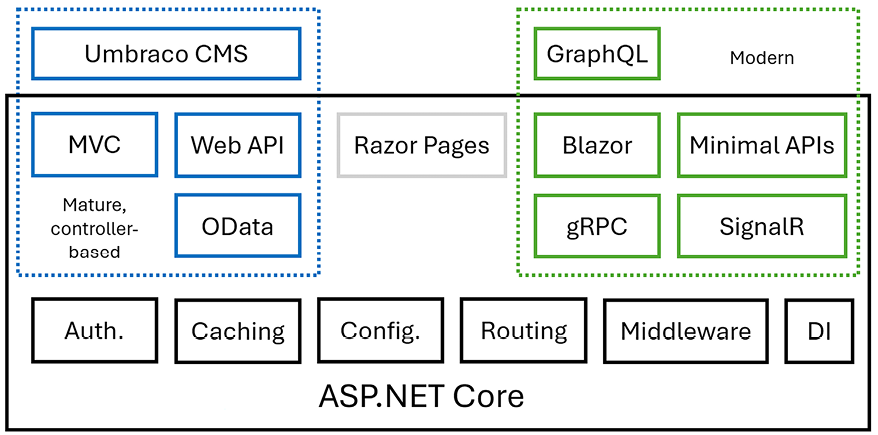
Much of ASP.NET Core is shared across these two choices anyway, so you will only need to learn about those shared components once, as shown in Figure 1.3:
Figure 1.3: Modern or mature controller-based (and shared) ASP.NET Core components
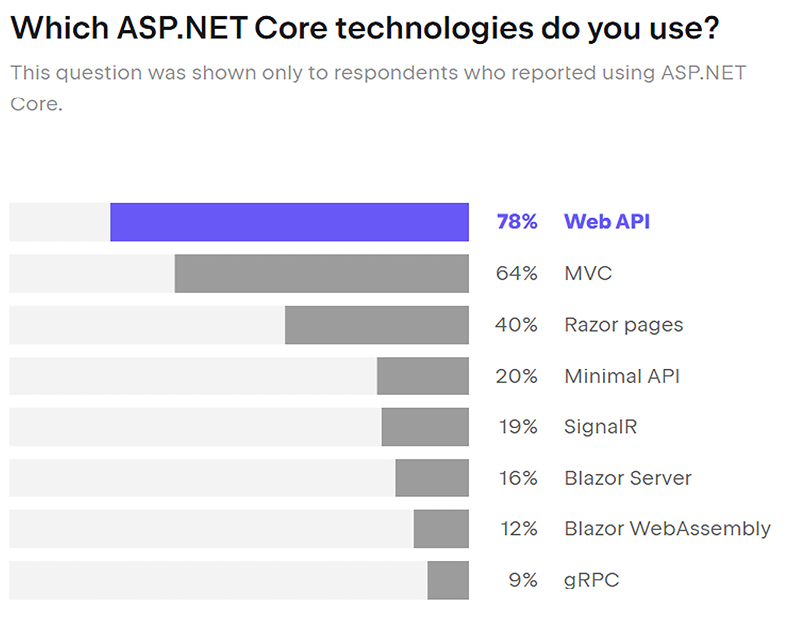
JetBrains did a survey of 26,348 developers from all around the world and asked about web development technologies and ASP.NET Core usage by .NET developers. The results showed that most .NET developers still use mature and proven controller-based technologies like MVC and Web API. The newer technologies, like Blazor, were far behind. A chart from the report is shown in Figure 1.4:
Figure 1.4: The State of Developer Ecosystem 2023 – ASP.NET Core
It is also interesting to see which JavaScript libraries and cloud host providers are used by .NET developers. For example, 18% use React, 15% use Angular, and 9% use Vue, and all have dropped by a few percent since the previous year. I speculate that this is due to a shift to Blazor instead. For cloud hosting, 24% use Azure, and 12% use AWS. This makes sense for .NET developers since Microsoft puts more effort into supporting .NET developers on its cloud platform.
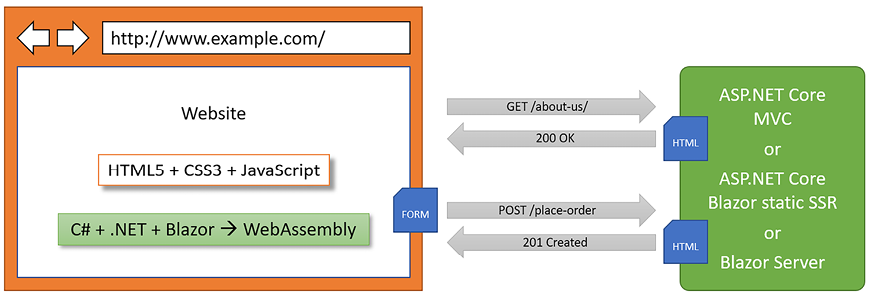
In summary, C# and .NET can be used on both the server side and the client side to build websites, as shown in Figure 1.5:
Figure 1.5: The use of C# and .NET to build websites on both the server and client side
To summarize what’s new in ASP.NET Core for its mature and proven controller-based technologies, let’s end this section with another quote from Dan Roth:
“We’re optimizing how static web assets are handled for all ASP.NET Core apps so that your files are pre-compressed as part of publishing your app. For API developers we’re providing built-in support for OpenAPI document generation.” – Dan Roth
Comparison of file types used in ASP.NET Core
It is useful to summarize the file types used by these technologies because they are similar but different. If you do not understand some subtle but important differences, it can cause much confusion when trying to implement your own projects. Please note the differences in Table 1.1:
Technology
Special filename
File extension
Directive
Razor View (MVC)
.cshtml
Razor Layout
.cshtml
Razor View Start
_ViewStart
.cshtml
Razor View Imports
_ViewImports
.cshtml
Razor Component (Blazor)
.razor
Razor Component (Blazor with page routing)
.razor
@page "<path>"
Razor Component Imports (Blazor)
_Imports
.razor
Razor Page
.cshtml
@page
Table 1.1: Comparison of file types used in ASP.NET Core
Directives like @page are added to the top of a file’s contents.
If a file does not have a special filename, then it can be named anything. For example, you might create a Razor View named Customer.cshtml, or you might create a Razor Layout named _MobileLayout.cshtml.
The naming convention for shared Razor files, like layouts and partial views, is to prefix with an underscore, _. For example, _ViewStart.cshtml, _Layout.cshtml, or _Product.cshtml (this might be a partial view for rendering a product).
A Razor Layout file like _MyCustomLayout.cshtml is identical to a Razor View. What makes the file a layout is being set as the Layout property of another Razor file, as shown in the following code:
@{
  Layout = "_MyCustomLayout"; // File extension is not needed.
}
Warning! Be careful to use the correct file extension and directive at the top of the file, or you will get unexpected behavior.
Building websites using a content management system
Most websites have a lot of content, and if developers had to be involved every time some content needed to be changed, that would not scale well. Almost no real-world website built with .NET only uses ASP.NET Core. A professional .NET web developer, therefore, needs to learn about other platforms built on top of ASP.NET Core.
A CMS enables CMS administrators to define content structure and templates to provide consistency and good design while making it easy for a non-technical content owner to manage the actual content. They can create new pages or blocks of content, and update existing content, knowing it will look great for visitors with minimal effort.
There are a multitude of CMSs available for all web platforms, like WordPress for PHP or Django for Python. CMSs that support modern .NET include Optimizely Content Cloud, Umbraco, Piranha, and Orchard Core.
The key benefit of using a CMS is that it provides a friendly content management user interface. Content owners log in to the website and manage the content themselves. The content is then rendered and returned to visitors using ASP.NET Core MVC controllers and views, or via web service endpoints, known as a headless CMS, to provide that content to “heads” implemented as mobile or desktop apps, in-store touchpoints, or clients built with JavaScript frameworks or Blazor.
This book covers the world’s most popular .NET CMS, Umbraco, in Chapter 14, Web Content Management Using Umbraco CMS, and Chapter 15, Customizing and Extending Umbraco CMS. The quantifiable evidence – usage statistics from BuiltWith, GitHub activity, download numbers, community engagement, and search trends – all point to Umbraco as the most popular .NET-based CMS worldwide. You can see a list of almost 100,000 websites built using Umbraco at the following link: https://trends.builtwith.com/websitelist/Umbraco/Historical.
Umbraco is open source and hosted on GitHub. It has over 2.7k forks and 4.4k stars on its main repository, found at the following link: https://github.com/umbraco/Umbraco-CMS.
The active developer community and constant updates indicate its popularity among developers. Umbraco has reported more than six million downloads of its CMS, which is a significant metric compared to competitors in the .NET CMS space.
Web applications are often built using technologies known as Single-Page Application (SPA) frameworks, such as Blazor, Angular, React, Vue, or a proprietary JavaScript library. They can make requests to a backend web service to get more data when needed and post updated data using common serialization formats such as XML and JSON. The canonical examples are Google web apps like Gmail, Maps, and Docs.
With a web application, the client side uses JavaScript frameworks or Blazor to implement sophisticated user interactions, but most of the important processing and data access still happens on the server side because the web browser has limited access to local system resources.
JavaScript is loosely typed and is not designed for complex projects, so most JavaScript libraries these days use TypeScript, which adds strong typing to JavaScript and is designed with many modern language features for handling complex implementations.
The .NET SDK has project templates for JavaScript and TypeScript-based SPAs, but we will not spend any time learning how to build JavaScript and TypeScript-based SPAs in this book.
If you are interested in building SPAs with an ASP.NET Core backend, Packt has other books that you might be interested in, as shown in the following list:
In this book, you will learn how to build a controller-based web service using ASP.NET Core Web API, and then how to call that web service from an ASP.NET Core MVC website.
There are no formal definitions, but services are sometimes described based on their complexity:
Service: All functionality needed by a client app in one monolithic service.
Microservice: Multiple services that each focus on a smaller set of functionalities. They are often deployed using containerization, which we will cover in Chapter 8, Configuring and Containerizing ASP.NET Core Projects.
Nanoservice: A single function provided as a service. Unlike services and microservices that are hosted 24/7/365, nanoservices are often inactive until called upon to reduce resources and costs.
Cloud providers and deployment tools
These days, websites and web services are often deployed to cloud providers like Microsoft Azure or Amazon Web Services. Hundreds of different tools are used to perform the deployments, like Azure Pipelines or Octopus Deploy.
Cloud providers and deployment tools are out of the scope for this book because there are too many choices, and I don’t want to force anyone to learn about or pay for cloud hosting that they will never use for their own projects. Instead, this book covers containerization using Docker in Chapter 8, Configuring and Containerizing ASP.NET Core Projects. Once you have containerized an ASP.NET Core project, it is easy to deploy it to any cloud provider using any deployment or production management tool.
We have now reviewed the important technologies used for web development with .NET. Now, let’s make sure that you know how to get the solutions for all the coding tasks in this book if you get stuck.
Read this chapter and the full book FREE of cost - No Credit card required!
Plus access over 8,000 other expert tech books and videos just by signing up - No commitment!
CONTINUE READING
83
Tech Concepts
36
Programming languages
73
Tech Tools
Unlimited access to the largest independent learning library in tech of over 8,000 expert-authored tech books and videos.
Innovative learning tools, including AI book assistants, code context explainers, and text-to-speech.
50+ new titles added per month and exclusive early access to books as they are being written.





 Free Chapter