Sign In Start Free Trial
Account

Add to playlist

Create a Playlist

Modal Close icon
You need to login to use this feature.
  • Book Overview & Buying Clean Code with TypeScript
  • Table Of Contents Toc
Clean Code with TypeScript

Clean Code with TypeScript

By : Rukevwe Ojigbo, Dr. Sanjay Krishna Anbalagan
close
close
Clean Code with TypeScript

Clean Code with TypeScript

By: Rukevwe Ojigbo, Dr. Sanjay Krishna Anbalagan

Overview of this book

Clean Code with TypeScript is a practical guide to writing maintainable, efficient, and elegant TypeScript code. It equips developers with the essential principles and techniques to produce code that is both functional and easy to read and maintain. Written by Rukevwe Ojigbo and Dr. Sanjay Krishna Anbalagan, expert software engineers with extensive experience in building scalable, high-performance applications across industries, this book reflects practical lessons from their real-world projects. Throughout the book, you’ll work through hands-on implementations, including an LLM integration project and a full-stack TypeScript application, ensuring the concepts are grounded, relevant, and applicable to real development environments. What sets this book apart is its example-driven approach rooted in real-world scenarios. It goes beyond TypeScript best practices by developing your architectural thinking, enhancing team collaboration, and fostering long-term code quality. Whether you're new to TypeScript or an experienced developer, this guide will improve your TypeScript programming skills and help you deliver cleaner, more robust code. *Email sign-up and proof of purchase required
Table of Contents (16 chapters)
close
close
14
Other Books You May Enjoy
15
Index

Understanding basic types in TypeScript

In TypeScript, basic types serve as the building blocks for crafting meaningful data representations. They establish a shared understanding between you, the developer, and the TypeScript compiler, ensuring clarity and precision within your code.

Throughout this section, you will gain insights into the basic types in TypeScript, how to effectively utilize them in your code, and discover practical examples and use cases for each type.

What are basic types in TypeScript?

In TypeScript, basic types are used to represent the most fundamental data types in the language. The following are the basic types in TypeScript:

  • string: Represents a sequence of characters
  • number: Represents a numeric value
  • boolean: Represents a logical value that can be either true or false
  • null: Represents a null value
  • undefined: Represents an undefined value
  • symbol: Represents a unique identifier

How to use basic types in TypeScript

To use basic types in TypeScript, you can declare a variable with a specific type. Here are some examples:

  • String type:
    let  fullName: string = "John Doe";

    Practical example/use case: Used to represent text data, such as names, addresses, and messages

  • Number type:
    let age: number = 30;

    Practical example/use case: Used to represent numeric data, such as ages, prices, and quantities

  • Boolean type:
    let isStudent: boolean = true;

    Practical example/use case: Used to represent logical data, such as whether a user is logged in or not

  • Null type:
    let nothing: null = null;

    Practical example/use case: Used to represent the absence of a value

  • Undefined type:
    let something: undefined = undefined;

    Practical example/use case: Used to represent a variable that has not been assigned a value

  • Symbol type:
    let id: symbol = Symbol("id");

    Practical example/use case: Used to represent a unique identifier, such as object keys

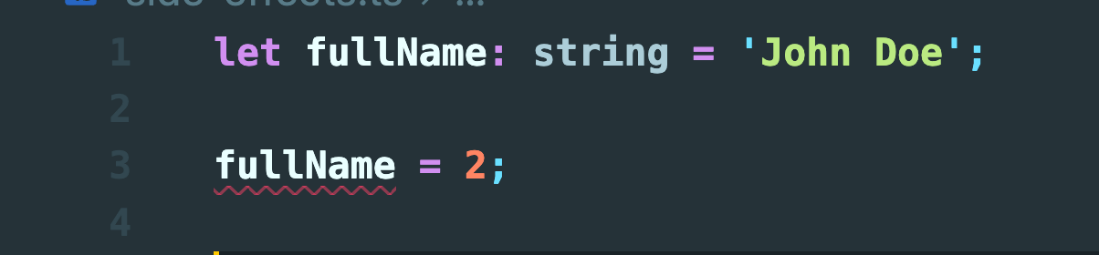
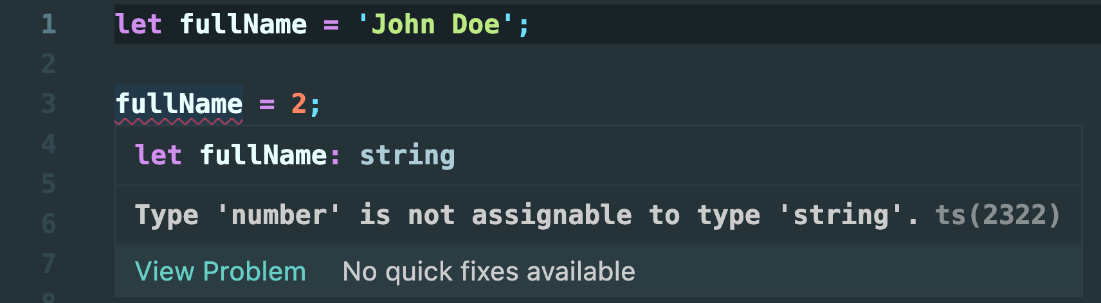
We've just listed common basic types in TypeScript. If you choose one of these variables, such as the fullName variable, and attempt to reassign it to a different type that doesn't match the expected type, TypeScript will show an error. For instance, in the following figure, we've tried to reassign the fullName variable to a number on line 4:

Image 4

Figure 1.4 —The squiggly red line under the fullName variable indicates a TypeScript error

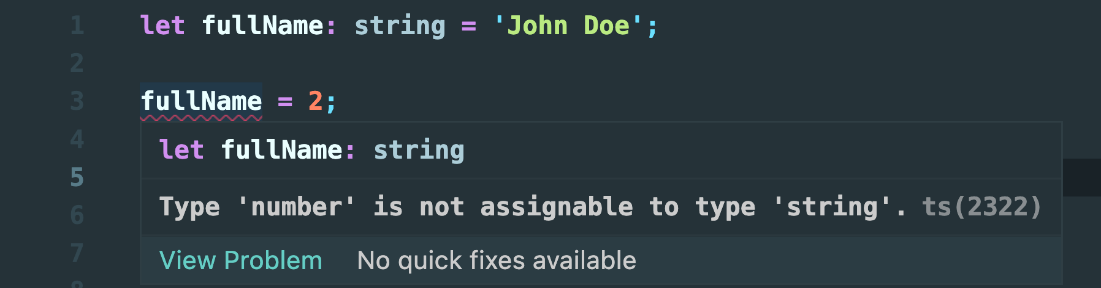
If you look closely at line 3, where the reassignment is happening, you will notice the red line. If you hover on the red line, you will notice what the issue is:

Error: Type 'number' is not assignable to type 'string'.

See the following figure for more clarity:

Image 5

Figure 1.5 — The error details when you hover over the fullName variable

While this example may appear trivial, the implications become crucial in real-world scenarios. Imagine building a financial application in plain JavaScript where precise data types are essential for mathematical operations. In such scenarios, TypeScript's type checking catches potential type errors early, reducing the risk of bugs, such as unintended arithmetic operations between incompatible types (e.g., a string and a number).

Arrays

Think of a shopping list, a sequence of items you need to buy. In TypeScript, arrays provide similar functionality, serving as ordered collections of values. Just like your list items, each element within an array can be accessed using its index position.

In the following example, we declare a shoppingList array with a type annotation specifying that it should contain strings. We initialize the array with some initial items – "Apples", "Bananas", and "Milk":

const shoppingList: string[] = ["Apples", "Bananas", "Milk"];

If we attempt to add a number (123) into the shoppingList array using the push method, we get a TypeScript error:

"Argument of type 'number' is not assignable to parameter of type 'string'."

In a previous section (on types and interfaces), we discussed objects and types. As an example, we defined the Person type:

type Person = {
  name: string;
  age: number;
  greet: () => void;
};

Now, let's combine this Person type with an array to create a list of individuals, each represented by an object. For instance, we'll include two people, Alice and Bob:

const persons: Person[] = [
 {
   name: "Alice",
   age: 30,
   greet() {
    console.log(
`Hello, my name is ${this.name} and I'm 	${this.age} years old.`
    );
   },
  },
 {
   name: "Bob",
   age: 25,
   greet() {
    console.log(
`Hello, my name is ${this.name} and I'm 	${this.age} years old.`);
   },
  },
];

In this example, we're already assembling these building blocks to create more robust and type-safe code. If you were to add a value to the persons array that doesn't conform to the structure defined by the Person type, TypeScript would raise an error.

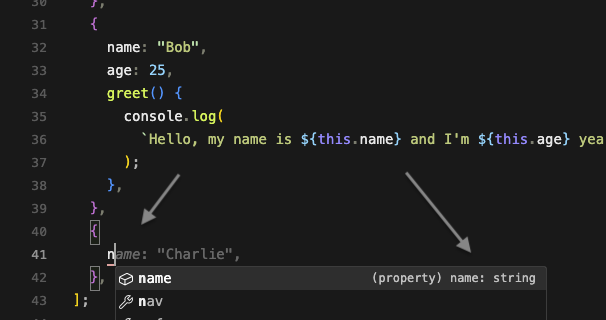
As demonstrated earlier, we continue to reap the benefits of type inference. For instance, if we attempt to add a new person object to our list, TypeScript provides a helpful hint in our code editor regarding the expected property types. Take a look at the following figure:

Image 6

Figure 1.9 — Code editor displaying type hints for the expected properties

Type inference

In the examples we've just seen regarding basic types, we explicitly specified the type of the variable. However, TypeScript's type system can infer types automatically. For instance, if we use the fullName variable again without explicitly specifying its type, TypeScript will still complain if we attempt to reassign the variable to a value of the number type:

Image 7

Figure 1.6 — TypeScript inferring types, even when they are not explicitly stated

Now that we've explored the basics of TypeScript types, let's delve into more complex types in the next section.

CONTINUE READING
83
Tech Concepts
36
Programming languages
73
Tech Tools
Icon Unlimited access to the largest independent learning library in tech of over 8,000 expert-authored tech books and videos.
Icon Innovative learning tools, including AI book assistants, code context explainers, and text-to-speech.
Icon 50+ new titles added per month and exclusive early access to books as they are being written.
Clean Code with TypeScript
notes
bookmark Notes and Bookmarks search Search in title playlist Add to playlist download Download options font-size Font size

Change the font size

margin-width Margin width

Change margin width

day-mode Day/Sepia/Night Modes

Change background colour

Close icon Search
Country selected

Close icon Your notes and bookmarks

Confirmation

Modal Close icon
claim successful

Buy this book with your credits?

Modal Close icon
Are you sure you want to buy this book with one of your credits?
Close
YES, BUY

Submit Your Feedback

Modal Close icon
Modal Close icon
Modal Close icon