-
Book Overview & Buying
-
Table Of Contents
Clean Code with TypeScript
By :
In the previous section, we discussed the basic types in TypeScript. In the realm of TypeScript, data representation extends beyond simple types such as strings and numbers. This section delves into objects, arrays, tuples, and enums, empowering you to structure and represent more complex data collections and enhance code readability.
We will begin with objects.
Objects in TypeScript allow you to encapsulate related data and functionality into a single entity. You can define object properties and methods, providing a clear structure to your code. In the following code snippet, we have created a person object:
const person: { name: string; age: number; greet: () => void } = {
name: "Alice",
age: 30,
greet() {
console.log(
`Hello, my name is ${this.name} and I'm ${this.age} years old.`
);
},
};
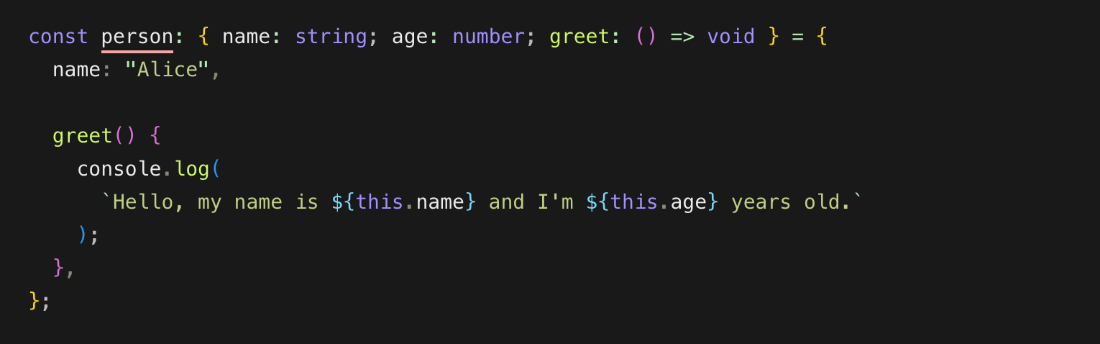
We have specified the expected structure of our object (the expected type). Let's see what happens when I remove one of the properties. Refer to the code snippet in the following figure; I have omitted the age property:

Figure 1.7 — TypeScript error when the object contains incomplete details
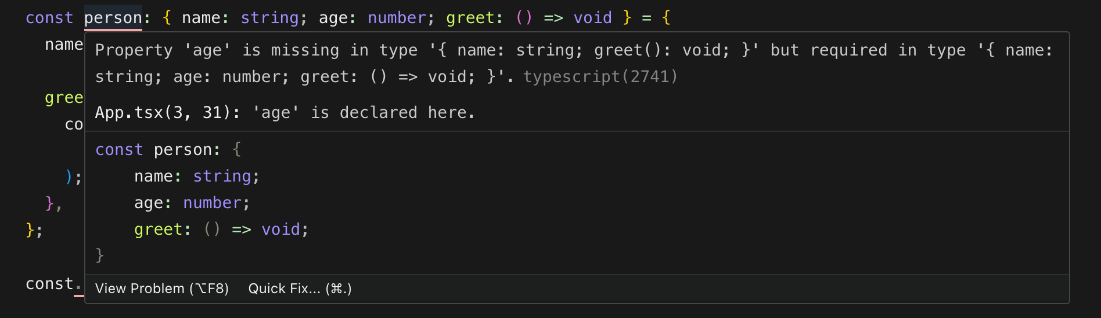
You will notice the red line under the person variable. If we hover over that line, we see more details about what the issue is. To get a better understanding, refer to the following figure:

Figure 1.8 — TypeScript shows error details when we hover over the person object
TypeScript once again is coming in handy, highlighting errors and giving us immediate feedback.
In the previous example, we defined the structure of an object (type) in the same line as our variable declaration. However, for improved reusability and organization, it's advantageous to extract the type definition into a separate block:
type Person = {
name: string;
age: number;
greet: () => void
}
And then we can use the defined type with the object as follows:
const person: Person = {
name: "Alice",
age: 25,
greet() {
console.log(
`Hello, my name is ${this.name} and I'm ${this.age} years old.`);
},
};
This approach is beneficial because it enables code reuse. You can combine types to form even more complex types and reuse them across different locations in your application.
Interfaces in TypeScript serve a similar purpose to types but with additional capabilities, allowing you to define contracts for object shapes and behavior. We'll delve into interfaces in more detail later, exploring their nuances and practical applications.
"Argument of type 'number' is not assignable to parameter of type 'string'."
`Hello, my name is ${this.name} and I'm ${this.age} years old.`
`Hello, my name is ${this.name} and I'm ${this.age} years old.`);
Tuples are similar to arrays, but have a fixed, predefined length and specific types for each element.
Imagine modeling a product with an ID, name, and price:
type Product = [number, string, number];
const product: Product = [123, "T-Shirt", 19.99];
You can access this as a normal array, so for example, if I wanted to see the price (third element in the array or second index), I could type something like this:
console.log(product[2]);
You can see in your console or terminal that the output is as follows:
19.99;
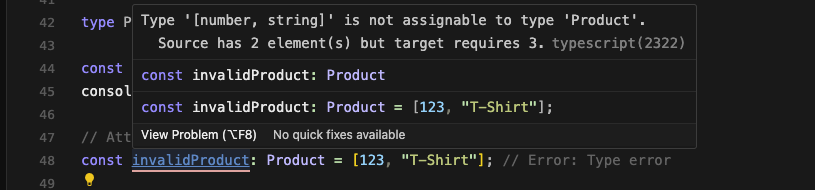
But I declared a different variable, say invalidProducts, and specified its type as Product:
const invalidProduct: Product = [123, "T-Shirt"];
The preceding code results in a type error. See the following figure for details:

Figure 1.10 — Code editor displaying type hints for the expected properties
The error message states the following:
Type '[number, string]' is not assignable to type 'Product'.
Source has 2 element(s) but target requires 3.
Enums allow you to define named constants for a set of related values with a clear, predefined list of choices. This structure makes code more consistent and reduces the chance of invalid values.
Let's start with a simple example to demonstrate how enums work:
enum Direction {
Up,
Down,
Left,
Right
}
let playerDirection: Direction = Direction.Up;
console.log("Player is facing:", playerDirection);
Output: Player is facing: 0 (Up)
In this example, we define a Direction enum with four members: Up, Down, Left, and Right. By default, Up is assigned the value of 0, Down is 1, Left is 2, and Right is 3. We then assign Direction.Up to a variable, playerDirection, and log its value, which outputs 0, indicating that the player is facing upward.
You can also explicitly set values for enum members:
enum ErrorCode {
NotFound = 404,
Unauthorized = 401,
InternalServerError = 500
}
let error: ErrorCode = ErrorCode.NotFound;
console.log("Error code:", error); // Output: Error code: 404 (NotFound)
In this example, we define an ErrorCode enum with three members: NotFound, Unauthorized, and InternalServerError. We assign custom HTTP status code values to each member. When we assign ErrorCode.NotFound to the error variable, it holds the value of 404.
Enums are especially useful when defining functions that operate on a fixed set of values. Here is an example:
enum DayOfWeek {
Sunday,
Monday,
Tuesday,
Wednesday,
Thursday,
Friday,
Saturday
}
function isWeekend(day: DayOfWeek): boolean {
return day === DayOfWeek.Saturday || day === DayOfWeek.Sunday;
}
let today: DayOfWeek = DayOfWeek.Saturday;
console.log("Is today a weekend?", isWeekend(today));
In this example, we define a DayOfWeek enum representing the days of the week. We then define an isWeekend function that takes a DayOfWeek parameter and returns true if it is a weekend (Saturday or Sunday), and false otherwise. Finally, we call the function with DayOfWeek.Saturday, which outputs true.
Enums in TypeScript provide a powerful way to represent fixed sets of values. By utilizing enums effectively, you can make your code more expressive and self-documenting, leading to better overall code quality. Experiment with enums in your TypeScript projects to see how they can simplify your development process.
In this section, we've broadened our TypeScript skills by diving into objects, arrays, tuples, and enums, enhancing our ability to handle complex data. Moving forward, we'll explore advanced types such as unions, intersections, generics, and conditionals, further refining our coding capabilities.