Sign In Start Free Trial
Account

Add to playlist

Create a Playlist

Modal Close icon
You need to login to use this feature.
  • Book Overview & Buying Mastering Sublime Text
  • Table Of Contents Toc
  • Feedback & Rating feedback
Mastering Sublime Text

Mastering Sublime Text

By : Dan Peleg
3.5 (12)
close
close
Mastering Sublime Text

Mastering Sublime Text

3.5 (12)
By: Dan Peleg

Overview of this book

Sublime is the leading platform for developing websites, applications, and software. Sublime Text is a sophisticated, cross-platform text and source code editor. It supports a number of different programming languages and is extremely efficient and feature rich. With Sublime Text, programmers can develop their web applications faster and with more efficiency. This book will put you at the frontier of modern software development. It will teach you how to leverage Sublime for anything from mobile games to missile protection. Above all, this book will help you harness the power of other Sublime users and always stay on top. This book will show you how to get started, from basic installation through lightning fast code navigation and up to the development of your own plugins. It takes you from the early stages of navigating through the platform and moves on by teaching you how to fully customize your platform, test, debug, and eventually create and share your own plugins to help and lead this community forward. The book will then teach you how to efficiently edit text, primarily by using the keyboard. You will learn how to interact with the Sublime Text community using the mailing lists and IRC.
Table of Contents (15 chapters)
close
close
Mastering Sublime Text
Credits
About the Author
About the Reviewers
www.PacktPub.com
Preface
1
Index

Installing Sublime Text on OS X


This section will explain how to install Sublime Text on OS X 10.7 or later, as required.

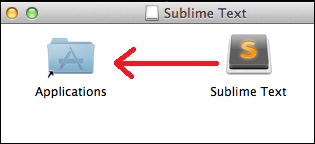
First go to http://www.sublimetext.com/3 and click on the download link for OS X. A file called Sublime Text Build #.dmg will be downloaded. Open this file and we will see the following window:

Simply drag the Sublime Text icon into the Applications folder and wait for the application to be copied.

We have just installed Sublime on our OS X! Is that all? No, we can also get the bleeding edge version from here: http://www.sublimetext.com/3dev. Bleeding edge versions are available for registered users only and are more susceptible to bugs.

Working with Sublime CLI

Sublime Text ships with a CLI called subl, but this CLI isn't added to our environment by default. We want to be able to use it straight from our terminal, so we need to add a symbolic link called subl to the subl executable.

ln –s /Applications/Sublime\ Text.app/Contents/SharedSupport/bin/subl /usr/local/bin/subl

To see if it worked, type subl filename in the terminal where filename is the file you want to edit. Did it work? If not, then we need to add our folder that contains the new symlink to the environment. Run the following command:

open ~/.bash_profile

The first line of the file should start with export PATH=. It contains all the directories that will be looked into for executable binaries when we type a command in the terminal. Since we created a symlink to subl inside the /usr/local/bin directory, we will add it to the path by adding it to the directories:

export PATH=/usr/local/bin[…]

Note

[…] represents other directories that would be listed on the same line, separated by a colon.

Now, run the following code before continuing:

source ~/.bash_profile

This will reload your .bash_profile with the newly added directory.

Sublime CLI should work now; try one of the following commands:

subl filename ("filename" is the filename to edit)
subl foldername ("foldername" is the folder to open)
subl . (to open the current directory)

That's it! We have Sublime Text with CLI running on our OS X!

Visually different images
CONTINUE READING
83
Tech Concepts
36
Programming languages
73
Tech Tools
Icon Unlimited access to the largest independent learning library in tech of over 8,000 expert-authored tech books and videos.
Icon Innovative learning tools, including AI book assistants, code context explainers, and text-to-speech.
Icon 50+ new titles added per month and exclusive early access to books as they are being written.
Mastering Sublime Text
notes
bookmark Notes and Bookmarks search Search in title playlist Add to playlist font-size Font size

Change the font size

margin-width Margin width

Change margin width

day-mode Day/Sepia/Night Modes

Change background colour

Close icon Search
Country selected

Close icon Your notes and bookmarks

Confirmation

Modal Close icon
claim successful

Buy this book with your credits?

Modal Close icon
Are you sure you want to buy this book with one of your credits?
Close
YES, BUY

Submit Your Feedback

Modal Close icon
Modal Close icon
Modal Close icon