Sign In Start Free Trial
Account

Add to playlist

Create a Playlist

Modal Close icon
You need to login to use this feature.
  • Book Overview & Buying Mastering Sublime Text
  • Table Of Contents Toc
Mastering Sublime Text

Mastering Sublime Text

By : Dan Peleg
3.5 (12)
close
close
Mastering Sublime Text

Mastering Sublime Text

3.5 (12)
By: Dan Peleg

Overview of this book

Sublime is the leading platform for developing websites, applications, and software. Sublime Text is a sophisticated, cross-platform text and source code editor. It supports a number of different programming languages and is extremely efficient and feature rich. With Sublime Text, programmers can develop their web applications faster and with more efficiency. This book will put you at the frontier of modern software development. It will teach you how to leverage Sublime for anything from mobile games to missile protection. Above all, this book will help you harness the power of other Sublime users and always stay on top. This book will show you how to get started, from basic installation through lightning fast code navigation and up to the development of your own plugins. It takes you from the early stages of navigating through the platform and moves on by teaching you how to fully customize your platform, test, debug, and eventually create and share your own plugins to help and lead this community forward. The book will then teach you how to efficiently edit text, primarily by using the keyboard. You will learn how to interact with the Sublime Text community using the mailing lists and IRC.
Table of Contents (15 chapters)
close
close
Mastering Sublime Text
Credits
About the Author
About the Reviewers
www.PacktPub.com
Preface
1
Index

Installing Sublime Text on Windows 32/64 bit


This section will explain how to install Sublime Text on Windows 7/8, 32/64 bit. It is important to get the right version because the 64-bit version won't run on a 32-bit PC.

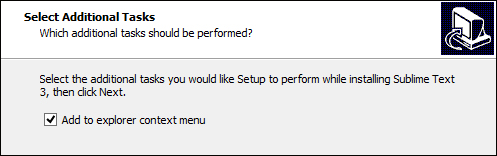
Go to http://www.sublimetext.com/3 and download the relevant file for 32-bit or 64-bit. A file called Sublime Text Build # Setup.exe will be downloaded. Open the file and you will be guided through the setup. Click on Next and choose setup location. Next, add Sublime to the explorer context by American English: should use "checking" Add to explorer context menu as shown in the following screenshot:

Then, finish the installation. We have just installed Sublime! Are we done? Not yet.

Adding Sublime to the environment

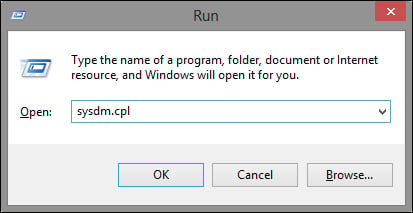
We want to add Sublime to our environment so we can use it straight from the command line. Open Run by pressing WinKey + R and enter sysdm.cpl, as shown in the following screenshot:

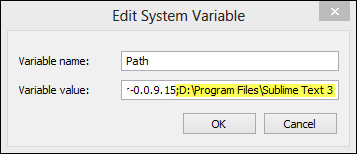
Click on OK, the System Properties window should open. Now, go to the Advanced tab and click on the Environment Variables… button at the bottom-right corner. Environment variables should open, look for the Path variable in System variables, double-click it to open the Edit System Variable window, and add your Sublime installation path to the end of the Variable value field prefixed with a semicolon, as shown in the following screenshot:

As we can see, my installation path is D:\Program Files\Sublime Text 3. Click on OK. Now we can run Sublime from the command line by typing sublime_text filename where filename is the file to edit. But the sublime_text command is too long to type every time we want to open a file with Sublime. Go to your installation directory and create a new file named subl.bat. Paste the following code into the file:

@echo off
start sublime_text.exe %*

The first line turns off the echo of the .bat file. This means that we won't see any output when we run the file. The second line will start the sublime_text executable with the given parameters.

Save the .bat file and open a new command line. We can now use the following commands in our command line:

subl filename ("filename" is the filename to edit)
subl foldername ("foldername" is the folder to open)
subl . (to open the current directory)

That's it; we have Sublime on our Windows PC!

CONTINUE READING
83
Tech Concepts
36
Programming languages
73
Tech Tools
Icon Unlimited access to the largest independent learning library in tech of over 8,000 expert-authored tech books and videos.
Icon Innovative learning tools, including AI book assistants, code context explainers, and text-to-speech.
Icon 50+ new titles added per month and exclusive early access to books as they are being written.
Mastering Sublime Text
notes
bookmark Notes and Bookmarks search Search in title playlist Add to playlist font-size Font size

Change the font size

margin-width Margin width

Change margin width

day-mode Day/Sepia/Night Modes

Change background colour

Close icon Search
Country selected

Close icon Your notes and bookmarks

Confirmation

Modal Close icon
claim successful

Buy this book with your credits?

Modal Close icon
Are you sure you want to buy this book with one of your credits?
Close
YES, BUY

Submit Your Feedback

Modal Close icon
Modal Close icon
Modal Close icon