
Sign In Start Free Trial
Account

Add to playlist

Create a Playlist

Modal Close icon
You need to login to use this feature.
  • Book Overview & Buying Managing and Visualizing Your BIM Data
  • Table Of Contents Toc
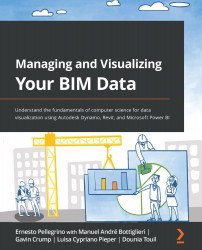
Managing and Visualizing Your BIM Data

Managing and Visualizing Your BIM Data

By : Ernesto Pellegrino, Manuel André Bottiglieri, Gavin Crump, Luisa Cypriano Pieper, Dounia Touil
4.8 (5)
close
close
Managing and Visualizing Your BIM Data

Managing and Visualizing Your BIM Data

4.8 (5)
By: Ernesto Pellegrino, Manuel André Bottiglieri, Gavin Crump, Luisa Cypriano Pieper, Dounia Touil

Overview of this book

Business intelligence software has rapidly spread its roots in the AEC industry during the last few years. This has happened due to the presence of rich digital data in BIM models whose datasets can be gathered, organized, and visualized through software such as Autodesk Dynamo BIM and Power BI. Managing and Visualizing Your BIM Data helps you understand and implement computer science fundamentals to better absorb the process of creating Dynamo scripts and visualizing the collected data on powerful dashboards. This book provides a hands-on approach and associated methodologies that will have you productive and up and running in no time. After understanding the theoretical aspects of computer science and related topics, you will focus on Autodesk Dynamo to develop scripts to manage data. Later, the book demonstrates four case studies from AEC experts across the world. In this section, you’ll learn how to get started with Autodesk Dynamo to gather data from a Revit model and create a simple C# plugin for Revit to stream data on Power BI directly. As you progress, you’ll explore how to create dynamic Power BI dashboards using Revit floor plans and make a Power BI dashboard to track model issues. By the end of this book, you’ll have learned how to develop a script to gather a model’s data and visualize datasets in Power BI easily.
Table of Contents (17 chapters)
close
close
1
Section 1: Overview of Digitalization and BIM Data
5
Section 2: Examples and Case Studies from Experts around the World
10
Section 3: Deep Dive into Autodesk Dynamo

Summary

In this chapter, we learned how to set up Visual Studio and customize its environment to program our plugin. We understood how to configure the Revit API and how to start the plugin solution. Then we moved on to Power BI to finalize the streaming data connection from Revit, and next, how to visualize, publish, and share the report.

This chapter has set the flow to understand all the great plugins you will build on top of Revit. Software implementation is one of the gems in our field, helping us to set up workflows to save time and increase efficiency.

This chapter concludes our trip through the core of plugin development, helping us better understand how this application works.

Back to Ernesto

This chapter has been tremendous. Manuel, from what I recall, always leaned toward computer science applications and development. He is now a full-stack developer, and one of the most brilliant ones. I learned a lot here about plugin development, what the process is, and...

CONTINUE READING
83
Tech Concepts
36
Programming languages
73
Tech Tools
Icon Unlimited access to the largest independent learning library in tech of over 8,000 expert-authored tech books and videos.
Icon Innovative learning tools, including AI book assistants, code context explainers, and text-to-speech.
Icon 50+ new titles added per month and exclusive early access to books as they are being written.
Managing and Visualizing Your BIM Data
notes
bookmark Notes and Bookmarks search Search in title playlist Add to playlist download Download options font-size Font size

Change the font size

margin-width Margin width

Change margin width

day-mode Day/Sepia/Night Modes

Change background colour

Close icon Search
Country selected

Close icon Your notes and bookmarks

Confirmation

Modal Close icon
claim successful

Buy this book with your credits?

Modal Close icon
Are you sure you want to buy this book with one of your credits?
Close
YES, BUY

Submit Your Feedback

Modal Close icon
Modal Close icon
Modal Close icon