Sign In Start Free Trial
Account

Add to playlist

Create a Playlist

Modal Close icon
You need to login to use this feature.
  • Book Overview & Buying Mastering Unity Scripting
  • Table Of Contents Toc
Mastering Unity Scripting

Mastering Unity Scripting

By : Alan Thorn
4.5 (14)
close
close
Mastering Unity Scripting

Mastering Unity Scripting

4.5 (14)
By: Alan Thorn

Overview of this book

Mastering Unity Scripting is an advanced book intended for students, educators, and professionals familiar with the Unity basics as well as the basics of scripting. Whether you've been using Unity for a short time or are an experienced user, this book has something important and valuable to offer to help you improve your game development workflow.
Table of Contents (12 chapters)
close
close
11
Index

Classes and polymorphism

To illustrate polymorphism in C#, let's start by considering the following code sample 1-12. This sample doesn't demonstrate polymorphism immediately but represents the start of a scenario where polymorphism will be useful, as we'll see. Here, a basic skeleton class is defined for a potential non-player character (NPC) in a generic RPG game. The class is intentionally not comprehensive and features basic variables that only mark the starting point for a character. The most important thing here is that the class features a SayGreeting function, which should be invoked when the player engages the NPC in conversation. It displays a generic welcome message to Console as follows:

01 using UnityEngine;
02 using System.Collections;
03 
04 public class MyCharacter
05 {
06 public string CharName = "";
07 public int Health = 100;
08 public int Strength = 100;
09 public float Speed = 10.0f;
10 public bool isAwake = true;
11 
12     //Offer greeting to the player when entering conversation
13     public virtual void SayGreeting()
14     {
15         Debug.Log ("Hello, my friend");
16     }
17 }

The first problem to arise relates to the diversity and believability of the MyCharacter class if we try imagining how it'd really work in a game. Specifically, every character instantiated from MyCharacter will offer exactly the same greeting when SayGreeting is invoked: men, women, orcs, and everybody. They'll all say the same thing, namely, "Hello, my friend". This is neither believable nor desirable. Perhaps, the most elegant solution would be to just add a public string variable to the class, thus allowing customization over the message printed. However, to illustrate polymorphism clearly, let's try a different solution. We could create several additional classes instead, all derived from MyCharacter, one for each new NPC type and each offering a unique greeting from a SayGreeting function. This is possible with MyCharacter, because SayGreeting has been declared using the virtual keyword (line 13). This allows derived classes to override the behavior of SayGreeting in the MyCharacter class. This means the SayGreeting function in derived classes will replace the behavior of the original function in the base class. Such a solution might look similar to the code sample 1-13:

01 using UnityEngine;
02 using System.Collections;
03 //-------------------------------------------
04 public class MyCharacter
05    {
06    public string CharName = "";
07    public int Health = 100;
08 public int Strength = 100;
09 public float Speed = 10.0f;
10 public bool isAwake = true;
11 
12 //Offer greeting to the player when entering conversation
13 public virtual void SayGreeting()
14 {
15        Debug.Log ("Hello, my friend");
16 	}
17 }
18 //-------------------------------------------
19 public class ManCharacter: MyCharacter
20 {
21 public override void SayGreeting()
22 {
23        Debug.Log ("Hello, I'm a man");
24 }
25 }
26 //-------------------------------------------
27 public class WomanCharacter: MyCharacter
28 {
29 public override void SayGreeting()
30 {
31        Debug.Log ("Hello, I'm a woman");
32 }
33 }
34 //-------------------------------------------
35 public class OrcCharacter: MyCharacter
36 {
37 public override void SayGreeting()
38 {
39        Debug.Log ("Hello, I'm an Orc");
40 }
41 }
42 //-------------------------------------------

With this code, some improvement is made, that is, different classes are created for each NPC type, namely, ManCharacter, WomanCharacter, and OrcCharacter. Each offers a different greeting in the SayGreeting function. Further, each NPC inherits all the common behaviors from the shared base class MyCharacter. However, a technical problem regarding type specificity arises. Now, imagine creating a tavern location inside which there are many NPCs of the different types defined, so far, all enjoying a tankard of grog. As the player enters the tavern, all NPCs should offer their unique greeting. To achieve this functionality, it'd be great if we could have a single array of all NPCs and simply call their SayGreeting function from a loop, each offering their own greeting. However, it seems, initially, that we cannot do this. This is because all elements in a single array must be of the same data type, such as MyCharacter[] or OrcCharacter[]. We cannot mix types for the same array. We could, of course, declare multiple arrays for each NPC type, but this feels awkward and doesn't easily allow for the seamless creation of more NPC types after the array code has been written. To solve this problem, we'll need a specific and dedicated solution. This is where polymorphism comes to the rescue. Refer to the following sample 1-14, which defines a new Tavern class in a completely separate script file:

01 using UnityEngine;
02 using System.Collections;
03 
04 public class Tavern : MonoBehaviour 
05 {
06 //Array of NPCs in tavern
07 public MyCharacter[] Characters = null;
08 //-------------------------------------------------------
09 // Use this for initialization
10 void Start () {
11 
12       //New array - 5 NPCs in tavern
13       Characters = new MyCharacter[5];
14 
15        //Add characters of different types to array MyCharacter
16        Characters[0] = new ManCharacter();
17        Characters[1] = new WomanCharacter();
18        Characters[2] = new OrcCharacter();
19        Characters[3] = new ManCharacter();
20        Characters[4] = new WomanCharacter();
21 
22        //Now run enter tavern functionality
23        EnterTavern();
24 }
25 //-------------------------------------------------------
26 //Function when player enters Tavern
27 public void EnterTavern()
28 {
29       //Everybody say greeting
30       foreach(MyCharacter C in Characters)
31       {
32              //call SayGreeting in derived class
33              //Derived class is accessible via base class
34             C.SayGreeting();
35       }
36 }
37 //-------------------------------------------------------
38 }

The following are the comments for code sample 1-14:

  • Line 07: To keep track of all NPCs in the tavern, regardless of the NPC type, a single array (Characters) of type MyCharacter is declared.
  • Lines 16-20: The Characters array is populated with multiple NPCs of different types. This works because, though they are of different types, each NPC derives from the same base class.
  • Line 27: The EnterTavern function is called at level startup.
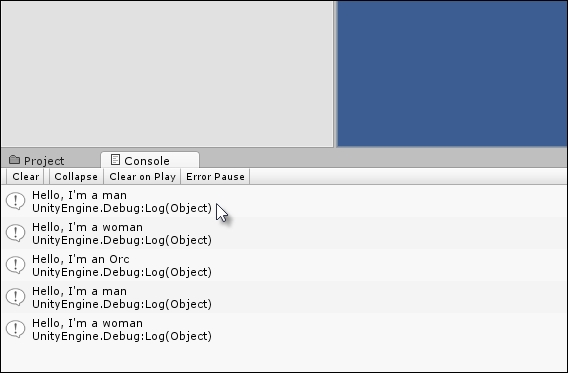
  • Line 34: A foreach loop cycles through all NPCs in the Characters array, calling the SayGreeting function. The result is shown in the following screenshot. The unique messages for each NPC are printed instead of the generic message defined in the base class. Polymorphism allows the overridden method in the derived classes to be called instead.
    Classes and polymorphism

    Polymorphism produces a backwards transparency between data types that share a common lineage

Tip

More information on polymorphism in C# can be found at http://msdn.microsoft.com/en-GB/library/ms173152.aspx.

CONTINUE READING
83
Tech Concepts
36
Programming languages
73
Tech Tools
Icon Unlimited access to the largest independent learning library in tech of over 8,000 expert-authored tech books and videos.
Icon Innovative learning tools, including AI book assistants, code context explainers, and text-to-speech.
Icon 50+ new titles added per month and exclusive early access to books as they are being written.
Mastering Unity Scripting
notes
bookmark Notes and Bookmarks search Search in title playlist Add to playlist font-size Font size

Change the font size

margin-width Margin width

Change margin width

day-mode Day/Sepia/Night Modes

Change background colour

Close icon Search
Country selected

Close icon Your notes and bookmarks

Confirmation

Modal Close icon
claim successful

Buy this book with your credits?

Modal Close icon
Are you sure you want to buy this book with one of your credits?
Close
YES, BUY

Submit Your Feedback

Modal Close icon
Modal Close icon
Modal Close icon