Sign In Start Free Trial
Account

Add to playlist

Create a Playlist

Modal Close icon
You need to login to use this feature.
  • Book Overview & Buying Cocos2d for iPhone 1 Game Development Cookbook
  • Table Of Contents Toc
Cocos2d for iPhone 1 Game Development Cookbook

Cocos2d for iPhone 1 Game Development Cookbook

By : Nathan Burba
4.7 (41)
close
close
Cocos2d for iPhone 1 Game Development Cookbook

Cocos2d for iPhone 1 Game Development Cookbook

4.7 (41)
By: Nathan Burba

Overview of this book

Cocos2d for iPhone is a robust but simple-to-use 2D game framework for iPhone. It is easy to use, fast, flexible, free, and Appstore approved. More than 2500 AppStore games already use it, including many best-seller games. Do you want to take your cocos2d game development skills to the next level and become more professional in cocos2d game design? Cocos2d for iPhone 1 Game Development Cookbook will help you reach that next level. You will find over 100 recipes here that explain everything from the drawing of a single sprite to AI pathfinding and advanced networking. Full working examples are emphasized. Starting with the first chapter, Graphics, you will be taken through every major topic of game development. You will find both simple and complex recipes in the book. Each recipe is either a solution to a common problem (playing video files, accelerometer steering) or a cool advanced technique (3D rendering, textured polygons). This cookbook will have you creating professional quality iOS games quickly with its breadth of working example code.
Table of Contents (15 chapters)
close
close
Cocos2d for iPhone 1 Game Development Cookbook
Credits
About the Author
About the Reviewers
www.PacktPub.com
Preface
1
Index

Saving data using Core Data


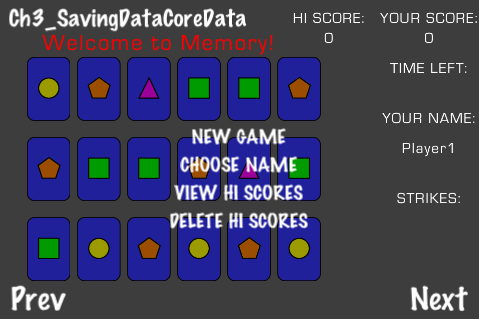
Our third game is a memory card game where you must flip over sets of cards. Flip over two matching cards and you get a point. Flip over two that don't match and you get a strike. Three strikes and you're out. For this game we persist hi-score data using Apple's Core Data model pattern.

Getting ready

Please refer to the project RecipeCollection01 for full working code of this recipe. For the sake of brevity all game logic has been omitted from the following code.

How to do it...

Setting up our Core Data based recipe requires a number of steps.

First we need to add the CoreData framework. You can do this by right clicking on your project and going to Add > Existing Frameworks and then, under iOS 4.x SDK, select CoreData.framework.

  1. Create a new folder inside your resources entitled Data Model. Inside this folder, create a class entitled Hiscore, which derives from ManagedObject:

    //Hiscore.h
    #import <CoreData/CoreData.h>
    
    @interface Hiscore :  NSManagedObject ...
CONTINUE READING
83
Tech Concepts
36
Programming languages
73
Tech Tools
Icon Unlimited access to the largest independent learning library in tech of over 8,000 expert-authored tech books and videos.
Icon Innovative learning tools, including AI book assistants, code context explainers, and text-to-speech.
Icon 50+ new titles added per month and exclusive early access to books as they are being written.
Cocos2d for iPhone 1 Game Development Cookbook
notes
bookmark Notes and Bookmarks search Search in title playlist Add to playlist font-size Font size

Change the font size

margin-width Margin width

Change margin width

day-mode Day/Sepia/Night Modes

Change background colour

Close icon Search
Country selected

Close icon Your notes and bookmarks

Confirmation

Modal Close icon
claim successful

Buy this book with your credits?

Modal Close icon
Are you sure you want to buy this book with one of your credits?
Close
YES, BUY

Submit Your Feedback

Modal Close icon
Modal Close icon
Modal Close icon