Sign In Start Free Trial
Account

Add to playlist

Create a Playlist

Modal Close icon
You need to login to use this feature.
  • Book Overview & Buying Learning QGIS 2.0
  • Table Of Contents Toc
Learning QGIS 2.0

Learning QGIS 2.0

By : Anita Graser
4.2 (22)
close
close
Learning QGIS 2.0

Learning QGIS 2.0

4.2 (22)
By: Anita Graser

Overview of this book

QGIS is a user friendly open source geographic information system (GIS) that runs on Linux, Unix, Mac OSX, and Windows. The popularity of open source geographic information systems and QGIS in particular has been growing rapidly over the last few years. More and more companies and institutions are adopting QGIS and even switching to QGIS as their main GIS. Learning QGIS 2.0 is a practical, hands-on guide that provides you with clear, step-by-step exercises that will help you to apply your GIS knowledge to QGIS. Containing a number of clear, practical exercises, this book will introduce you to working with QGIS, quickly and painlessly. If you want to take advantage of the wide range of functionalities that QGIS offers, then this is the book for you. This book takes you from installing and configuring QGIS, through handling spatial data to creating great maps. You will learn how to load and visualize existing spatial data and how to create data from scratch. You will perform common geoprocessing and spatial analysis tasks and automate them. We will cover how to achieve great cartographic output and print maps. You will learn everything you need to know to handle spatial data management, processing, and visualization tasks in QGIS.
Table of Contents (12 chapters)
close
close

Working with feature selection tools


Selecting features is one of the core functions of any GIS, and it is useful to know them before we venture forward into editing geometries and attributes. Depending on the use case, selection tools come in many different flavors. QGIS offers three different kinds of tools to select features using the mouse, an expression, or another layer.

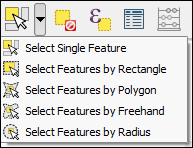
The first group of tools in the Attributes toolbar allows us to select features on the map using the mouse, either one at a time or by drawing different shapes such as rectangles or freehand areas around the features. All features that intersect with the drawn shape are selected. Holding down Ctrl will add the new selection to an existing one.

Similarly, holding down Ctrl + Shift will remove the new selection from the existing selection. The following screenshot shows the tools:

The second type of select tool is called Select by Expression and it is also available in the Attribute toolbar. It selects features based on...

CONTINUE READING
83
Tech Concepts
36
Programming languages
73
Tech Tools
Icon Unlimited access to the largest independent learning library in tech of over 8,000 expert-authored tech books and videos.
Icon Innovative learning tools, including AI book assistants, code context explainers, and text-to-speech.
Icon 50+ new titles added per month and exclusive early access to books as they are being written.
Learning QGIS 2.0
notes
bookmark Notes and Bookmarks search Search in title playlist Add to playlist font-size Font size

Change the font size

margin-width Margin width

Change margin width

day-mode Day/Sepia/Night Modes

Change background colour

Close icon Search
Country selected

Close icon Your notes and bookmarks

Confirmation

Modal Close icon
claim successful

Buy this book with your credits?

Modal Close icon
Are you sure you want to buy this book with one of your credits?
Close
YES, BUY

Submit Your Feedback

Modal Close icon
Modal Close icon
Modal Close icon