Sign In Start Free Trial
Account

Add to playlist

Create a Playlist

Modal Close icon
You need to login to use this feature.
  • Book Overview & Buying Mastering Geoserver
  • Table Of Contents Toc
Mastering Geoserver

Mastering Geoserver

By : Henderson
4.6 (7)
close
close
Mastering Geoserver

Mastering Geoserver

4.6 (7)
By: Henderson

Overview of this book

If you are a GIS professional who intends to explore advanced techniques and get more out of GeoServer deployment rather than simply delivering good looking maps, then this book is for you.
Table of Contents (14 chapters)
close
close
13
Index

Deploying GeoServer to Apache Tomcat

We are getting there for a basic configuration of GeoServer, which we can use as a basis to architect our production environment for high-availability, failover, and scalability. Now we need to deploy GeoServer into Apache Tomcat, which is happily a straightforward process.

We will utilize Apache Tomcat's auto-deploy feature that allows us to copy the GeoServer WAR (Web Archive) file directly to appBase of a running Tomcat instance. Tomcat will detect the presence of the WAR file, and then deploy it ready for use.

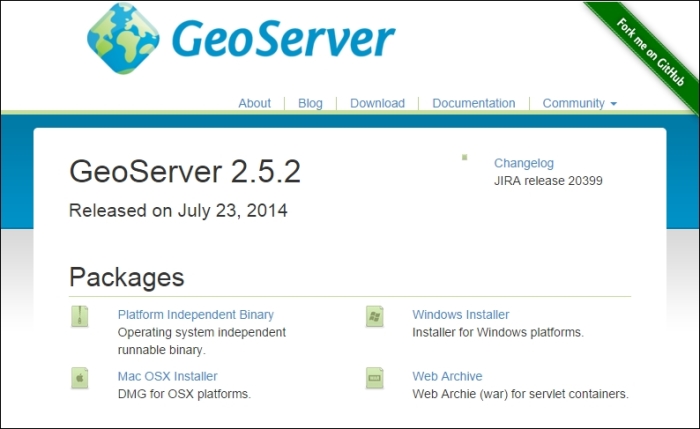
First, we need to download the WAR file from the GeoServer download page at http://geoserver.org/release/Stable. At the time of writing, the current stable version of GeoServer is 2.5.2:

Deploying GeoServer to Apache Tomcat

Click on the Web Archive link and save the downloaded ZIP file somewhere it is accessible.

Deploying on CentOS 6.3

Deployment of GeoServer on CentOS is a very straightforward process, thanks to the way Tomcat is architected. WAR files can automatically be deployed by copying them to a specific location in the Tomcat home directory.

Download the WAR file to a location on your system, for example, your home directory:

$ cd ~
$ wget http://sourceforge.net/projects/geoserver/files/GeoServer/2.5.2/geoserver-2.5.2-war.zip

The WAR file that we want to deploy to GeoServer is contained within the downloaded ZIP file, so we need to extract this from the Tomcat appBase directory:

$ sudo unzip geoserver-2.5.2-war.zip *.war –d $CATALINA_HOME/webapps/

This command will only extract the geoserver.war file from the ZIP file and place it in the Tomcat appBase directory. Tomcat will then autodeploy the WAR file, and you should see a geoserver directory appear.

Deploying on Windows Server 2008 R2 SP1

Deploying the GeoServer WAR file on Windows follows the same process as that of Linux. The WAR file is copied in the Tomcat home directory, where it is unpacked and the GeoServer context started.

The following steps are required to deploy the GeoServer WAR file in Tomcat:

  1. Download the WAR file to a location on your system, for example, the Downloads folder within your home directory.
  2. Double-click on the geoserver-2.5.2-war.zip file to open it in Windows Explorer (assuming you do not have another ZIP application installed).
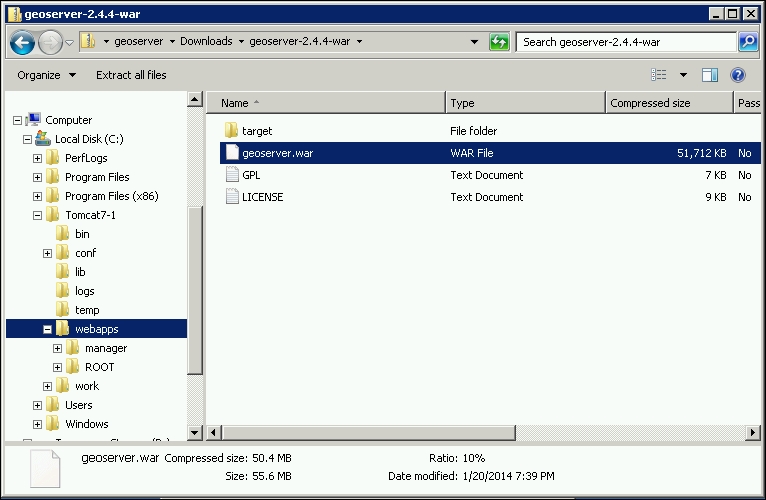
  3. Drag and drop the geoserver.war file from the ZIP folder to the webapps folder in your Tomcat service home directory. If you followed the steps to install Tomcat on Windows, then this directory will be C:\Tomcat7-1\webapps:
    Deploying on Windows Server 2008 R2 SP1
  4. After dropping the file into the folder, Tomcat will autodeploy it and a directory called geoserver will appear.

Checking GeoServer deployment

We should now have a basic configuration of GeoServer deployed inside an Apache Tomcat instance. Test that GeoServer was successfully deployed by opening a web browser and navigating to the GeoServer administration interface:

http://[your server address]:8080/geoserver

If everything worked as expected, then we should be presented with the GeoServer administration interface's front page:

Checking GeoServer deployment
CONTINUE READING
83
Tech Concepts
36
Programming languages
73
Tech Tools
Icon Unlimited access to the largest independent learning library in tech of over 8,000 expert-authored tech books and videos.
Icon Innovative learning tools, including AI book assistants, code context explainers, and text-to-speech.
Icon 50+ new titles added per month and exclusive early access to books as they are being written.
Mastering Geoserver
notes
bookmark Notes and Bookmarks search Search in title playlist Add to playlist font-size Font size

Change the font size

margin-width Margin width

Change margin width

day-mode Day/Sepia/Night Modes

Change background colour

Close icon Search
Country selected

Close icon Your notes and bookmarks

Confirmation

Modal Close icon
claim successful

Buy this book with your credits?

Modal Close icon
Are you sure you want to buy this book with one of your credits?
Close
YES, BUY

Submit Your Feedback

Modal Close icon
Modal Close icon
Modal Close icon