Sign In Start Free Trial
Account

Add to playlist

Create a Playlist

Modal Close icon
You need to login to use this feature.
  • Book Overview & Buying Mastering Geoserver
  • Table Of Contents Toc
Mastering Geoserver

Mastering Geoserver

By : Henderson
4.6 (7)
close
close
Mastering Geoserver

Mastering Geoserver

4.6 (7)
By: Henderson

Overview of this book

If you are a GIS professional who intends to explore advanced techniques and get more out of GeoServer deployment rather than simply delivering good looking maps, then this book is for you.
Table of Contents (14 chapters)
close
close
13
Index

Configuring GeoServer for maximum performance and availability

One of the best things about GeoServer, apart from the quality of the software and community, is the fact that because it is free, you will not be hampered by cost considerations when increasing the capacity of your production environment. Unlike the Commercial-Off-The-Shelf (COTS) software that commonly utilizes a licensing model based on the number of physical or virtual cores, the software runs on.

Since there is no financial implication (in terms of software licensing) on running multiple instances of GeoServer, the only limitation will be the amount of infrastructure you can afford to implement. With the growth in cloud computing and Infrastructure as a Service (IaaS) providers such as Microsoft (Windows Azure) and Amazon (EC3), the costs of implementing large infrastructures is becoming more reasonable.

Performance can be gained by maximizing the usage of resources within your production environment and/or by increasing the capacity through additional nodes. Load balancing traffic across the environment to spread the load will also aid in ensuring that the environment performs well. Increasing the number of nodes within the environment will present an opportunity to set up for high availability. This is when one or more nodes in the environment are reserved to take over if the primary nodes fail. Usually, this can be handled by the load balancer by intelligently switching traffic to a reserved node when it detects that one or more primary nodes failed.

Scaling vertically

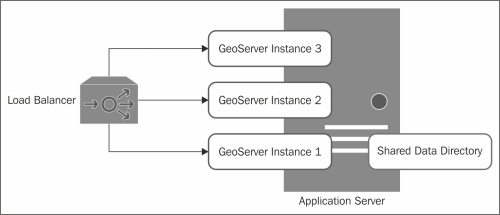
Scaling vertically, also known as scaling up, is when additional resources are added to a single (physical or virtual) node. In other words, this is when you create more than one instance of GeoServer to run on the same physical or virtual server. The following diagram depicts scaling vertically:

Scaling vertically

The available resources on the server are maximized by running multiple instances of GeoServer. Consistency of data is maintained across each of the instances by all of them sharing a common data directory, either located on the node itself or elsewhere on the network.

Traffic is managed across the GeoServer instances by a load balancer that can be a physical one in the network or even a software-based one.

Scaling horizontally

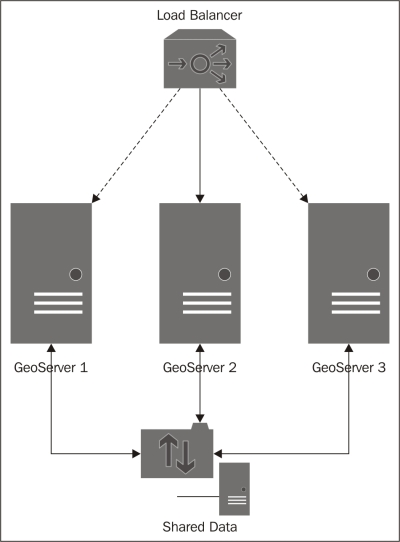
Scaling horizontally, also known as scaling out, is when you add additional nodes (physical or virtual) to your environment. Each additional node can have an instance of GeoServer running on it. The following diagram depicts scaling horizontally:

Scaling horizontally

Increased capacity is provided by the additional nodes running GeoServer, and the traffic across them is managed through a physical load balancer in the network.

In a scaled-out architecture, the data directory for GeoServer is shared across the additional nodes to ensure consistency of the configurations. With this approach, you can choose to place the shared data directory on one of the nodes and allow access to the additional nodes, or you can choose to have a separate server to hold shared data such as a Network Attached Storage (NAS) device.

Tip

If you configure multiple instances of GeoServer to provide resilience to your infrastructure, high availability, or failover, then best practice is not to place your shared data directory on one of the nodes running GeoServer. If this node fails, then all other nodes will lose their data connections. For proper resilience, the shared data server should also be replicated.

Getting the best of both

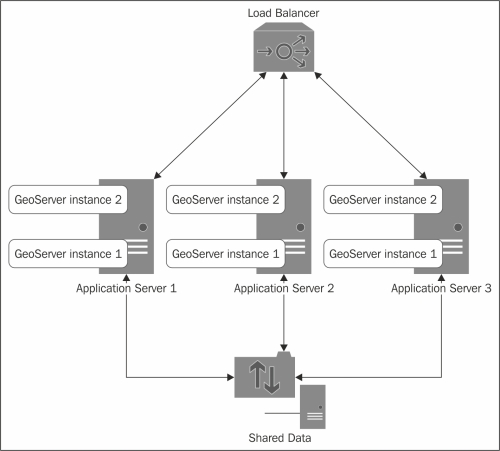
To really get the best performance from your production environment, it is worth considering scaling GeoServer both vertically and horizontally. Increase the capacity of your environment through additional nodes, and then maximize the resources on each node by running multiple instances of GeoServer. The following diagram depicts scaling vertically as well as horizontally:

Getting the best of both

In this architecture, traffic to each of the GeoServer instances running on each node is managed through a physical load balancer on the network. The load balancer can be configured to register one of the GeoServer nodes as the failover node, ensuring continuity of service should one or more of the primary nodes fail.

Once again, a shared data directory is used across the nodes to ensure consistency, but in this case, it will definitely make sense to keep the directory on a separate server instance.

CONTINUE READING
83
Tech Concepts
36
Programming languages
73
Tech Tools
Icon Unlimited access to the largest independent learning library in tech of over 8,000 expert-authored tech books and videos.
Icon Innovative learning tools, including AI book assistants, code context explainers, and text-to-speech.
Icon 50+ new titles added per month and exclusive early access to books as they are being written.
Mastering Geoserver
notes
bookmark Notes and Bookmarks search Search in title playlist Add to playlist font-size Font size

Change the font size

margin-width Margin width

Change margin width

day-mode Day/Sepia/Night Modes

Change background colour

Close icon Search
Country selected

Close icon Your notes and bookmarks

Confirmation

Modal Close icon
claim successful

Buy this book with your credits?

Modal Close icon
Are you sure you want to buy this book with one of your credits?
Close
YES, BUY

Submit Your Feedback

Modal Close icon
Modal Close icon
Modal Close icon